Home Appliances / Cookers & Ranges
User Manual for Amica WA 15EX Washing Machine
Quick guide for the Amica WA 15EX washing machine. Includes installation steps, calibration, control panel explanation, maintenance, and troubleshooting error codes.
PDF source: Deutsch · summary: English
Table of contents
Manual images
Click an image to enlargeQuick guide from the manual
Before using your Amica WA 15EX, ensure all 4 transport bolts are removed. The machine requires a cold water connection and a stable, level surface. Perform the calibration procedure before the first wash to optimize energy and water consumption.
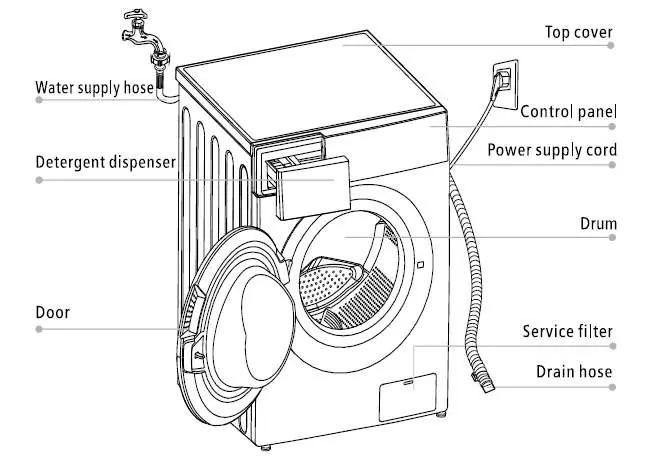
Safety instructions
- Children: Keep children under 3 years away unless supervised. Children 8+ can use the device under supervision.
- Electrical: Connect only to a properly grounded outlet. Do not use extension cords or power strips.
- Water: Ensure water pressure is between 0.05 MPa (0.5 bar) and 1 MPa (10 bar). Use only cold water.
- General: Do not climb on the machine or sit on the open door. Do not wash items containing solvents.
Installation
Transport bolts: Unscrew the 4 transport bolts using a wrench and remove them along with the rubber/plastic bushings. Plug the holes with the provided caps.

Leveling: Place the machine on a hard, level floor. Adjust the feet to ensure the machine is stable and does not vibrate.
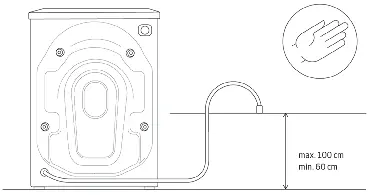
Water connection: Connect the inlet hose to a cold water tap. Ensure the drain hose is secured at a height between 60 cm and 100 cm.
Operation
Calibration: To calibrate, remove all items from the drum, close the door, and plug in the machine. Turn it on, press 'Ready in' and 'Spin' simultaneously for one second until 't19' appears. Press Start/Pause. The process takes 5 minutes.
Control Panel: Use the program knob to select cycles. Buttons allow adjustment of temperature, spin speed, and additional functions like 'SteamPower PRO' or 'Extra Rinse'.
Maintenance
Pump filter: Clean the pump filter after approximately every 20 wash cycles to ensure proper drainage.
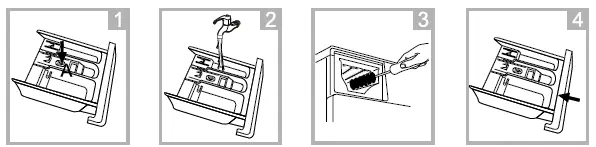
Detergent drawer: Clean the drawer at least once a month under running water.
Troubleshooting
If the machine displays an error code, refer to the following:
- E10: Low water pressure or no water. Check the tap, hose, and filter.
- E12: Overfilling. Restart the device.
- E21: Drainage issue. Check the pump and filter.
- E30: Door not locked. Close the door and ensure no laundry is trapped.
Manufacturer information
Amica S.A.
Practical help
Common problems
Machine does not start
Open water valve, clean inlet filter, close the door, and press Start/Pause.
Water leaks
Ensure the cold water inlet hose is connected correctly.
Excessive vibration
Remove transport bolts, level the machine, and tighten the feet.
Error E10
Low water pressure. Check the water tap, inlet hose, and filter.
Error E30
Door not locked. Close the door and check if laundry is trapped.
Before use
- Remove all 4 transport bolts.
- Level the machine using a spirit level.
- Connect cold water hose (0.05-1 MPa).
- Secure drain hose at 60-100 cm height.
- Perform the calibration procedure.
Show more Show less
Specs in practice
- Water pressure
- 0.05 MPa (0.5 bar) to 1 MPa (10 bar).
Images and diagrams
- Transport bolts: Unscrew 4 bolts, remove parts, plug holes.
- Drainage: Ensure hose is between 60-100 cm height.
Model compatibility
- Only use cold water supply.
- Do not use extension cords or power strips.

Manual page author
Emily Carter
User documentation editor