Electronics / AV Splitters
Operating Instructions for Angustos 1x4 HDMI Splitter
Quick guide for the Angustos 1x4 HDMI Splitter. Learn how to connect your devices, configure EDID settings, and troubleshoot common setup issues.
Quick answers from the manual
Quick answer
- The Angustos 1x4 HDMI Splitter distributes one HDMI signal to four UTP outputs and one looping HDMI output over distances up to 50m, supporting 1080p and 3D video. p. 1
Key actions
- Connect HDMI source to input and displays to outputs using Cat5e/6 cables. p. 3
- Configure EDID settings using the DIP switch on the front panel. p. 3
First start
- Connect all cables, set EDID DIP switches if necessary, and plug in the 12V power supply. p. 3
Technical specifications
| Parameter | Value | Meaning | Pages |
|---|---|---|---|
| Transmission Distance | 50m | Maximum distance for 1080p 8-bit over Cat5e/6. | p. 2 |
| Power Consumption | 12W | Maximum power usage. | p. 2 |
Where to find it in the PDF
- Features and Package Contents p. 1
- Specifications and Front Panel p. 2
- Rear Panel and EDID Settings p. 3
- Connection Diagrams p. 4
Table of contents
Manual images
Click an image to enlargeQuick Guide
The Angustos 1x4 HDMI Splitter allows you to distribute one HDMI signal to four identical UTP outputs synchronously, while also providing one looping HDMI output. It supports transmission distances up to 50 meters over a single Cat5e/6 cable and includes bi-directional IR control.
Device Overview
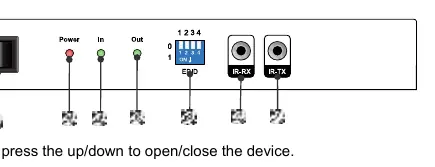
Front Panel: Features the power switch, power indicator, HDMI input/output indicators, DIP switch for EDID settings, and IR-RX/IR-TX ports.
Rear Panel: Contains the four Cat5e/6 output ports, one HDMI output port, one HDMI input port, and the DC 12V power input.
Connecting and Operating
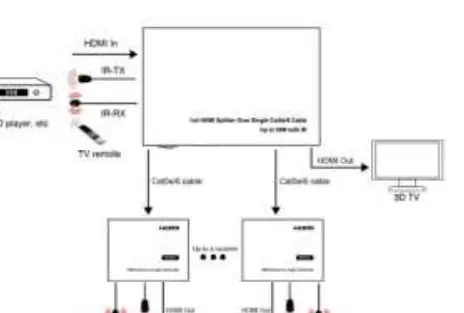
- Connect your HDMI input source to the HDMI input port on the splitter.
- Connect the splitter to the receiver using a single Cat5e/6 cable. Ensure the cable termination follows the EIA/TIA 568B standard.
- Connect your HDMI display (e.g., HD-LCD or HD-DLP) to the HDMI output of the receiver.
- Connect the Loop HDMI output port of the splitter to an additional HDMI display using an HDMI cable.
- Plug the IR TX and IR RX cables into the respective IR ports on both the splitter and the receiver.
- Connect the DC 12V power supply to both the splitter and the receiver.
EDID Configuration
The device features a DIP switch for EDID settings to ensure compatibility with various displays. Common settings include:
- 0000: Default (1080P2D 2ch)
- 0001: Copy from HDMI output
- 0010: 1080P2D 2CH
- 0011: 1080P2D 6CH
- 0100: 1080P2D 8CH
- 0110: 1080P3D 2CH
- 0111: 1080P3D 6CH
- 1111: 1080P3D 8CH
Technical Specifications
- Transmission Distance: Up to 50m (1080p, 8-bit) over Cat5e/6 cable.
- Video Support: Full HD 1080p, VESA resolution up to 1920x1200, 3D video.
- Audio Support: DTS-HD Master Audio, Dolby True HD, multi-channel 5.1, stereo.
- Power Consumption: 12W (Max).
- Operating Temperature: -10°C to 40°C.
Maintenance
Clean the unit with a soft, dry cloth. Do not use alcohol, paint thinner, or benzine for cleaning. If the unit requires service, ensure it is handled by qualified personnel, especially if the power cord is damaged, liquids have entered the unit, or performance has changed.
Practical help
Common problems
No signal on display
Verify that the Cat5e/6 cable termination follows the EIA/TIA 568B standard and that all connections are secure.
Resolution issues
Adjust the DIP switch settings for EDID to match your display's capabilities.
Distance limitations
Note that maximum transmission distance is 40m for 1920x1200 resolution or 5.1/7.1CH audio, and 50m for 1080p.
Before use
- Ensure Cat5e/6 cables are terminated to EIA/TIA 568B standard
- Verify HDMI source is active
- Check that the power supply is 12V DC
- Confirm display supports the resolution being output
- Ensure IR cables are connected to correct ports (TX/RX)
Specs in practice
- Video Amplifier Bandwidth
- 140MHz, determines the maximum data rate the device can handle.
- Data transfer speed
- 6.75Gbps maximum, sufficient for 1080p and 3D signals.
- Power consumption
- 12W maximum, ensure the power adapter provides sufficient current.
Images and diagrams
- Front panel diagram identifies power, indicators, EDID switch, and IR ports.
- Rear panel diagram identifies input/output ports and power connection.
- Connection diagram illustrates the setup for a single splitter and cascading for 4 layers.
Model compatibility
- Supports Full HD 1080p and 1920x1200 resolution.
- Supports Dolby TrueHD and DTS-HD Master Audio.
- Requires Cat5e/6 cable for transmission.
- Supports 3D video.

Manual page author
Michael Turner
Technical manual editor
Reviews PDF manuals for structure, safety notes, and practical product details so readers can find the right information quickly.