Electronics / KVM Extenders
User Manual for Tesmart 1x2 HDMI Splitter
Quick guide for the Tesmart 1x2 HDMI Splitter. Learn how to connect your device, understand features, and set up your dual-display configuration.
Quick answers from the manual
Quick answer
- The Tesmart 1x2 HDMI Splitter allows you to distribute one Ultra HD A/V source to two Ultra HD displays simultaneously. p. 2
Key actions
- Connect the HDMI source to the input port and two displays to the output ports. p. 2
- Connect the Micro USB cable for power. p. 2
Technical specifications
| Parameter | Value | Meaning | Pages |
|---|---|---|---|
| Resolution | 3840*2160@30Hz | Maximum supported resolution | p. 2 |
| Bandwidth | 10.2Gbps | Maximum data transfer rate | p. 2 |
Where to find it in the PDF
- Warranty and Title p. 1
- Features and Connection Diagram p. 2
Table of contents
Quick guide from the manual
The Tesmart 1x2 HDMI Splitter is designed to distribute a single Ultra HD A/V source to two separate Ultra HD displays simultaneously. This guide covers the basic setup and technical specifications required to operate the device.
Features
- Resolution Support: Supports resolutions up to 3840x2160 at 30Hz.
- Bandwidth: Supports bandwidth up to 10.2Gbps.
- Color Depth: Supports up to 36 bit/pixel Deep Color.
- Audio Support: Compatible with LPCM 7.1, Dolby TrueHD, Dolby Digital Plus, and DTS-HD Master Audio.
- Smart EDID: Features smart EDID management for compatibility with most HDMI sources and displays.
- DVI Compatibility: Supports DVI sources and displays when using HDMI-to-DVI adapters.
Packing List
Ensure your package contains the following items:
- 1 x 1x2 HDMI Splitter
- 1 x Micro USB Cable
- 1 x User Manual
Connection and Setup
To set up the HDMI splitter, follow these steps based on the connection diagram:
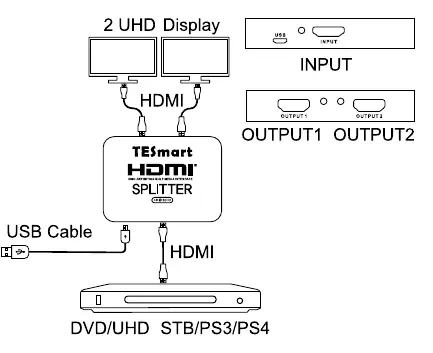
- Connect your HDMI source device (e.g., DVD player, PS3, PS4, or STB) to the INPUT port on the splitter using an HDMI cable.
- Connect your two displays to the OUTPUT 1 and OUTPUT 2 ports using HDMI cables.
- Connect the provided Micro USB cable to the splitter to provide necessary power.
Warranty Information
The product includes a one-year warranty from the date of shipment covering defects in material and workmanship under normal use. The warranty does not cover damage caused by mechanical, electrical, or other abuse or modifications.
Practical help
Common problems
No signal on displays
Ensure the Micro USB power cable is connected and the source device is powered on.
Resolution issues
Verify that your HDMI cables support 4K resolution and that the source device is set to an output resolution of 3840x2160@30Hz or lower.
Before use
- Verify you have an HDMI source device (DVD, PS3/PS4, etc.)
- Ensure you have two HDMI displays
- Confirm you have the included Micro USB cable for power
- Check that your HDMI cables are compatible with 4K resolution
Images and diagrams
- The diagram illustrates connecting a single source (DVD/UHD/STB/PS3/PS4) to the Input port.
- It shows two displays connected to Output 1 and Output 2.
- It highlights the requirement of a USB cable for power input.
Model compatibility
- Supports DVI sources and displays via HDMI-to-DVI adapters.
- Compatible with most HDMI sources and displays via smart EDID management.

Manual page author
David Miller
Documentation analyst
Organizes user manual content into clear summaries, with attention to model details, product context, and everyday usability.