Power / Batteries & Chargers
User Manual for Anker 100W Charging Base
Quick guide for the Anker 100W Charging Base (Model A1902). Learn how to charge devices, use the Pogo Pin for power banks, connect via Bluetooth/Wi-Fi, and manage settings in the Anker app.
Table of contents
Manual images
Click an image to enlargeQuick guide from the manual
The Anker 100W Charging Base (Model A1902) is a multi-port charging station designed to charge devices via USB and compatible Anker Prime Power Banks via a Pogo Pin connector. It features Bluetooth and Wi-Fi connectivity for app-based management, firmware updates, and real-time data monitoring.
At a Glance
The charging base includes the following ports and controls:
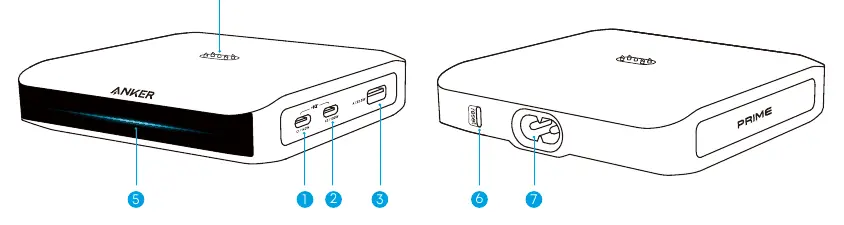
- USB-C1 Port: High-speed charging port.
- USB-C2 Port: Secondary USB-C port.
- USB-A Port: Standard USB-A port.
- Pogo Pin: Charging connector for compatible Anker Prime Power Banks.
- Indicator Light: Displays status (e.g., pulsing from center for power on, flashing twice for device connection).
- Reset Button: Used for Bluetooth/Wi-Fi resets.
- Input Port: Connects to a power outlet.
Charging Your Devices
Connect the input port to a power outlet. Once powered on, the indicator light will illuminate from the center, flash once, and remain solid blue. Connect your devices to the USB ports. The indicator light will flash twice when a new device is connected.
Recharging the Power Bank
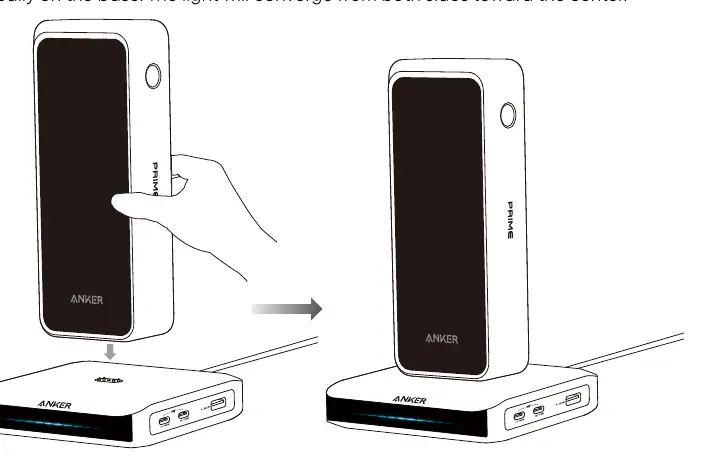
The Pogo Pin connector allows for vertical charging of compatible Anker Prime Power Banks. Align the bottom of the power bank with the Pogo Pin and place it vertically on the base. The light will converge from both sides toward the center to indicate charging. To remove, tilt the power bank slightly backward and lift it up.
Bluetooth and Wi-Fi Connection
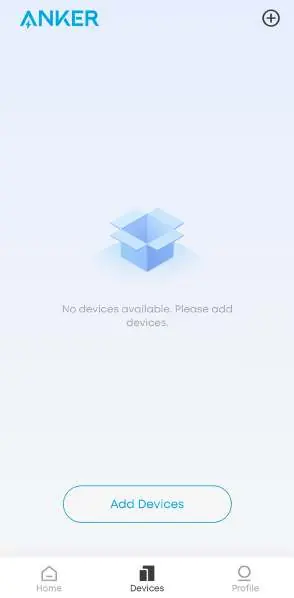
To enable smart features, download the Anker app. Bluetooth is enabled by default. Ensure your phone's Bluetooth is on and the base is within 10 meters. Follow the in-app instructions to add the device. After pairing, you can configure Wi-Fi (2.4 GHz networks only) to enable remote monitoring and automatic firmware updates.
In-App Combination
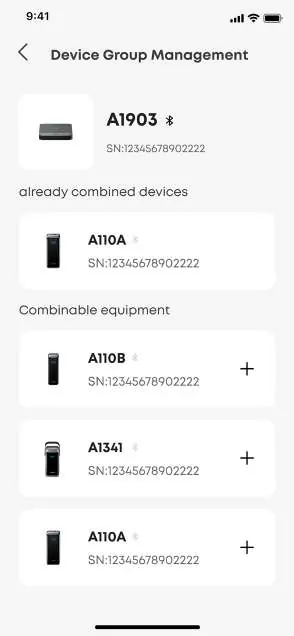
You can combine the charging base with up to four compatible power banks in the Anker app. This allows for monitoring real-time charging data for all paired products. Ensure both devices are added to your account and connected to Wi-Fi before starting the combination process.
Troubleshooting
If you encounter issues, try the following:
- Bluetooth pairing fails: Ensure Bluetooth is enabled on your phone, move away from other Bluetooth devices, or hold the reset button for 7 seconds to reset.
- Wi-Fi configuration fails: Ensure you are using a 2.4 GHz network and that the password is correct.
- Firmware update fails: Keep the product close to your phone, keep the app open, and ensure a stable network connection.
Specifications
The charging base supports a total output of 150W. USB-C1 supports up to 140W, USB-C2 up to 100W, and USB-A up to 22.5W. The Pogo Pin supports up to 150W for compatible power banks.
Manufacturer information
Anker
Practical help
Common problems
Bluetooth pairing fails
Ensure Bluetooth is enabled on your phone, move to an area with fewer Bluetooth devices, or press and hold the reset button for 7 seconds to reset.
Wi-Fi network configuration fails
Confirm the network is 2.4 GHz (5 GHz is not supported), check signal stability, and verify the Wi-Fi name and password.
Firmware update fails
Keep the product close to your phone, leave the Anker app open, and ensure the network connection is stable.
Output does not reach 150W
Only the Anker Prime Power Bank (26K, 300W)—Model A110A supports 150W charging through the Pogo Pin.
Before use
- Ensure the charging base is powered on.
- Download the Anker app.
- Check that your Wi-Fi network is 2.4GHz.
- Ensure your device supports the required charging power.
- Place the power bank vertically on the base for Pogo Pin charging.
Images and diagrams
- The indicator light pulses from the center when powered on.
- The indicator light flashes twice when a device is connected to a USB port.
- The indicator light converges from both sides when a power bank is connected to the Pogo Pin.
Model compatibility
- Supports 2.4GHz Wi-Fi only.
- Pogo Pin charging compatible with Anker Prime Power Banks (A1335, A1336, A1340, A110A, A110B).

Manual page author
Michael Turner
Technical manual editor
Reviews PDF manuals for structure, safety notes, and practical product details so readers can find the right information quickly.