Power / Batteries & Chargers
User Manual for Anker 10K Zolo Power Bank
Quick guide for the Anker 10K Zolo Power Bank. Learn how to charge your devices, recharge the power bank, use trickle-charging mode, and understand the LED indicators and technical specifications.
Table of contents
Manual images
Click an image to enlargeQuick guide from the manual
The Anker 10K Zolo Power Bank is designed for portable charging of phones, tablets, and low-power devices. It features a built-in USB-C cable, a USB-C port, and a USB-A port. The device includes an LED display to show the remaining battery percentage and a dedicated trickle-charging mode for smaller accessories.
Device Overview
The power bank features the following components:
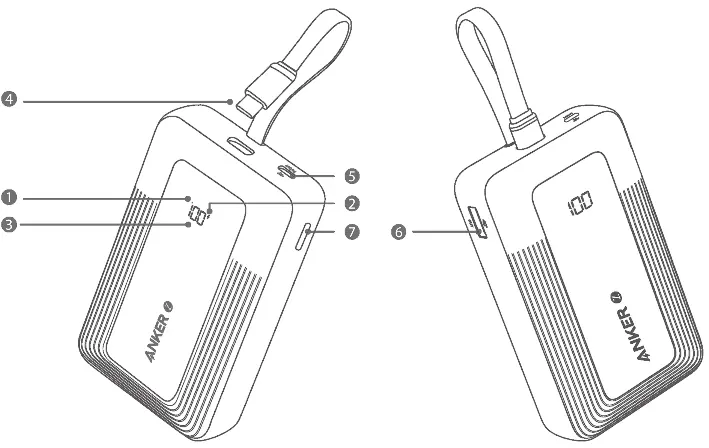
- LED Display: Shows the remaining battery percentage.
- Built-in USB-C Cable: Integrated cable for charging devices or recharging the power bank.
- USB-C Port: Input/Output port for charging devices or recharging the power bank.
- USB-A Port: Output port for charging devices.
- Power Button: Used to check battery level and activate/deactivate trickle-charging mode.
Charging Your Devices
You can charge your phones and tablets using the built-in USB-C cable or the USB-C/USB-A ports. Simply connect your device to the appropriate port or cable. The power bank will automatically detect the device and begin charging.
Recharging the Power Bank
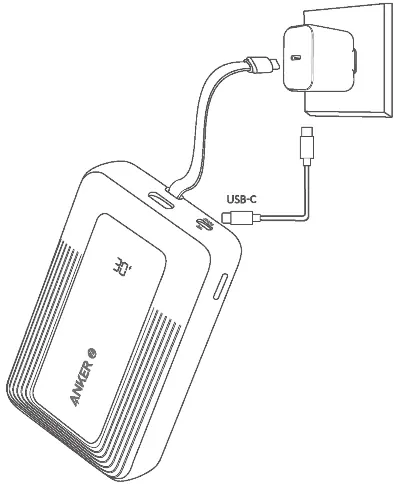
To recharge the power bank, connect it to a wall charger using the built-in USB-C cable or the USB-C port. The LED display will indicate the charging progress.
Trickle-Charging Mode
Trickle-charging mode is designed for low-power devices such as earbuds or smartwatches.
- Activate: Double-press the power button to enter trickle-charging mode.
- Charge: Connect your low-power device to the power bank.
- Exit: Double-press the power button again to exit trickle-charging mode.
Specifications
The Anker 10K Zolo Power Bank has a cell capacity of 10,000mAh. It supports various charging speeds depending on the port used. The USB-C cable and port support up to 30W output, while the USB-A port supports up to 22.5W. The total output when using multiple ports is limited to 15W.
Manufacturer information
Anker
Practical help
Common problems
Device not charging
Ensure the cable is securely connected to both the power bank and the device. Check if the power bank has sufficient battery remaining.
Trickle-charging mode not working
Ensure you have double-pressed the power button to activate the mode. The LED display should indicate the mode is active.
Before use
- Check the battery level on the LED display.
- Ensure you are using the correct port (USB-C or USB-A) for your device.
- Verify the power bank is charged before use.
- If charging earbuds, ensure trickle-charging mode is activated.
Specs in practice
- 30W Max Output
- The maximum power delivery via the USB-C port for fast charging.
- 15W Total Output
- The maximum power output when multiple devices are charged simultaneously.
Images and diagrams
- The LED display shows the remaining battery percentage.
- The power button is used to activate trickle-charging mode by double-pressing.
Model compatibility
- Trickle-charging mode is specifically designed for low-power devices like earbuds.

Manual page author
Emily Carter
User documentation editor
Prepares concise manual descriptions and highlights the most useful setup, operation, and maintenance information for readers.