Power / Batteries & Chargers
MAG20905 Power Bank
Quick guide for the MAG20905 Power Bank. Learn how to charge your devices, recharge the power bank, understand power indicators, and follow safety precautions.
Table of contents
Quick Start Guide
The MAG20905 Power Bank is designed to provide portable power for smartphones, tablets, and other digital devices. Before using the device for the first time, it is essential to charge it to full capacity. The battery requires 3-4 full charge and drain cycles to reach its optimized potential. If the power bank is not in use, it should be recharged every 3 months to maintain battery health.
Charging the Power Bank
To recharge the power bank:
- Insert the standard USB end of your cable into a computer or a wall outlet adapter.
- Insert the USB-C end into the input port on the power bank.
- The display will turn on and show a breathing effect while charging.
- The display will light up continuously once the power bank is fully charged.
Charging Your Devices
Always verify the voltage compatibility of your device before connecting it to the power bank.
- Insert your device's regular USB charging cable into the output port of the power bank.
- Insert the other end of the cable into your electronic device.
- Your device should indicate that charging has started.
- Once charging is complete, remove the USB cable from the power bank.
Power Indication
To check the remaining battery capacity, perform a short press on the power key. The display will show the current capacity as a digital percentage.
Safety Precautions
To ensure safe operation and prevent damage to the unit or your devices, follow these guidelines:
- Do not drop, bump, throw, or shake the unit, as this may damage internal components.
- Do not disassemble, repair, or modify the unit.
- Keep the unit away from water and moisture.
- Stop using the device immediately if the battery becomes excessively hot, emits an odor, gets dented, or shows abnormal deformity.
- Do not use harsh chemicals or cleaning agents on the exterior.
- Do not store the power bank in high or low-temperature environments or small, enclosed areas without ventilation.
- Only charge the unit using a computer or a certified, approved power adapter.
Technical Specifications
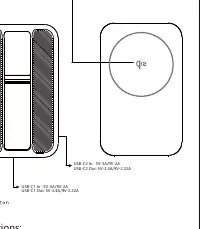
- USB-C1/2 Input: 5V-3A / 9V-2A
- USB-C1/2 Output: 5V-2.4A / 9V-2.22A
- Wireless Output: 5W / 7.5W / 10W / 15W (Qi2 MPP)
- Capacity: 5000mAh / 3.85V / 19.25Wh
- Operating Temperature: 10ºC - 40ºC (50ºF - 104ºF)
- Weight: 115g
- Dimensions: 63 x 102 x 13mm
Manufacturer information
Anker
Practical help
Common problems
Device not charging
Check voltage compatibility and ensure the cable is securely connected to the output port.
Power bank not holding charge
Ensure the unit is recharged every 3 months when not in use and has completed the initial 3-4 full charge/drain cycles.
Battery overheating or abnormal odor
Stop using the device immediately and do not attempt to repair it.
Before use
- Charge the power bank to full before first use.
- Check device voltage compatibility.
- Use a certified power adapter for recharging.
- Ensure the environment is well-ventilated.
Specs in practice
- Wireless Output
- Supports up to 15W (Qi2 MPP) for compatible devices.
- Operating Temperature
- 10ºC - 40ºC; do not use outside this range to prevent damage.
Images and diagrams
- The diagram illustrates the power button, USB-C input/output ports, and the wireless charging surface.
Model compatibility
- Compatible with smartphones, tablets, and mini speakers.
- Supports iPhone and iPad devices using the user's own Apple cable or connector.

Manual page author
David Miller
Documentation analyst
Organizes user manual content into clear summaries, with attention to model details, product context, and everyday usability.