Power / Batteries & Chargers
User Manual for Anko 10000mAh RGB Light Charging Power Bank
Quick guide for the Anko 10000mAh RGB Light Charging Power Bank (Model D4). Learn how to operate the RGB light modes, check charging specifications, and follow safety guidelines for optimal battery life.
Table of contents
Quick guide from the manual
This document provides essential operating instructions and safety guidelines for the Anko 10000mAh RGB Light Charging Power Bank (Model D4). Key usage includes understanding the RGB light modes and maintaining battery health by charging the device at least every 3 months if stored for long periods.
Product Overview
The power bank features multiple output ports and a built-in cable for charging mobile devices. The interface includes:
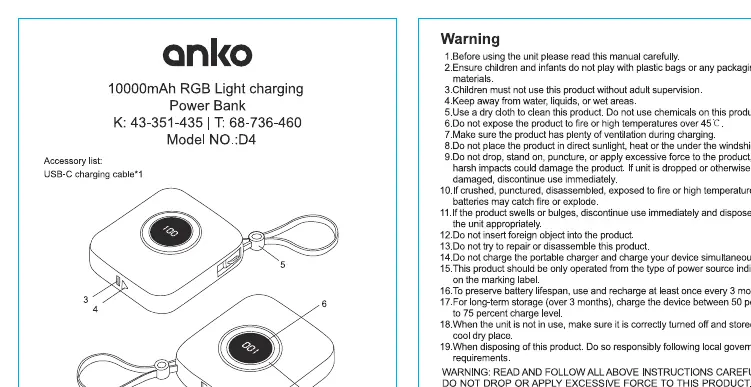
- USB-A output 1 & 2: Standard ports for device charging.
- USB-C port: Used for input charging.
- Power button: Controls the power and RGB light functions.
- Built-in USB-C cable: Designed for output only; do not use this cable to charge the power bank itself.
- Display: Indicates status.
Operation
To control the RGB light functionality:
- Turn on/off: Long press the power button.
- Change modes: Short press the power button to cycle through the following modes:
- Mode 1: RGB
- Mode 2: Purple
- Mode 3: Blue
- Mode 4: Green
Safety and Maintenance
To ensure safe operation and longevity of the device, observe the following:
- Keep the device away from water, liquids, and wet areas.
- Do not expose the product to fire or high temperatures.
- Do not drop, disassemble, or apply excessive force to the product.
- If the product swells or bulges, discontinue use immediately and dispose of it properly.
- The power bank includes built-in temperature protection and will stop charging if the environment is too hot.
- Charge the device at least every 3 months if it is not in use.
Technical Specifications
- Capacity: 10000mAh/3.7V 37Wh
- Battery type: Li-ion
- Input: USB-C
- Rated Input: 5V/2A, 9V/2.22A, 12V/1.67A
- USB-A Output: 5V/4.5A, 9V/2A, 12V/1.5A
- USB-C Output: 5V/2A, 9V/2.22A, 12V/1.67A
- Charging Time: Approx. 3 hours
Warranty
The product comes with a 12-month warranty covering defects in materials and workmanship. Please retain your receipt as proof of purchase for any warranty claims.
Manufacturer information
Anko
Practical help
Common problems
Device not charging
Ensure the power bank is charged and the cables are connected securely to both the power bank and your device.
Power bank gets hot
The device has built-in temperature protection and will stop charging if it overheats. Allow it to cool down before resuming use.
Battery degradation
Charge the power bank at least every 3 months if it is stored for long periods to preserve battery lifespan.
Before use
- Check the power bank for any physical damage.
- Ensure the charging cable is compatible with your device.
- Charge the power bank fully before first use.
- Read all safety instructions provided in the manual.
Specs in practice
- Charging Time
- Approximately 3 hours to fully recharge the power bank.
Images and diagrams
- 1: USB-A output 1
- 2: USB-A output 2
- 3: USB-C port (Input)
- 4: Power button and RGB light button
- 5: Built-in USB-C cable (Output only)
Model compatibility
- Designed primarily for mobile phones.
- The built-in USB-C cable is for output only; do not use it to charge the power bank.

Manual page author
David Miller
Documentation analyst
Organizes user manual content into clear summaries, with attention to model details, product context, and everyday usability.