Power / Solar Panels
User Manual for anko 15W Wireless Car Charger with Sucker Stand
Quick guide for the anko 15W Wireless Car Charger (42829584). Includes installation steps, safety instructions, and technical specifications for optimal use.
Table of contents
Quick guide from the manual
This device is a Qi-compatible wireless car charger designed to mount on your dashboard or window. To begin, assemble the stand, mount it to your vehicle, connect the power cable to the cigarette lighter, and adjust the holder to fit your smartphone. Ensure your phone case is free of metal objects to allow for proper wireless charging.
Safety instructions
- Do not disassemble the device or expose it to fire or water.
- Avoid using the charger in environments that are severely hot, humid, or corrosive.
- Keep the charger at least 30cm away from implantable medical devices like pacemakers or cochlear implants to prevent interference.
- Do not place magnetic stripe or RFID cards (e.g., credit cards, ID cards) near the charger to avoid magnetic failure.
- Remove any metal objects from your phone case before charging; the charger will stop if metal is detected.
- Use only the provided car charger.
Package contents
- 1 x Qi Wireless Charging Pad
- 1 x 12V/2A Car Charger
- 1 x Stand
- 1 x User Manual
Installation
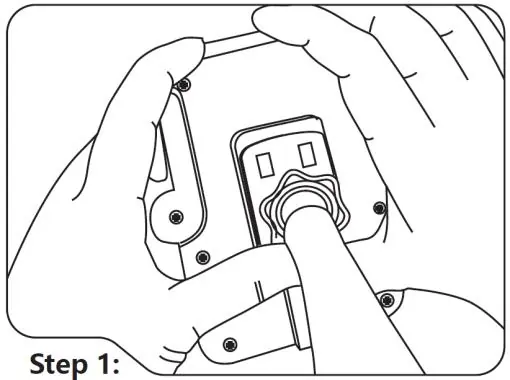
- Assembly: Place the sucker stand snap joints at the back of the Qi charging pad.
- Mounting: Tear off the protective film from the bottom of the sucker stand. Attach the stand securely to your car's dashboard or window.
- Power Connection: Plug the DC jack into the wireless charging pad.
- Car Power: Insert the car charger into the vehicle's cigarette lighter socket.
- Adjustment: Use the button at the back of the holder to adjust the height to fit your smartphone size.
- Charging: Place your Qi-compatible device on top of the pad to begin wireless charging.
Specifications
Qi Wireless Charging Pad:
- Input: 12V 2A
- Charging Mode: Supports Qi charging up to 15W
- Dimensions: 112 x 101 x 36mm
12V 2A Car Charger (DC2.5 Jack):
- Input: 12-24VDC
- Output: 12V 1.8A
Warranty
This product comes with a 12-month warranty from Kmart Australia. Kmart warrants the product to be free from defects in materials and workmanship from the date of purchase, provided it is used in accordance with the instructions. For assistance, contact the Customer Service Centre at 1800 124 125 (Australia) or 0800 945 995 (New Zealand), or visit Kmart.com.au.
Official resources from the manual
Manufacturer information
Anko
Practical help
Common problems
Wireless charger stops charging
Ensure there are no metal objects between your phone and the case. Remove the phone case if necessary.
Interference with medical devices
Maintain a distance of at least 30cm between the charger and any implantable medical devices like pacemakers.
Magnetic card failure
Do not place magnetic stripe or RFID cards (credit cards, ID cards) near the charger.
Before use
- Verify your smartphone is Qi-compatible.
- Ensure the car charger is connected to a 12V cigarette lighter socket.
- Remove any metal objects from your phone case.
- Clean the surface before attaching the sucker stand.
- Ensure the DC jack is fully plugged into the charging pad.
Specs in practice
- Charging Mode
- Supports up to 15W wireless charging for Qi-compatible devices.
- Car Charger Output
- 12V 1.8A output for the cigarette lighter adapter.
Images and diagrams
- Step 1: Attaching the stand to the charging pad.
- Step 2: Mounting the sucker stand to the dashboard or window.
- Step 3: Connecting the DC power cable.
- Step 4: Plugging the charger into the cigarette lighter.
- Step 5: Adjusting the holder height.
Model compatibility
- Compatible with any Qi-compatible wireless device, such as Apple or Samsung smartphones.

Manual page author
Michael Turner
Technical manual editor
Reviews PDF manuals for structure, safety notes, and practical product details so readers can find the right information quickly.