Lighting / LED Strips
User Manual for Anko Wireless 10W Charging Pad 43249114
Quick guide for the Anko 10W Wireless Charging Pad (43249114). Learn how to set up, understand LED indicators, and troubleshoot charging errors.
Table of contents
Manual images
Click an image to enlargeQuick Start Guide
Follow these steps to set up and use your Anko Wireless Charging Pad:
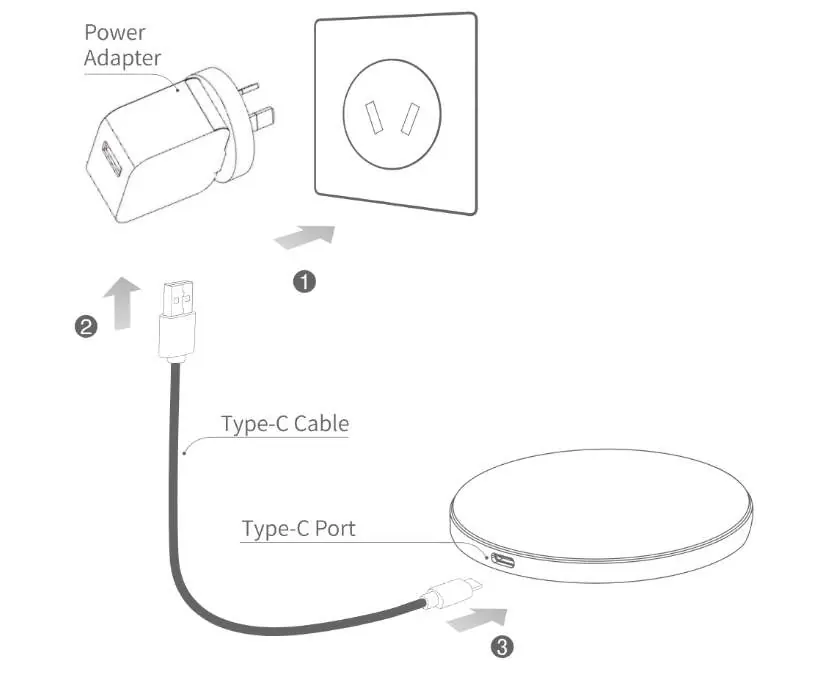
- Connect the included Quick Charge 3.0 adapter to a wall socket.
- Connect the provided USB-C charging cable to the adapter and the USB-C port on the charging pad.
- The LED indicator will flash green and blue twice, then remain solid green, indicating the device is in standby mode.
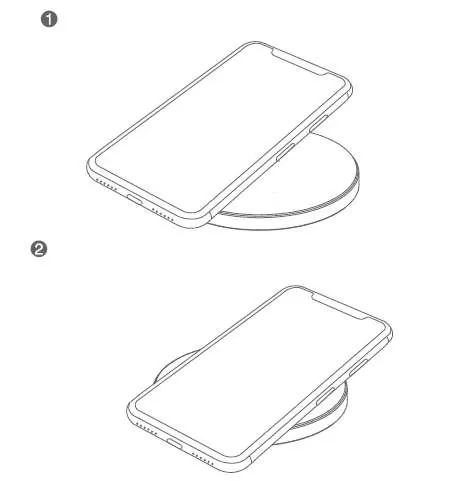
- Place your wireless charging-compatible device on the center of the pad. The blue LED indicator will turn on to signal that charging has started.
- When the device is fully charged, the LED indicator will turn solid green.
LED Indicator Guide
The LED light provides status updates on the charging process:
- Off: No power connected.
- Green: Standby mode or device fully charged.
- Blue: Wireless charging in progress.
- Blue and Green Flashing: Error detected. This may indicate that the power source is too low (less than 5V/2A) or a metal object has been detected on the charging area.
Safety and Usage Warnings
To ensure safe operation and prevent damage to your device or the charger, please observe the following:
- Do not disassemble the unit or expose it to fire or water.
- Avoid using the charger in environments that are severely hot, humid, or corrosive.
- Keep magnetic stripe cards (ID cards, credit cards) away from the charger to prevent magnetic failure.
- Maintain a distance of at least 30cm between the charger and any implantable medical devices (e.g., pacemakers).
- Keep out of reach of children; this is not a toy.
- Ensure there are no metal objects between your phone and the charger, as this can interfere with performance.
Technical Specifications
- Input: DC 5V 3A or 9V 2A
- Output: 10W max
- Charging distance: ≤10mm
- Dimensions: 100 x 100 x 6 mm
Manufacturer information
Anko
Practical help
Common problems
Blue and Green LED flashing
This indicates an error. Ensure the power adapter provides at least 5V/2A and remove any metal objects from the charging surface.
Device not charging
Check that the phone case does not contain metal and that the device is properly aligned on the center of the pad.
Before use
- Ensure you are using the included QC3.0 18W adapter.
- Verify the USB-C cable is securely connected to both the adapter and the pad.
- Remove any metal objects or thick cases from the phone before placing it on the pad.
- Confirm your device supports wireless charging.
Specs in practice
- Charging distance
- The charger can transmit power through cases up to 10mm thick.
Images and diagrams
- The setup diagram illustrates connecting the power adapter to the wall, plugging the USB-C cable into the adapter, and connecting the other end to the charging pad.
- The usage diagram shows the correct placement of a smartphone on the center of the charging pad.
Model compatibility
- Compatible with wireless charging devices such as Apple and Samsung smartphones.

Manual page author
Michael Turner
Technical manual editor
Reviews PDF manuals for structure, safety notes, and practical product details so readers can find the right information quickly.