Power / Car Chargers
Anko 160W Folding Solar Panel
Quick guide for the Anko 160W Folding Solar Panel. Includes setup instructions, connection procedures, controller operation, and troubleshooting tips for your solar kit.
Table of contents
Manual images
Click an image to enlargeQuick guide from the manual
The Anko 160W Folding Solar Panel is designed for charging 12V lead-acid batteries. Always connect the battery to the solar controller first before connecting the solar panel to ensure the system initializes correctly. When disconnecting, reverse the process: disconnect the solar panel first, then the battery. For optimal performance, angle the panel between 10° and 40° towards the sun.
Included in the kit
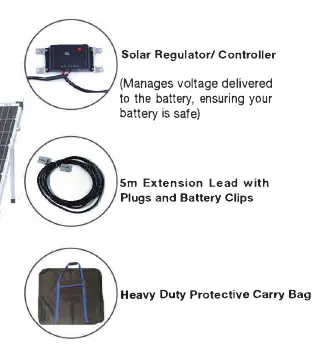
- 160W Monocrystalline Folding Solar Panel with adjustable legs
- Solar Regulator/Controller
- 5m Extension Lead with plugs and battery clips
- Heavy Duty Protective Carry Bag
Safety information
- Only use the solar panel to charge 12V rechargeable lead-acid batteries.
- Never connect the solar panel directly to a battery without the controller.
- Keep the solar panel and controller clean and free of debris.
- Do not use the solar panel, controller, or wiring if damaged.
- Ensure the installation site is clear of flammable or explosive materials.
- Do not allow children to operate the equipment.
Connecting your solar panel
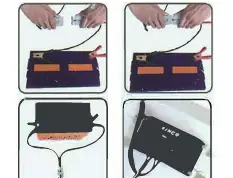

- Place the panel facing the sun.
- Connect the battery clips to the battery first.
- Connect the solar panel to the controller. The battery indicator on the controller will illuminate.
Disconnecting and storing
- Disconnect the solar panel from the alligator clips before removing the battery clips from the battery.
- Roll the wire neatly into the space behind the solar panel.
- Do not store the solar panel with the battery connected.
Solar panel controller operation
The controller features LED indicators to show battery capacity and load status. It provides PWM charging and includes USB output (5V, 1A). The controller automatically manages voltage to protect the battery from overcharging and short-circuiting.
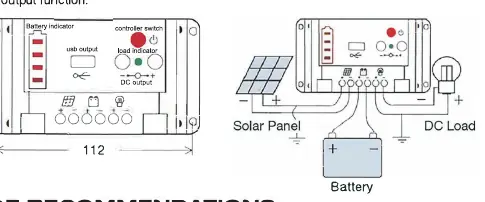
Battery and load indicators
- Battery Indicator: Shows battery capacity. If it flashes rapidly, it indicates an overload.
- Load Indicator: Indicates load status. If it flashes, the load function is switched off (e.g., due to overload or low battery).
Troubleshooting
- Battery indicator not lighting up: Check the connection between the battery and the controller; ensure the panel is in direct sunlight.
- Battery indicator flashing rapidly: Overload detected. Remove the excess load; the controller will reset within 3 minutes.
- Load indicator flashing: Short circuit or overload. Resolve the short circuit or remove the load; the controller will reset within 5 minutes.
Specifications
- Rated Max Power: 160W (2x80W)
- Open-Circuit Voltage (VOC): 21.6V
- Maximum Power Voltage (Vmp): 18V
- Controller Rated Current: 10A
- USB Output: 5V, 1A
- Dimensions: 770 x 670 x 62mm
- Weight: 13kg
Manufacturer information
Anko
Practical help
Common problems
Battery indicator not lighting up
Check the connection between the battery and the controller. Ensure the panel is in direct sunlight and the battery is healthy.
Battery indicator flashing rapidly
Overload detected. Remove the excess load. The controller will clear the protection within 3 minutes.
Load indicator flashing
Short circuit or overload. Resolve the short circuit or remove the load. The controller will reset within 5 minutes.
Before use
- Ensure the solar panel and controller are clean.
- Verify you are using 12V rechargeable lead-acid batteries.
- Check all cables for damage or debris.
- Ensure the installation site is clear of flammable or explosive materials.
- Ensure the controller is installed in a well-ventilated area with 10cm clearance.
Specs in practice
- Rated Max Power (160W)
- The total power output of the solar panel under optimal conditions.
- Open-Circuit Voltage (21.6V)
- The maximum voltage the panel can produce when not connected to a load.
- Controller Rated Current (10A)
- The maximum current the controller can handle for charging and load output.
Images and diagrams
- The controller features a battery indicator and a load indicator to monitor system status.
- The controller has a USB output port for charging small devices.
- The solar panel has adjustable legs to optimize the angle towards the sun.
Model compatibility
- Compatible only with 12V rechargeable lead-acid batteries.
- Do not connect the solar panel directly to a battery without the controller.
- The controller is designed for 12V systems (Auto).

Manual page author
David Miller
Documentation analyst
Organizes user manual content into clear summaries, with attention to model details, product context, and everyday usability.