Power / Uninterruptible Power Supplies
End of Life Treatment Guide for ABB PowerValue 11 LI Up UPS
Professional guide for the end-of-life treatment and safe dismantling of the ABB PowerValue 11 LI Up UPS series. Includes safety warnings, battery removal procedures, and recycling information.
Table of contents
Manual images
Click an image to enlargeImportant Safety Information
This document provides instructions for the end-of-life treatment of the ABB PowerValue 11 LI Up UPS. Before starting any dismantling procedure, read these safety instructions carefully:
- Electric Shock Hazard: The UPS contains internal capacitors that may store energy for a long time. Always switch off the unit and wait at least 5 minutes after shutdown before beginning any dismantling.
- Battery Safety: The unit contains VRLA batteries which present a risk of electrical shock and high short-circuit current.
- Personal Protection: Remove all metal objects (watches, rings), wear rubber gloves and boots, and use tools with insulated handles.
- Handling: Do not place tools or metal parts on top of batteries. Disconnect the charging source before handling battery terminals.
Recycling and Environmental Information
The UPS contains components that require selective treatment in accordance with EU Directive 2012/19/EU (WEEE). Key materials include:
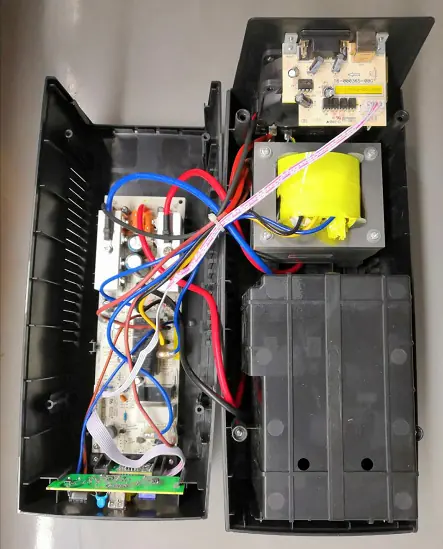
- Batteries: VRLA block(s).
- Printed Circuit Boards: Require selective treatment.
- Plastic Enclosure: Contains brominated flame retardants (BFRs).
- Cables: Contain copper, brass, PVC, nylon, and PBT.
- Other Components: The 50Hz transformer and fan require further separation after removal.
Dismantling Instructions
Ensure the UPS is disconnected from all power sources before beginning. The procedure varies by model capacity.
600VA/800VA Models
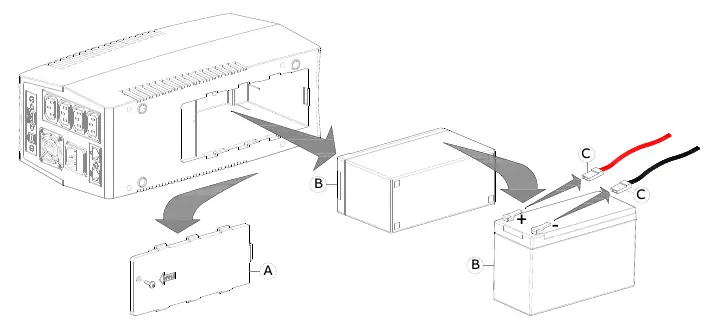
- Loosen the screws that hold the bottom battery panel (A).
- Remove the bottom battery panel (A).
- Swipe out the battery (B).
- Disconnect the battery wires (C).
1000VA/1500VA/2000VA Models
- Loosen the screws that hold the bottom battery panel (A).
- Remove the bottom battery panel (A).
- Swipe out the first battery (B2).
- Remove the two supports (D1 and D2).
- Swipe out the second battery (B1).
- Disconnect the battery wires (C).
Practical help
Common problems
Electric shock risk during dismantling
Ensure the UPS is completely switched off and wait at least 5 minutes for internal capacitors to discharge before opening the unit.
Battery removal difficulty
Follow the specific steps for your model capacity (600/800VA vs 1000/1500/2000VA) to correctly access and remove the battery blocks.
Before use
- Ensure the UPS is completely switched off.
- Wear rubber gloves and boots.
- Remove watches, rings, and other metal objects.
- Use tools with insulated handles.
- Ensure the area is well-ventilated.
Images and diagrams
- Figure 4-2 illustrates the battery removal process for 600VA and 800VA models.
- Figure 4-3 illustrates the battery removal process for 1000VA, 1500VA, and 2000VA models.
- Figure 4-4 provides an internal view of the UPS components including the fan, transformer, and circuit board.
Model compatibility
- This guide covers the PowerValue 11 LI Up series: 600VA, 800VA, 1000VA, 1500VA, and 2000VA.

Manual page author
Emily Carter
User documentation editor
Prepares concise manual descriptions and highlights the most useful setup, operation, and maintenance information for readers.