Power / Uninterruptible Power Supplies
User Manual for CPG 15K-200K Uninterruptible Power Supply System
Quick guide for the CPG Uninterruptible Power Supply System (UPS). Learn about installation, wiring, LCD operation, settings, and troubleshooting for 15K to 200K models.
Table of contents
Manual images
Click an image to enlargeQuick guide from the manual
This document provides essential information for the installation, operation, and maintenance of the CPG Online Uninterruptible Power Supply (UPS) system. This equipment is intended for commercial and industrial use and must be installed by qualified personnel.
Safety and EMC instructions
Important: Read all safety instructions before installation. The UPS must be installed in a well-ventilated, dust-free environment with an ambient temperature below 35°C. Ensure proper unit spacing (approx. 50 cm) for ventilation. The system requires a TN grounding/earthing system. High leakage current is present; earth connection is essential before connecting the supply.
Installation
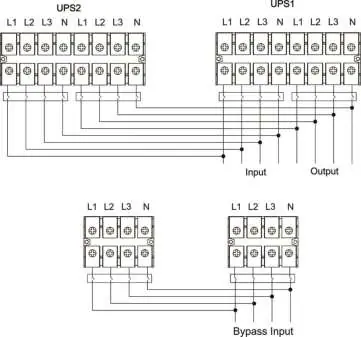
Installation must be performed by trained professionals in accordance with local electrical laws. Ensure mains wire and breakers are rated for the UPS capacity. Do not use wall receptacles as input power sources. Connect the grounding/earthing wire first. The system supports both single and parallel operation configurations.
Operations
The UPS features an LCD interface with five sub-menus: Control, Measure, Setting, Info, and Data Log. Upon startup, the system initializes and enters 'No Output' mode. Users can turn the UPS on/off, perform battery tests, and mute alarms via the Control menu. The Measure menu provides real-time data on voltage, power, and temperature. Settings allow for configuration of output voltage, frequency, ECO mode, and battery parameters.
Maintenance
The UPS system operates with hazardous voltages. Before maintenance, disconnect batteries and verify no hazardous voltage exists in high-capacity capacitors. Replace batteries with the same number and type. Recharge batteries periodically during storage according to the temperature-based schedule provided in the manual.
Troubleshooting
The UPS displays fault and warning codes on the LCD. Common issues include:
- No indication/alarm: Check AC input connection.
- Warning code 0B: EPO function activated; check switch/jumper.
- Warning code 01: Battery incorrectly connected.
- Warning code 09: UPS overload; remove excess loads.
- Battery backup time short: Charge batteries for at least 7 hours.
Practical help
Common problems
No indication and alarm on display
Check if the AC input cable is firmly connected to the mains.
Warning code 0B
EPO function is activated. Set the circuit in closed position to disable the EPO function.
Warning code 01
External or internal battery is incorrectly connected. Check all battery connections.
Warning code 09 / Fault code 43
UPS is overloaded. Remove excess loads from the UPS output and restart.
Battery backup time shorter than nominal
Batteries are not fully charged. Charge for at least 7 hours. If the problem persists, contact your dealer.
Before use
- Ensure installation is performed by qualified maintenance personnel.
- Verify the installation environment is free of flammable, explosive, or corrosive gas.
- Ensure ambient temperature is maintained below 35°C.
- Check that input/output wiring matches the AWG specifications for your model.
- Ensure the grounding/earthing wire is connected before any live wire terminal.
- Verify battery polarity and voltage before connection.
Specs in practice
- Transfer Time
- 0ms for line-to-battery and inverter-to-bypass transitions.
Images and diagrams
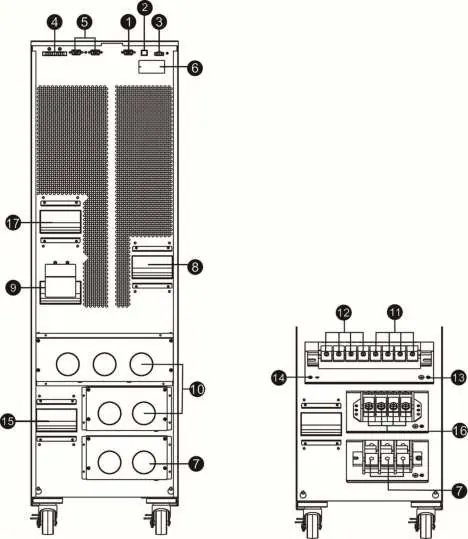
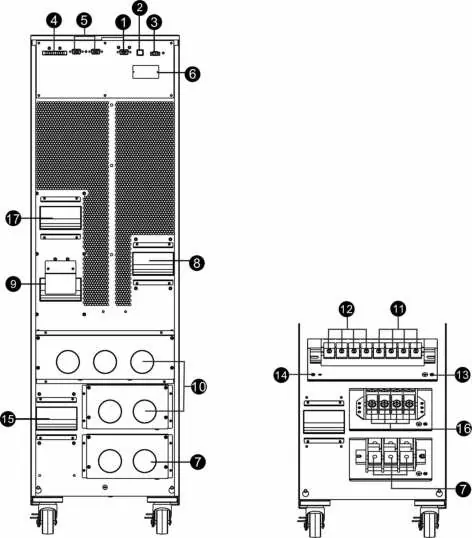
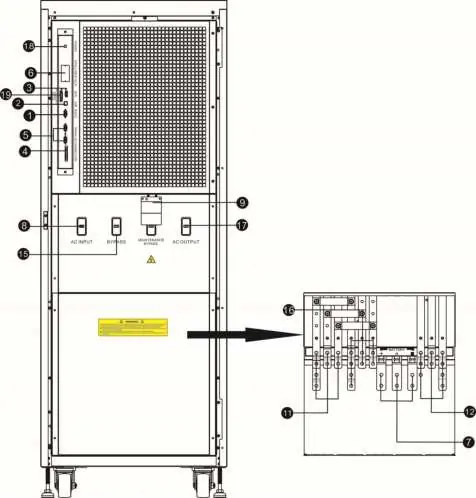
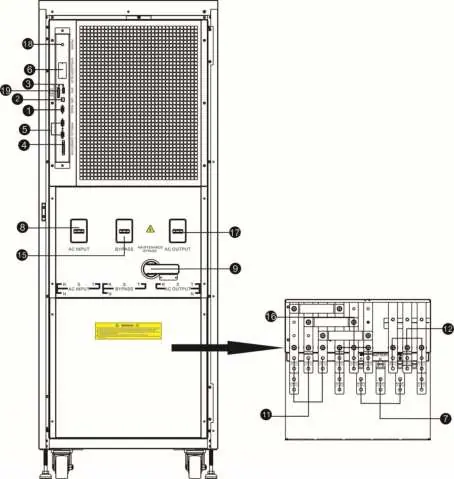
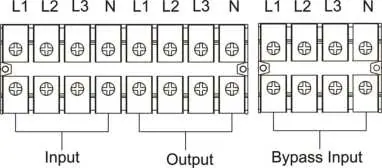
- Wiring Terminal View: Identifies input, output, bypass, and grounding terminals.
- Parallel System Wiring: Illustrates the connection of multiple UPS units for parallel operation.
- LCD Menu Tree: Shows the navigation structure for Control, Measure, Setting, Info, and Data Log screens.
Model compatibility
- Supports Windows 2000/2003/XP/Vista/7/8/10, Linux, Unix, and MAC via RS-232 or USB.
- Optional SNMP management available for web browser access.

Manual page author
Emily Carter
User documentation editor
Prepares concise manual descriptions and highlights the most useful setup, operation, and maintenance information for readers.