Home Appliances / Dehumidifiers
User Manual for Aprilaire 1870 and 1870W Dehumidifier
Quick guide for the Aprilaire 1870 and 1870W dehumidifier. Learn how to set humidity levels, maintain the air filter, understand diagnostic codes, and optimize energy usage.
Table of contents
Manual images
Click an image to enlargeQuick guide from the manual
The Aprilaire 1870 and 1870W are whole-home dehumidifiers designed to control humidity levels. Upon initial installation, set the humidity to 55% RH. Allow the unit to run until it reaches the setting before making adjustments. The unit is not designed to prevent window condensation in winter; use ventilation for that purpose. If you are leaving for an extended period in summer, set the RH to 55% and adjust your thermostat to a comfortable level for your home.
Product overview
The dehumidifier consists of a cabinet containing a blower, a sealed refrigeration system, and a drain pan. Air is drawn into the inlet, filtered, dehumidified, and discharged through the outlet. The control panel features an ON/OFF button, MODE button for ventilation, and UP/DOWN buttons for humidity settings.
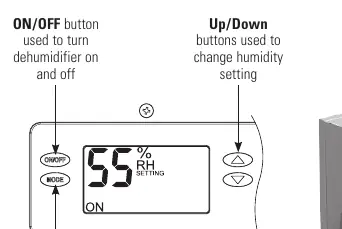
Setting the desired humidity level
The on-board control displays the humidity setting when the unit is idle and the measured humidity when running. Use the UP and DOWN buttons to adjust the relative humidity between 40% and 80%. If you prefer drier air, decrease the setting; for less dry air, increase it. Note that the home acts like a sponge, so the unit may run for an extended period when first installed to remove moisture from building materials.
How the dehumidifier works
The unit measures humidity once per hour. If the humidity is higher than the setting, the compressor turns on. The unit continues to dehumidify until the level is 3% RH below the setting. When the unit turns on, the blower circulates air for 3 minutes to sample the humidity before the compressor engages. The display will show AIR SAMPLING or DEHUMIDIFYING accordingly.
External control options
The dehumidifier can be controlled by optional external controls such as the Aprilaire Model 76, 8620, or 8910. The Model 76 acts as a dedicated control and remote, while the 8620 and 8910 integrate dehumidification into the thermostat. Refer to the specific owner's manuals for these controls for operating instructions.
Optional ventilation
If installed, the ventilation feature brings fresh air into the home. To adjust the ventilation time, press the MODE button twice to display the ventilation setting. Use the UP or DOWN buttons to set the minutes per hour (0-60) that ventilation should run. Setting it to zero turns the feature off.
Maintenance
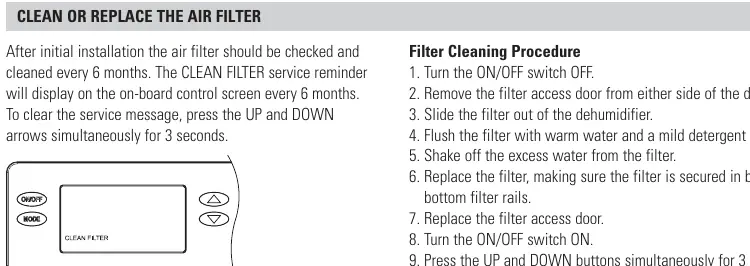
The air filter should be checked and cleaned every 6 months. When the CLEAN FILTER reminder appears, press the UP and DOWN arrows simultaneously for 3 seconds to clear it. To clean the filter: turn the unit OFF, remove the access door, slide out the filter, wash with warm water and mild detergent, dry, and reinstall. The drain system should also be checked annually for blockages.
Troubleshooting
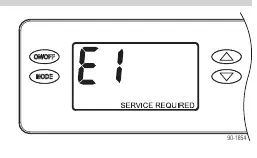
The on-board control displays diagnostic codes if service is required. If E1–E7 or E9 appears, contact your installing contractor. The E8 code indicates that the incoming air is below 50°F or above 104°F, or the dew point is below 40°F. The unit will resume operation automatically once conditions return to the acceptable range.
Manufacturer information
AprilAire
Practical help
Common problems
E8 diagnostic code displayed
Incoming air is outside operating range (below 50°F/10°C or above 104°F/40°C, or dew point below 40°F/4°C). Unit will resume automatically when conditions improve.
E1-E7 or E9 diagnostic code displayed
Service is required. Contact your installing contractor.
Unit not draining properly
Check the drain system annually for blockages or air locks. If issues persist, contact a qualified service professional.
Before use
- Set initial humidity to 55% RH.
- Ensure the drain tube is routed to a floor drain or condensate pump.
- Verify the air filter is properly installed.
- Close windows and doors when outdoor humidity is high.
- Ensure the unit is installed by a qualified heating and air conditioning contractor.
Specs in practice
- Humidity Setting Range
- 40% to 80% relative humidity.
- Defrost Mode
- Automatic mode to prevent ice formation on the refrigeration coil.
- Air Sampling
- Blower runs for 3 minutes to measure humidity before deciding to dehumidify.
Images and diagrams
- The control panel displays current humidity and status (ON/OFF, MODE).
- Filter access door is located on the side of the unit.
Model compatibility
- Compatible with Aprilaire Model 76, 8620, and 8910 external controls.

Manual page author
Michael Turner
Technical manual editor
Reviews PDF manuals for structure, safety notes, and practical product details so readers can find the right information quickly.