Garden / Grow Tents
User Manual for VIVOSUN 10L/23 Pint Smart WIFI Dehumidifier
Quick guide for the VIVOSUN 10L/23 Pint Smart WIFI Dehumidifier. Learn about installation, operation modes, app connectivity, maintenance, and troubleshooting error codes.
Table of contents
Manual images
Click an image to enlargeQuick guide from the manual
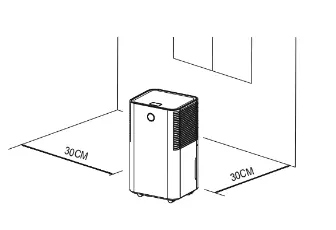
This dehumidifier is designed for indoor residential use. Before first use, ensure the unit is placed on a flat, hard floor and has been upright for at least 24 hours if it was tipped during transport. Maintain an ambient temperature between 5°C and 35°C. The unit requires 30cm of clearance on all sides for proper air circulation.
Product Overview
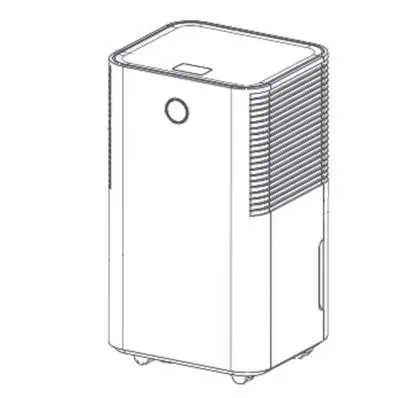
The unit features a control panel on top, a color display, and wheels for mobility. The rear includes an air inlet, air outlet, continuous drainage port, and water tank. The power cord is located on the back.
Installation
Place the unit on a firm, level surface. Ensure there is at least 30cm of free space around the unit to allow for proper air circulation. Do not install the unit in rooms smaller than 4m² or near heat sources, direct sunlight, or excessive dust. Ensure the unit is positioned so the plug is accessible.
Operation
The control panel allows you to manage settings:
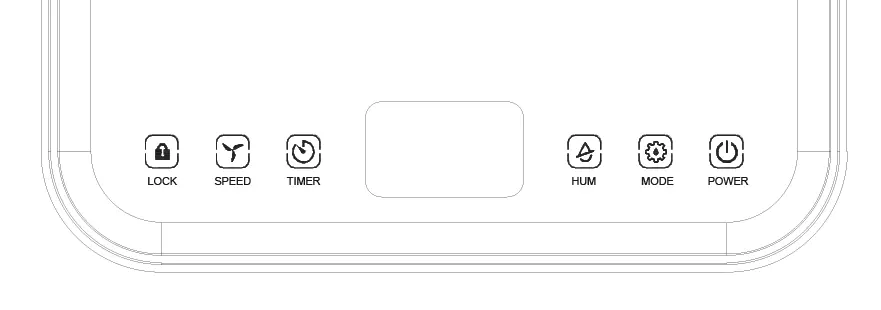
- Power: Turns the unit on/off.
- Mode: Switches between Auto, Continuous, and Sleep modes.
- Auto Mode: The compressor starts when environmental humidity is at least 3% higher than the set humidity.
- Continuous Drying Mode: The unit runs continuously; humidity level cannot be adjusted.
- Sleep Mode: Indicators dim, and wind speed switches to low.
- Humidity (HUM): Adjusts the target humidity (30%-80%).
- Timer: Sets operation time from 0-24 hours.
- Speed: Adjusts fan speed (high/low) in Auto mode.
- Lock: Activates child lock.
Smart Life App
The appliance can be operated via the Smart Life app. Install the app, create an account, and activate the WIFI function on the appliance. Place the unit within 5 meters of your router. If the WIFI indicator flashes, the unit is ready for pairing. You can connect via Bluetooth or by selecting the device in the app.
Drainage
Emptying the Water Tank: When the tank is full, the unit buzzes and the "Water Full" light turns on. Press power to turn off, slide out the tank, empty it, and replace it.
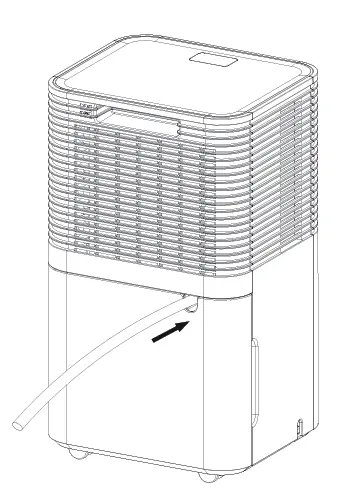
Continuous Drainage: Connect the attached drain hose to the continuous drainage port. Ensure the hose is straight and leads to a floor drain or bucket. The hose must be lower than the outlet for gravity drainage.
Maintenance
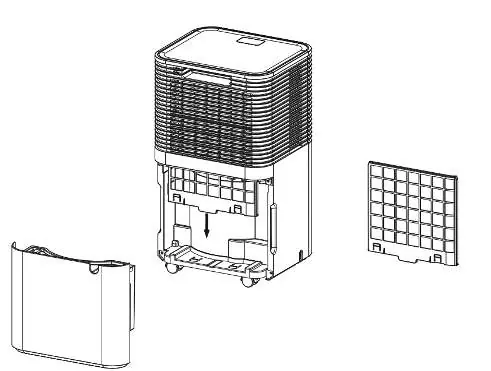
Clean the air filter every two weeks. Remove the water tank, pull out the filter, and use a vacuum cleaner to remove dust. If very dirty, wash with water and a soft detergent, then dry thoroughly before reinstalling.
Troubleshooting
The unit displays error codes for specific issues:
- E2: Humidity sensor problem.
- LO: Environmental humidity is below 20%.
- HI: Environmental humidity is above 90%.
- CL: Low temperature protection (<5°C).
- CH: High temperature protection (>38°C).
Decommissioning
For long-term storage, switch off and unplug the unit. Drain all water, clean the filter, and let it dry completely. Store the unit in a well-ventilated, dry, and safe place indoors.
Manufacturer information
Vivosun
Practical help
Common problems
Unit not working
Check power supply, ensure water tank is correctly positioned, or check if room temperature is outside the 5°C-35°C range.
Bad functioning / No air intake
Check if the air filter is clogged and clean it; ensure intake/discharge ducts are not obstructed.
Loud noise
Ensure the machine is placed on a flat surface and the filter is clean.
Error codes (E2, LO, HI, CL, CH)
These indicate sensor issues or environmental conditions (humidity/temperature) outside operating limits. The unit shuts down to protect itself.
Before use
- Place on a flat, hard floor.
- Ensure 30cm clearance around the unit.
- If the unit was tipped, let it stand upright for 24 hours before use.
- Check that the ambient temperature is between 5°C and 35°C.
- Ensure the water tank is correctly fitted.
- Check that the plug is accessible.
Specs in practice
- Operating Temperature
- 5°C to 35°C. The unit will stop if the temperature is outside this range.
- Humidity Display
- Blue light (65%).
Images and diagrams
- Control panel layout showing Lock, Speed, Timer, Humidity, Mode, and Power buttons.
- Continuous drainage setup showing hose connection to the rear port.
- Filter removal and cleaning process.
Model compatibility
- Requires Smart Life app (Android/iOS).
- Requires permanent WIFI connection for app features.

Manual page author
David Miller
Documentation analyst
Organizes user manual content into clear summaries, with attention to model details, product context, and everyday usability.