Electronics / Video Lighting
User Manual for Aputure amaran 200d S LED Light
Comprehensive user guide for the Aputure amaran 200d S LED light. Includes setup instructions, safety warnings, operation modes, app control, and technical specifications.
Quick answers from the manual
Quick answer
- The amaran 200d S is a 200W daylight-balanced LED light. To operate, remove the protective cover, connect the power supply, and use the INT knob on the back to adjust brightness. p. 2, 5, 8
Key actions
- Remove protective cover p. 2, 5
- Adjust brightness p. 8
- Reset Bluetooth p. 9
First start
- Remove protective covers, mount the light on a stand, connect the power adapter, and press the power button. p. 5, 6, 7, 8
Show 4 more answers Show less
Problems and fixes
Bluetooth reset failed
The LCD will display 'Failed'. Try the reset process again.
p. 9Maintenance and reset
- Bluetooth reset: Long press the Bluetooth reset button. p. 9
Technical specifications
| Parameter | Value | Meaning | Pages |
|---|---|---|---|
| Output Power | 200 W | Maximum power output of the lamp. | p. 11 |
| CCT | 5600 K | Color temperature. | p. 11 |
| Weight | 1560 g | Weight of the fixture. | p. 11 |
Where to find it in the PDF
- Safety Instructions p. 2, 3
- Installation p. 5, 6, 7
- Operations p. 8, 9, 10
- Specifications p. 11
Table of contents
Manual images
Click an image to enlargeQuick guide from the manual
The Aputure amaran 200d S is a 200W daylight-balanced LED light. Before using the unit, you must remove the protective cover from the light and the reflector. Ensure the light is connected to a grounded outlet and do not block the ventilation during operation.
Components List
The standard kit includes:
- amaran 200d S light fixture
- Protection cover
- Hyper-reflector
- Power adapter
- Power cable
- Cable tie
Installations
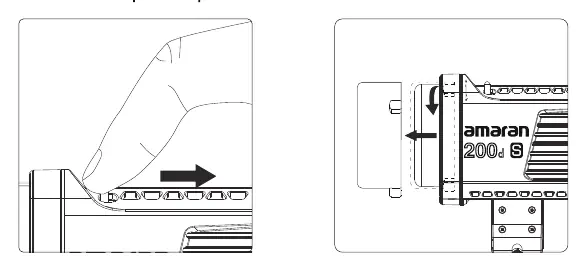
Detaching/attaching the Protection Cover
Push the handle of the lever in the direction of the arrow shown on the fixture, and rotate the cover to pull it out. Reverse the rotation to re-attach the cover.
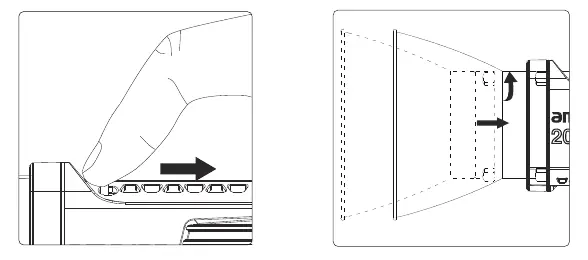
Attaching/detaching the Reflector
Push the lever handle according to the arrow direction and rotate the reflector to lock it into the Bowens mount. Rotate in the opposite direction to release it.
Setting up the light
Adjust the lamp body to the desired height, rotate the tie-down to fix the lamp body on the tripod, adjust the angle, and tighten the locking handle.
Soft light umbrella installation
Insert the soft light handle into the umbrella hole on the fixture, then lock the locking knob.
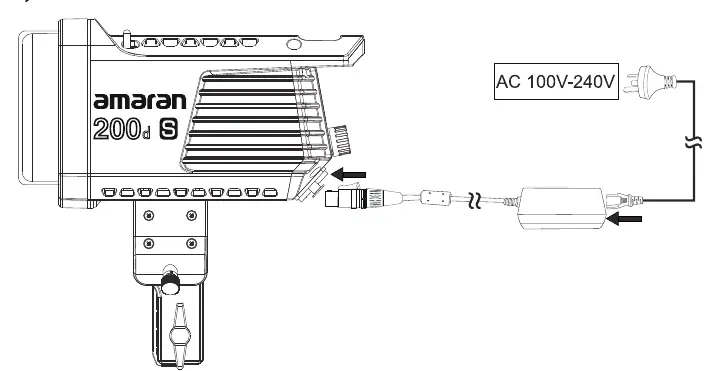
Power supply
Connect the power cable to the power adapter and the fixture. Press the button on the DC interface to remove the power cord; do not pull it out forcibly.
Operations
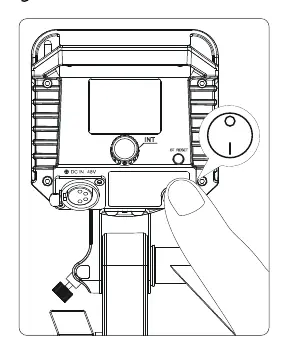
Power ON/OFF
Press the power button on the back of the unit to turn the light on or off.
Manual Control
Rotate the INT adjusting knob to adjust the brightness from 0% to 100%. Clicking the knob allows you to cycle through brightness levels: 20% -> 40% -> 60% -> 80% -> 100% -> 20%.
Bluetooth and App Control
You can control the light using the Sidus Link app. To reset Bluetooth, long-press the Bluetooth reset button. The LCD will display "BT Reset" and show progress. Success or failure will be indicated on the display.
Specifications
The amaran 200d S features a 5600K CCT, 96 CRI, and 99 TLCI. It supports active cooling and has a maximum power draw of 221W. The operating temperature range is -10°C to +40°C.
Manufacturer information
Aputure
Practical help
Common problems
Light does not turn on
Ensure the power cable is securely connected to both the power adapter and the fixture. Press the button on the DC interface to ensure it is locked.
Bluetooth connection failed
Perform a Bluetooth reset by long-pressing the Bluetooth reset button on the back of the unit until the LCD displays the reset progress.
Reflector or cover stuck
Ensure you are pushing the lever handle in the direction of the arrow before attempting to rotate the accessory.
Before use
- Remove the protective cover from the light.
- Remove the protective cover from the reflector.
- Ensure the power outlet is grounded.
- Check that all accessories from the components list are present.
- Ensure the ventilation is not blocked.
Show more Show less
Specs in practice
- Beam angle (111°)
- The spread of light without the reflector.
Images and diagrams
- The rear panel contains the OLED display, INT adjusting knob, Bluetooth reset key, and power switch.
- The Bowens mount release latch is located on top of the fixture.
- The DC-in connector is located on the rear panel.
Model compatibility
- Compatible with Sidus Link app for wireless control.
- Uses standard Bowens mount for light modifiers.
- Supports soft light umbrellas.

Manual page author
Michael Turner
Technical manual editor