Home Appliances / Small Kitchen Appliances
User Manual for Cuisinart Brew Central 14-Cup Programmable Coffeemaker DCC-2600 Series
Quick guide for the Cuisinart Brew Central 14-Cup Programmable Coffeemaker (DCC-2600 Series). Learn how to program, brew, clean, and maintain your coffee maker.
Table of contents
Manual images
Click an image to enlargeQuick guide from the manual
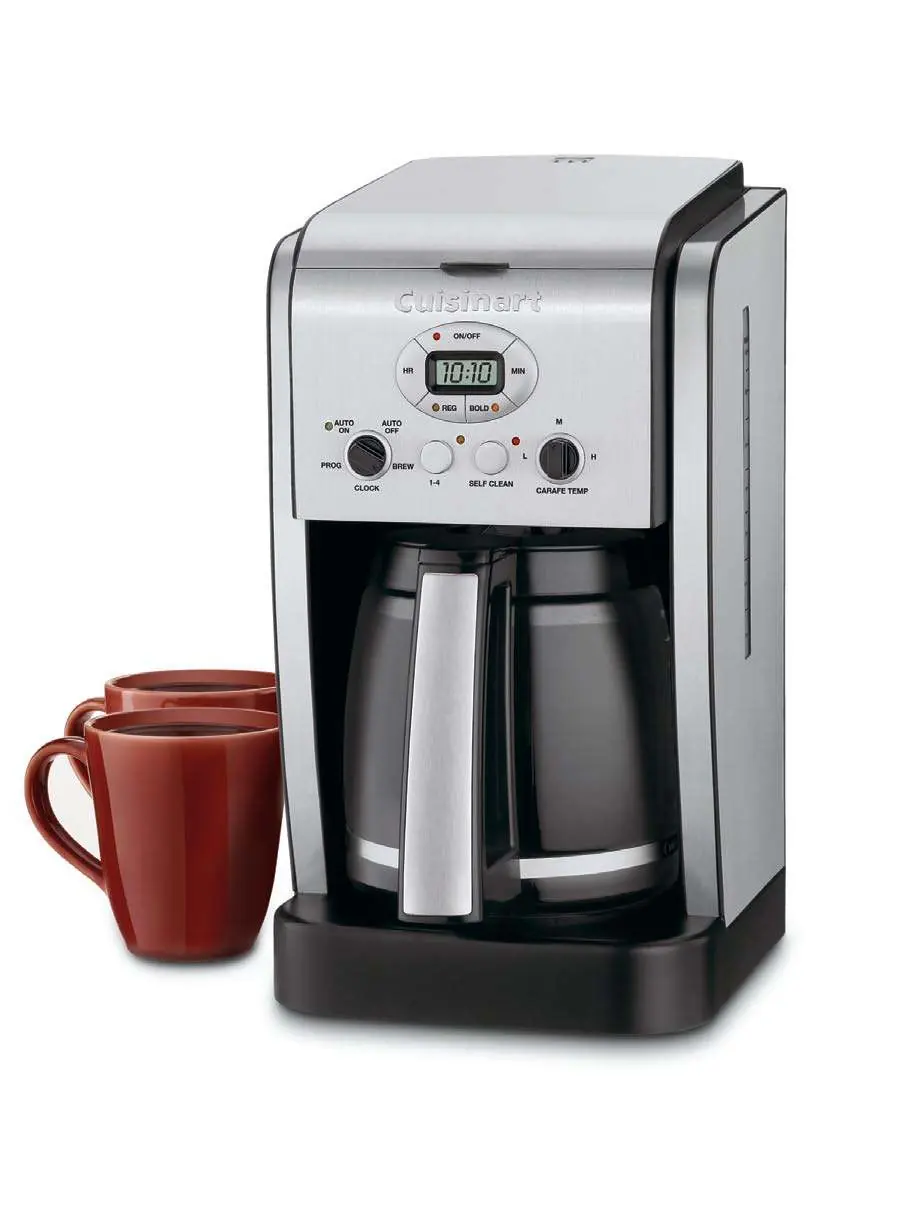
Before using your coffeemaker for the first time, it is recommended to flush the system. Fill the water reservoir and run a brew cycle without adding coffee grounds. This removes any dust from the manufacturing process. Always ensure the carafe is in position on the heating plate and the top cover is closed before starting a brew cycle.
Unpacking and Setup
Place the box on a large, sturdy, flat surface. Remove the instruction book and literature. Turn the box so the back of the coffeemaker is down and slide the unit out. Remove all polyfoam inserts and plastic bags. Keep all packing materials in case you need to ship the machine in the future.
Control Panel Overview
The control panel allows you to manage all functions:
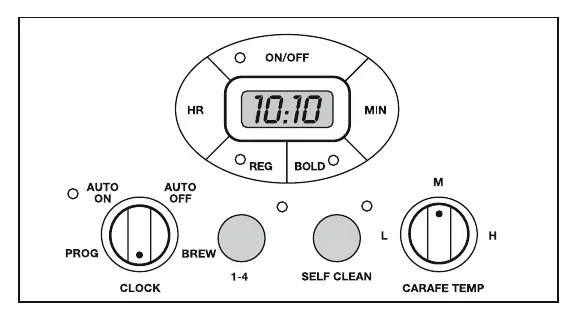
- On/Off Button: Turns the coffeemaker on and off.
- Function Knob: Used to select modes: PROG (program auto-on), AUTO ON, AUTO OFF, BREW, and CLOCK.
- Hour/Minute Buttons: Used to set the time of day, auto-on, and auto-off times.
- Strength Selector: Choose between Regular or Bold flavor intensity.
- 1-4 Cup Setting: Improves extraction and temperature when brewing smaller batches.
- Carafe Temperature Knob: Adjusts the heater plate to Low (L), Medium (M), or High (H).
Programming
Setting the Clock
When plugged in, 12:00 will appear. Turn the Function Knob to CLOCK. Hold down the Hour or Minute button until the clock flashes, then use the buttons to set the desired time.
Setting Auto On/Off
Turn the Function Knob to PROG to set the auto-on time using the Hour/Minute buttons. Turn the knob to AUTO ON to activate the programmed start time. Turn the knob to AUTO OFF to program the unit to shut off up to 4 hours after brewing.
Making Coffee
- Insert the charcoal water filter (see instructions below).
- Fill the water reservoir with the desired amount of water.
- Set your preferences: select 1-4 cup setting if needed, choose flavor strength, and set the carafe temperature.
- Add ground coffee to the filter basket using a #4 paper filter or the permanent gold tone filter. Use 1 level scoop per cup.
- Ensure the carafe is on the heating plate and the top cover is closed.
- Turn the Function knob to BREW and press the ON/OFF button.
Charcoal Water Filter
The charcoal water filter eliminates chlorine, calcium, and bad tastes from tap water. To install: soak the filter in cold water for 15 minutes, lift the filter holder out of the reservoir, place the filter inside, snap it closed, and flush it by running cold water through the bottom holes for 10 seconds. Replace the filter every 60 days or 60 uses.
Cleaning and Maintenance
Always turn off and unplug the unit before cleaning. The filter basket and carafe are dishwasher safe (upper rack). Wipe the base unit with a damp cloth; never immerse it in water. If the Clean light flashes, it indicates calcium buildup. To decalcify, fill the reservoir with a mixture of 1/3 white vinegar and 2/3 water, press the Clean button, and turn the unit on. Run one cycle, then run a cycle of fresh cold water before brewing coffee again.
Manufacturer information
Cuisinart
Practical help
Common problems
Coffee or water backing up in filter basket
Use a coarser grind, do not use two paper filters, do not use the gold tone filter with a paper filter, or ensure the gold tone filter is properly cleaned.
Brew Pause overflow
Do not remove the carafe for more than 20 seconds during the brewing cycle.
Clean light is flashing
This indicates calcium buildup. Run a cleaning cycle using a mixture of 1/3 white vinegar and 2/3 water.
Before use
- Flush the system with water (no coffee) before the first use.
- Soak the charcoal water filter in cold water for 15 minutes.
- Ensure the glass carafe is correctly positioned on the heating plate.
- Verify the top cover is closed securely.
- Plug the unit into a polarized outlet.
Specs in practice
- 1-4 Cup Setting
- Improves extraction, flavor, and temperature when brewing fewer than 5 cups.
- Strength Selector
- Allows you to choose between Regular or Bold coffee flavor intensity.
- Carafe Temperature
- Adjusts the heater plate to Low (L), Medium (M), or High (H) to keep coffee at your preferred temperature.
Images and diagrams
- The control panel features buttons for clock, strength, and function selection.
- The water reservoir includes a window for water level indication.
- The filter basket holds either a #4 paper filter or the permanent gold tone filter.
Model compatibility
- Use only #4 paper filters or the included permanent gold tone filter.
- Do not use the gold tone filter in conjunction with a paper filter.

Manual page author
Michael Turner
Technical manual editor
Reviews PDF manuals for structure, safety notes, and practical product details so readers can find the right information quickly.