Home Appliances / Coffee Equipment
Bosch Tassimo Vivy 2 TAS 140x Coffee Machine User Manual
Quick guide for the Bosch Tassimo Vivy 2 TAS 140x coffee machine. Includes setup, operation, cleaning, descaling, and troubleshooting steps.
Table of contents
Quick guide from the manual
This guide provides essential information for operating your Bosch Tassimo Vivy 2 (TAS 140x) coffee machine. Always refer to the full manual for detailed safety and maintenance instructions.
Safety Instructions
Important: Read the safety instructions carefully before use. Keep children under 8 years away from the appliance. Use only fresh, cold, non-carbonated water. Do not use chemically softened water. Never leave the appliance unattended during operation.
At a Glance
The machine consists of the following main components:
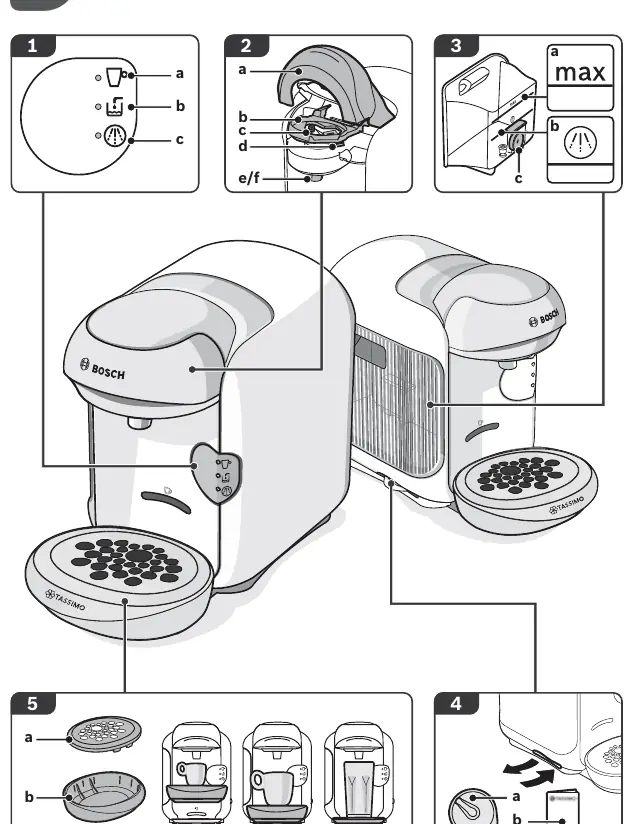
- Start/Stop button: With status LEDs.
- Brewing unit: Includes the lid, T DISC support, piercing unit, and beverage outlet.
- Water tank: Removable, with a max mark and float.
- Storage compartment: Located in the machine, holds the yellow Service T DISC and brief instructions.
- Cup stand: Removable and height-adjustable, includes a drip grate and tray.
Operation
Before first use, ensure the machine is clean. Use the yellow Service T DISC for the initial cleaning process as described in the manual. To prepare a drink, insert a T DISC with the printed side facing down, close the brewing unit, and press the Start/Stop button. The machine automatically reads the barcode on the T DISC to determine the correct brewing parameters.
Cleaning and Maintenance
Regular cleaning is essential for the quality of your drinks. Clean the beverage outlet and brewing unit regularly. Use the yellow Service T DISC for cleaning the system. If the machine indicates that descaling is required, follow the descaling procedure outlined in the manual using appropriate descaling tablets.
Troubleshooting
If you encounter issues, check the following:
- Appliance not working: Ensure it is plugged into a power supply.
- Brewing starts but no drink: Check if the water tank is inserted correctly or if there is air in the system. Run a cleaning cycle with the Service T DISC.
- Brewing won't start: Ensure a T DISC is inserted, the brewing unit is closed properly, and the reading window is clean.
- Water dripping: Clean the brewing unit and ensure the T DISC is not damaged.
Manufacturer information
Bosch
Practical help
Common problems
Appliance not working, no LEDs lit
Check if the appliance is connected to the power supply.
Brewing starts, but no beverage dispensed
Check if the water tank is inserted correctly. If air is in the system, run a cleaning process with the yellow Service T DISC.
Brewing will not start
Check if a T DISC is inserted. Clean the T DISC reading window with a soft, damp cloth. Ensure the brewing unit is closed properly.
Water dripping from the brewing unit
Ensure the T DISC is not damaged and is inserted correctly. Clean the brewing unit.
Before use
- Check the appliance for transport damage after unpacking.
- Ensure the appliance is placed on a flat, stable surface.
- Fill the water tank with fresh, cold, non-carbonated water.
- Ensure the appliance is plugged into a properly installed, earthed socket.
- Check that the yellow Service T DISC is available for the initial cleaning.
Specs in practice
- Yellow Service T DISC
- A special disc used for cleaning and descaling the machine.
Images and diagrams
- 1: Start/Stop button with status indicators.
- 2: Brewing unit with lid, T DISC support, and piercing unit.
- 3: Removable water tank with max mark and float.
- 4: Storage compartment for the Service T DISC.
- 5: Height-adjustable cup stand with drip tray.
Model compatibility
- Use only TASSIMO T DISCs.
- Do not use chemically softened water.

Manual page author
David Miller
Documentation analyst
Organizes user manual content into clear summaries, with attention to model details, product context, and everyday usability.