Home Appliances / Small Kitchen Appliances
User Manual for Cuisinart Brew Central 14-Cup Programmable Coffeemaker
Quick guide for the Cuisinart Brew Central 14-Cup Programmable Coffeemaker (CBC-6400PCC). Learn how to program, brew, clean, and maintain your coffee maker.
Table of contents
Manual images
Click an image to enlargeQuick Guide from the Manual
Before using your Cuisinart Brew Central coffeemaker for the first time, it is essential to rinse the system. Fill the water reservoir with fresh water and run a brew cycle without adding coffee grounds. Always ensure the carafe is placed correctly on the heating plate before starting. The unit features a Brew Pause function, allowing you to pour a cup mid-brew for up to 20 seconds.
Product Overview
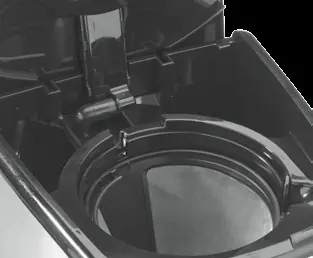
The Cuisinart Brew Central 14-Cup Programmable Coffeemaker includes a charcoal water filter to improve taste by removing chlorine and odors. It features a programmable control panel for setting the time, Auto On, and Auto Off functions. The unit is designed for use with #4 paper filters or the included gold-tone permanent filter.
Programming
Setting the Clock
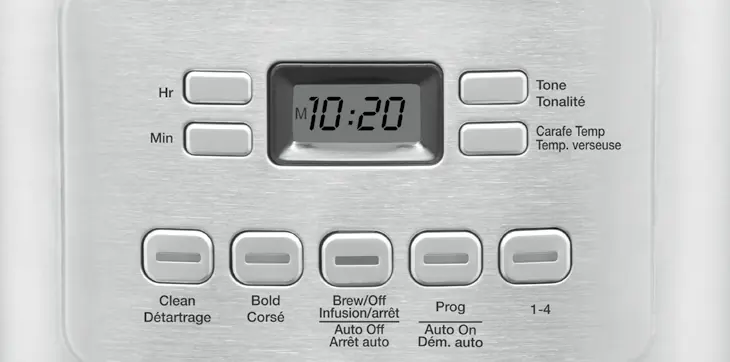
When plugged in, the display flashes 12:00. Press the Hour or Minute button to set the desired time. Ensure the PM indicator is correct if setting a PM time.
Setting Auto On
Press and hold the Prog/Auto On button for 2 seconds. Use the Hour and Minute buttons to set your desired start time. The indicator light will illuminate when Auto On is activated.
Setting Auto Off
Press and hold the Auto Off button for 2 seconds. Use the Hour and Minute buttons to program the shut-off time (from 0 to 4 hours after the brew cycle).
Making Coffee
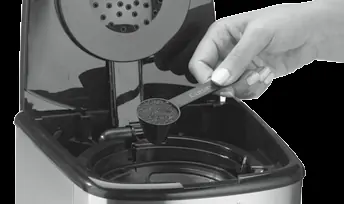
- Fill the water reservoir with the desired amount of water using the level indicator.
- Insert a #4 paper filter or the gold-tone filter into the basket.
- Add ground coffee (1 level scoop per cup). Do not exceed 15 tablespoons.
- Place the carafe on the heating plate and ensure the lid is closed.
- Press the 1–4 cup button if brewing small batches, or the Bold button for stronger flavor.
- Press the Brew/Off button to start.
Cleaning and Maintenance
Always turn off and unplug the unit before cleaning. The filter basket and carafe are dishwasher safe (upper rack). Wipe the base unit with a clean, damp cloth; never immerse the base in water. The heating plate can be wiped with a damp cloth.
Decalcification
If the CLEAN indicator lights up, it is time to decalcify. Fill the reservoir with a mixture of 1/3 white vinegar and 2/3 water. Press and hold the CLEAN button until the indicator flashes. When the cycle finishes, run a cycle with fresh water to rinse.
Manufacturer information
Cuisinart
Practical help
Common problems
Coffee grounds in carafe
Use a coarser grind or ensure the filter is seated correctly in the basket.
Filter basket overflowing
Do not use too finely ground coffee, do not use multiple paper filters, and do not open the basket during the brewing cycle.
Coffee not brewing
Ensure the water reservoir is filled and the unit is properly plugged into an electrical outlet.
Before use
- Remove all packaging materials.
- Rinse the system by running a brew cycle with water only (no coffee).
- Soak the charcoal water filter in cold water for 15 minutes before installing.
- Ensure the carafe is placed correctly on the heating plate.
Specs in practice
- 14-Cup Capacity
- The maximum brewing capacity of the glass carafe.
Images and diagrams
- Control Panel: Features buttons for Clock, Auto On/Off, Brew/Off, Clean, Bold, and 1-4 Cup settings.
- Water Filter: Charcoal filter holder located inside the water reservoir.
Model compatibility
- Use only Cuisinart Gold-Tone Commercial Style Filter or #4 basket-style paper filters.

Manual page author
David Miller
Documentation analyst
Organizes user manual content into clear summaries, with attention to model details, product context, and everyday usability.