Furniture / Media Furniture
User Manual for Atlantic Doris Mixte Bathroom Radiator
Quick guide for the Atlantic Doris Mixte bathroom radiator. Learn about installation, electrical and hydraulic connections, programming modes, Boost function, and troubleshooting.
Table of contents
Manual images
Click an image to enlargeQuick guide from the manual
The Atlantic Doris Mixte is a mixed bathroom radiator designed for both central heating and electric operation. It features a control panel for managing temperature, programming, and a Boost function for rapid heating. The device is compatible with the Cozytouch application for remote control (requires a Bridge and Interface).
Safety warnings
- Hot surface: Some parts of this product can become very hot and cause burns. Special care must be taken if children or vulnerable adults are present.
- Installation: The lowest heated rail must be at least 600 mm above the floor. Do not install the device in a draught or directly under a fixed power socket.
- Electrical: Connection must be performed by an authorized person. Connection to the earth is prohibited for the pilot wire (black wire).
- Water circuit: The service pressure must not exceed 4 bars. The boiler return tap must remain open in all cases to allow fluid expansion.
Installation
The device is designed for residential use. It is class 2 and IP24 protected. Ensure the device is installed according to local standards. Do not install shelves above the device. The bottom case must be at least 5 mm from the wall.
Electrical and hydraulic connection
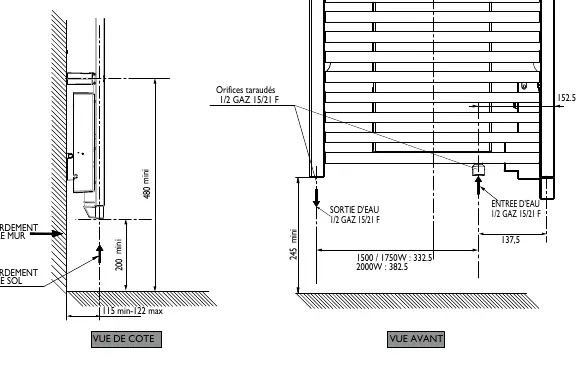
Hydraulic: The mixed version has two 1/2 gas 15/21 F threaded ports at the base. Follow the flow direction indicated in the diagram. Use a new connection set.
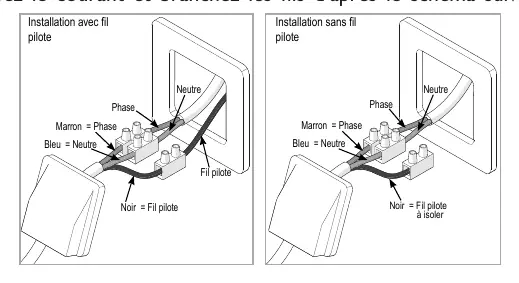
Electrical: The device requires a 230V single-phase 50Hz power supply. Connect directly to the network after a circuit breaker without an intermediate switch. If using a load shedder, choose a pilot wire output load shedder to avoid damaging the thermostat.
Operation and modes
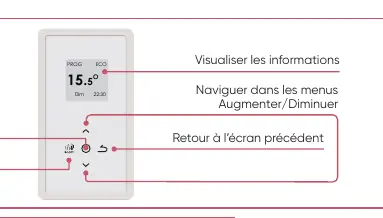
The control panel allows you to navigate menus, adjust temperature, and activate the Boost function. The device offers two main modes: Active Prog (follows internal/external programming) and Inactive Prog (follows the setpoint temperature at all times).
Boost Mode: Accelerates heating for a rapid temperature rise in the bathroom. The duration is adjustable (10 to 60 minutes).
Programming
You can program up to 3 Comfort temperature ranges for each day of the week. Outside these ranges, the device uses the Eco temperature. You can also copy programs from one day to another. For external programming via a pilot wire, the internal programming must be set to inactive.
Expert menu
To access advanced functions, press the Menu and Boost buttons simultaneously for over 3 seconds. This menu allows for temperature calibration, setting maximum temperature limits, adjusting Boost duration, and setting a PIN code for access control.
Troubleshooting
If the device does not heat up, ensure it is in Comfort mode and that the circuit breakers are on. If an error code appears: Err 3.3 indicates the control box is covered; Err 6 indicates the filter needs cleaning (if equipped with a fan) or air inlets are obstructed; Err 10 indicates a connection fault (contact your installer).
Maintenance
Dust the air inlets and outlets with a vacuum cleaner or brush about twice a year. Never use abrasive products or solvents. Have the inside of the device checked by a professional electrician every five years.
Practical help
Common problems
Control panel display does not turn on
Check if the switch on the back of the unit is in the 'I' (on) position and ensure the device is electrically powered.
Device does not heat up
Ensure the device is in Comfort mode, check if you are within a Comfort period, and verify that circuit breakers or load shedders have not cut power.
Err 6 error code
Clean the filter (if the model has a fan) and check that the air inlet or outlet are not obstructed.
Err 3.3 error code
Ensure nothing is covering the right side of the control box.
Device takes time to heat up
The fluid inside requires time to circulate and heat up; it may take at least 15 minutes to reach optimal surface temperature.
Before use
- Ensure the device is installed at least 600mm above the floor.
- Verify the electrical connection is performed by an authorized person.
- Check that the water circuit is properly filled and bled.
- Ensure the device is not installed in a draught.
- Confirm the switch on the back is set to 'I'.
Specs in practice
- Comfort Mode
- Maintains the room at a pleasant, user-defined temperature.
Images and diagrams
- Wiring diagram shows connections for Phase, Neutral, and Pilot wire.
- Hydraulic connection diagram indicates water inlet and outlet ports.
Model compatibility
- Compatible with Cozytouch application (requires Bridge and Interface).
- Not compatible with load shedders that cut power; use pilot wire output load shedders.

Manual page author
Michael Turner
Technical manual editor
Reviews PDF manuals for structure, safety notes, and practical product details so readers can find the right information quickly.