Power / Wireless Chargers
User Manual for Atomi 10W Qi Wireless Charger
Quick guide for the Atomi 10W Qi Wireless Charger. Learn how to set up your charger, understand indicator lights, and follow safety precautions for optimal use.
Table of contents
Manual images
Click an image to enlargeQuick guide from the manual
The Atomi Qi Wireless Charger uses electromagnetic induction to charge compatible devices. To use it, simply connect the charger to a power source and place your Qi-enabled device on the center of the pad. Ensure you use a 2A wall charger for optimal performance, as using a 1A charger will result in longer charging times.
What's inside
- Qi Wireless Charger
- Micro-USB cable
- User guide
Setup and operation
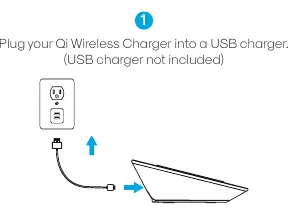
- Connect power: Plug your Qi Wireless Charger into a USB charger (not included).
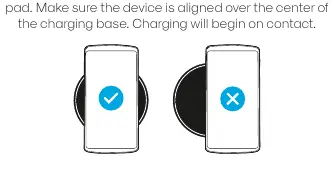
- Position device: Place the device on the center of the wireless charging pad. Ensure the device is aligned over the center of the charging base. Charging will begin on contact.
Indicator lights
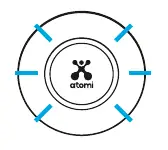
- Blue light: Your device is charging.
- Green light: Your device is fully charged and is in standby mode.
Note: For iOS devices, the green light indicating a full charge may not turn on.
Safety and care
- Keep the charger dry; moisture can corrode electronic circuits.
- Do not use the charger if it is wet or damaged.
- Keep the charger free from dust.
- Do not store in cold temperatures to prevent moisture buildup.
- Do not modify, drop, knock, or shake the charger.
- Clean with a soft, clean, dry cloth.
- Medical device warning: Keep the charger more than 6 inches away from implanted medical devices like pacemakers. Unplug if you suspect interference.
- Magnetic warning: Do not place credit cards or magnetic storage devices near the charger.
Compatibility and specifications
Input: 5V 2A, 9V 1.67A
Compatible devices: Works with any Qi-enabled device, including iPhone 11/11 Pro/11 Pro Max, iPhone XS/XS Max/XR/X/8/8 Plus, Galaxy S10e/S10/S10+/S9/S9+/S8/S8+, Galaxy Note10/10+/Note9/Note8, and LG G8 ThinQ/G7 ThinQ/V30 ThinQ.
Note: Watches are not recommended for charging on this item as the charger may get hot and damage the watch.
Practical help
Common problems
Device is not charging
Ensure the device is Qi-compatible. If not, you will need a Qi receiver. Also, ensure the device is properly aligned on the center of the pad.
Slow charging speed
Ensure you are using a 2A wall charger. Using a 1A charger will result in longer charging times.
Green light does not turn on when fully charged
This is normal behavior for some iOS devices; the green light indicating a full charge may not turn on.
Before use
- Ensure you have a compatible micro-USB cable and a 2A wall charger.
- Verify your device is Qi-enabled.
- If your device is not Qi-compatible, obtain a Qi receiver.
- Ensure the charging area is free from magnetic items like credit cards.
- Keep the charger away from implanted medical devices.
Images and diagrams
- Placement: Always align the device over the center of the charging base for charging to begin.
- Indicator Lights: Blue indicates charging, Green indicates standby/fully charged.
Model compatibility
- Compatible with most modern smartphones with integrated Qi functionality (iPhone 8 and newer, Galaxy S8 and newer, etc.).
- Watches are not recommended for charging on this device.

Manual page author
Michael Turner
Technical manual editor
Reviews PDF manuals for structure, safety notes, and practical product details so readers can find the right information quickly.