Power / Wireless Chargers
User Manual for AUKEY Ora Hooded 10X Macro Lens
Quick guide for the AUKEY Ora Hooded 10X Macro Lens (PL-M1). Learn how to attach the lens, align it with your camera, and achieve the perfect focal distance for clear macro photography.
Table of contents
Quick guide from the manual
The AUKEY Ora Hooded 10X Macro Lens is designed to capture detailed close-up photos. To achieve the best results, ensure the lens is centered on your device's camera and maintain a distance of 10-25mm (0.4-1 inch) from your subject. Always use the translucent lens hood for improved stability and light balance.
Installation and alignment
Follow these steps to attach the lens to your smartphone:
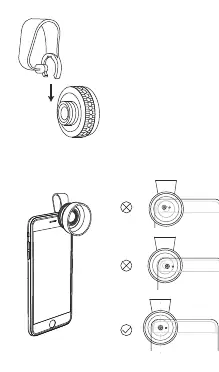
- Attach the lens clip to the macro lens.
- Clip the macro lens directly over your device's camera lens.
- Ensure the macro lens is precisely centered on the camera. You can verify this by looking through the front of the macro lens at your device's camera lens.
- If your device has a case, try removing it to ensure a better fit and performance.
Using the macro lens
For optimal image quality, position the macro lens 10-25mm (0.4-1 inch) from the subject. Attach the translucent lens hood to the lens; this helps maintain the correct focal distance, improves stability, and provides better light distribution.
Troubleshooting
If you notice black borders or blurred edges in your photos, the lens is likely not centered correctly. Adjust the position of the clip until the view is clear. If the clip does not fit securely, remove any protective phone case.
Manufacturer information
AUKEY
Practical help
Common problems
Black borders or blurred edges in photos
Ensure the lens is precisely centered over your device's camera lens.
Poor fit or unstable attachment
Remove your phone case to allow the clip to sit flush against the device.
Before use
- Attach the clip to the macro lens.
- Remove phone case if the fit is not secure.
- Ensure the lens is centered over the camera.
- Attach the translucent lens hood.
Specs in practice
- Focal distance
- 10-25mm (0.4-1 inch) from the subject.
Images and diagrams
- The manual includes a diagram showing the clip attachment process and the alignment method by looking through the lens.
Model compatibility
- Compatible with most smartphones; phone cases may need to be removed for optimal fit.

Manual page author
Emily Carter
User documentation editor
Prepares concise manual descriptions and highlights the most useful setup, operation, and maintenance information for readers.