Power / USB Chargers
User Manual for AUKEY Foldable 14W Solar Charger
Quick guide for the AUKEY Foldable 14W Solar Charger (PB-P3). Learn how to set up, charge devices, and maintain your solar charger for optimal performance.
Table of contents
Quick guide from the manual
The AUKEY Foldable 14W Solar Charger is designed to convert sunlight into electricity to charge your USB-powered devices. To use it, unfold the panels, place them in direct sunlight, and connect your device using a standard USB charging cable. Note that this device does not store power; it is not a power bank and requires direct sunlight to function.
Product Overview
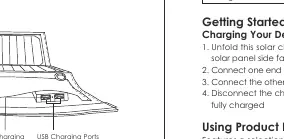
The solar charger features multiple solar panels, a device charging compartment, an LED charging indicator, and USB charging ports. It includes hanging loops and adjustable fixings for flexible placement, such as hanging from walls or tables.
Getting Started
- Unfold the solar charger completely.
- Place the charger under direct sunlight with the solar panel side facing up.
- Connect one end of your device's charging cable to your device.
- Connect the other end of the cable to the USB port on the solar panel.
- Disconnect the cable once your device is fully charged.
Using Product Fixings & Storage
The charger includes hanging loops and adjustable fixings for convenient placement. You can hang the unit from walls or tables by resting the two vertically-opening flaps on top. The charging compartment is designed to hold and protect your device while it is charging.
Product Care & Use
- Do not bend: Avoid bending the solar panel parts of the charger.
- Keep dry: Keep the device away from liquids.
- Sunlight exposure: Ensure direct sunlight shines on the entire solar panel surface for better performance.
- Temperature: In strong sunlight and high temperatures, protect your connected device from overheating.
- Surface protection: Do not scratch the solar panel surface with sharp or rough objects like keys.
- Cable usage: Use your original device charging cable or one of an equivalent standard.
Specifications
- Model: PB-P3
- Solar Panel Type: SunPower
- Conversion Efficiency: 23.5%
- Total Power Output: 14W
- USB Output: 5V 2A Max
- Dimensions: 528 x 290 x 15mm (20.8 x 11.4 x 0.6 inches)
- Weight: 467g (16.5oz)
Warranty & Customer Support
For questions, support, or warranty claims, contact the support team corresponding to your region. Please include your Amazon order number and product model number (PB-P3) in your correspondence.
Amazon US orders: [email protected] EU orders: [email protected] CA orders: [email protected] JP orders: [email protected]
Manufacturer information
AUKEY
Practical help
Common problems
Solar panel does not store power
This device is not a power bank and does not contain an internal battery. It only provides power while exposed to sunlight.
Slow or no charging
Ensure the entire solar panel surface is exposed to direct sunlight. Check that the charging cable is securely connected to both the device and the solar panel.
Device overheating
In strong sunlight and high temperatures, place the connected device in the shade or inside the charging compartment to protect it from heat.
Before use
- Ensure the solar panel is fully unfolded.
- Verify the solar panel surface is clean and free of scratches.
- Check that the weather conditions allow for direct sunlight.
- Use a high-quality or original charging cable for your device.
Specs in practice
- Total Power Output: 14W
- The maximum power the solar panels can generate under ideal sunlight conditions.
- USB Output: 5V 2A Max
- The standard voltage and maximum current provided to your device; suitable for most smartphones and small electronics.
- Conversion Efficiency: 23.5%
- The percentage of sunlight energy successfully converted into electrical energy.
Images and diagrams
- The product diagram identifies the solar panels, the device charging compartment, the LED charging indicator, and the USB charging ports.
Model compatibility
- Compatible with devices that charge via USB (5V input).
- Actual output performance depends on geographical location, weather conditions, and the device's rated input.

Manual page author
David Miller
Documentation analyst
Organizes user manual content into clear summaries, with attention to model details, product context, and everyday usability.