Electronics / AV Switchers
User Manual for Av Link 4K HDMI 2.0 Matrix 4x4 (128.850UK)
Quick guide for the Av Link 128.850UK 4K HDMI 2.0 Matrix 4x4. Includes connection instructions, EDID settings, technical specifications, and setup tips.
Table of contents
Manual images
Click an image to enlargeQuick guide from the manual
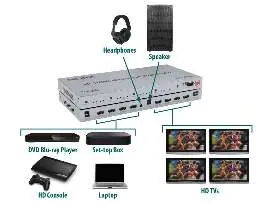
The Av Link 128.850UK is a 4K HDMI 2.0 Matrix designed to switch between 4 source devices and 4 display outputs. It supports 4K resolution at 60Hz and includes EDID management for specific video and audio requirements. Audio can be extracted from HDMI output #1 via SPDIF or 3.5mm stereo jacks.
Connection instructions
Follow these steps to set up your matrix:
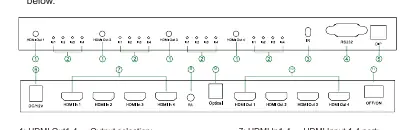
- Source Devices: Connect up to 4 source devices to the HDMI inputs (7) on the back of the unit. Use HDMI cables up to 15m for 4K@30Hz/FHD or 5m for 4K@60Hz.
- Display Devices: Connect up to 4 display devices to the HDMI outputs (10). Use HDMI cables up to 15m for 4K@30Hz/FHD or 5m for 4K@60Hz.
- Power: Connect the supplied 12V power adaptor to the DC/12V port (6) and plug into a mains outlet.
- Audio Extraction: To channel audio from HDMI output 1 to external sound systems or headphones, use the digital SPDIF (9) or analogue 3.5mm jacks (8).
- Switching: Use the HDMI output selection buttons (1) on the front panel or the included IR remote control to switch between sources. The current selection is shown on the LED indicators (2).
EDID management settings
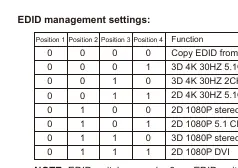
The EDID dip switches (5) allow you to configure resolution and audio settings. Note that the EDID switch upward equals 0, and downward equals 1. Refer to the EDID management table in the manual to select the appropriate configuration for your setup, such as Copy EDID from Output 1, 3D 4K 30Hz 5.1CH, or 2D 1080P stereo.
Technical specifications
- HDMI Version: 2.0b
- Video Resolution: Up to 3840 x 2160 @ 60Hz
- Audio Formats: DTS-HD, Dolby-trueHD, LPCM7.1, DTS, Dolby-AC3, DSD
- Transmission Distance: 30m max for 4K@30Hz/FHD; 10m max for 4K@60Hz
- Power Adaptor: Input 100-240V, Output DC12V/1A
- Dimensions: 276 x 143 x 26mm
- Weight: 720g
Safety warnings
- Do not immerse the device in water or expose it to damp conditions.
- Do not use excessive force on the device.
- Do not attempt to repair or take apart the device, as this will invalidate the warranty.
- If the device is damaged, do not use it.
Practical help
Common problems
No 4K resolution or signal issues
Ensure you are using 4K certified HDMI cables. Check that cable lengths do not exceed 30m for 4K@30Hz/FHD or 5m for 4K@60Hz.
No audio from external sound system
Ensure the audio source is connected to HDMI output #1, as audio extraction via SPDIF/3.5mm is specific to this output.
Before use
- Verify all HDMI cables are high-quality and 4K certified.
- Ensure source devices are connected to inputs 1-4.
- Ensure display devices are connected to outputs 1-4.
- Connect the supplied 12V power adaptor.
- Configure EDID dip switches based on your display requirements.
Images and diagrams
- Front panel: Contains output selection buttons (1) and LED indicators (2) for each output.
- Rear panel: Contains HDMI inputs (7), HDMI outputs (10), audio extraction ports (8, 9), and power input (6).
Model compatibility
- Compatible with 4K digital TV boxes.
- Requires separate sound system or headphones for audio extraction.

Manual page author
Michael Turner
Technical manual editor
Reviews PDF manuals for structure, safety notes, and practical product details so readers can find the right information quickly.