Electronics / AV Switchers
Av Link 128.855UK 4K HDMI Multi-viewer
Quick guide for the Av Link 128.855UK 4K HDMI Multi-viewer. Learn how to connect your devices, switch between 7 display modes, and configure audio settings for your 4K setup.
Table of contents
Manual images
Click an image to enlargeQuick guide from the manual
The Av Link 128.855UK is a 4K HDMI Multi-viewer that allows you to display and switch between up to 4 HDMI signals on a single output. It supports 7 different display modes, making it suitable for CCTV, security, gaming, and hospitality applications. To ensure optimal performance, use 4K certified HDMI cables for all 4K resolution setups.
Installation
Follow these steps to set up your multi-viewer:
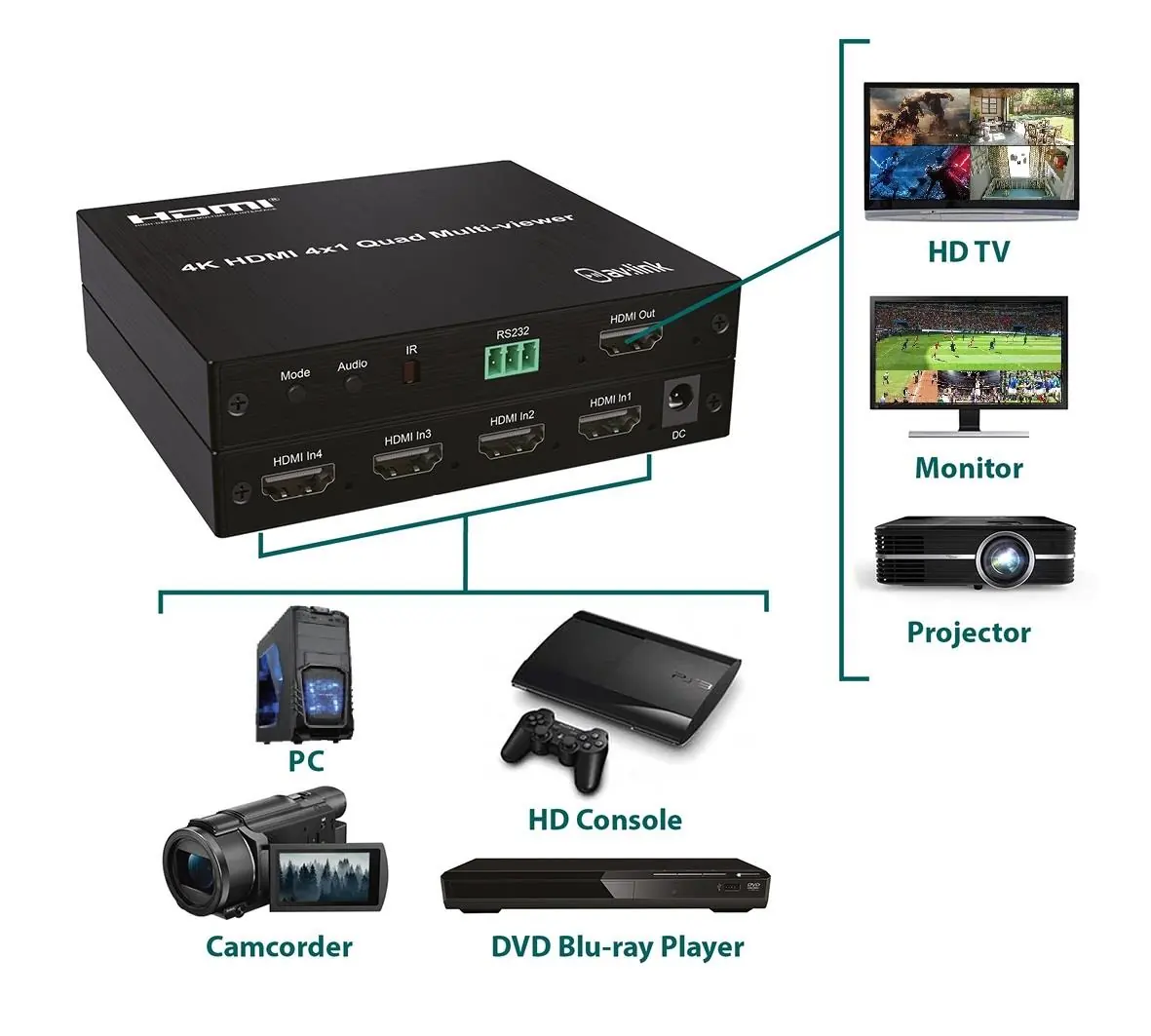
- Connect Sources: Connect the outputs of up to 4 source devices to the HDMI inputs (1) on the unit.
- Connect Display: Connect the HDMI output (7) of the multi-viewer to your display device (TV, monitor, or projector).
- Power Connection: Connect the supplied UK power adaptor to the DC power input (2) and plug it into a mains outlet.
- Cable Requirements: Use HDMI cables up to 10m in length for 4K@30Hz or FHD signals. Always use 4K certified cables to maintain 4K resolution.
Device Overview
The unit features physical buttons on the front panel for quick control:
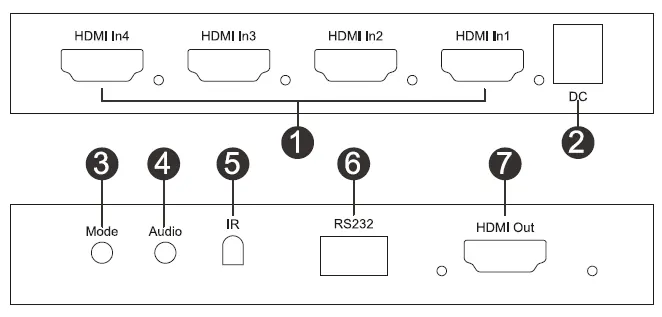
- Mode Selection Switch (3): Cycles through the 7 available view modes. Note that if fewer than 4 inputs are connected, fewer view modes will be available.
- Audio Selection Switch (4): Switches the audio output between the connected source inputs.
- Indicators: Blue LEDs next to the HDMI inputs and output indicate when a signal is detected.
Remote Control Functions
The provided IR remote control offers more precise control over the device:

- Four screen mode: Displays all inputs simultaneously.
- Audio selection switch: Cycles through audio sources.
- Mode selection switch: Cycles through display modes.
- Single screen selection switch 1-4: Selects a specific input to display full screen.
- Up and down mode selection switches: Navigate through display modes.
- Resolution selection switch: Adjusts output resolution settings.
Technical Specifications
- Max. Resolution: 3840 x 2160 @ 30Hz
- Audio Format: LPCM2.0
- Input Connections: 4x HDMI, DC5V/1A
- Output Connections: HDMI, RS232
- Max. Cable Length: 10m (Input/Output) for 4K/30Hz
- Operating Temperature: -10°C to +45°C
- Power Adaptor: 100-240V AC, 50/60Hz input; DC5V/1A output
Safety Warnings
- Do not immerse the device in water or expose it to damp conditions.
- Do not use the device if it appears damaged.
- Only use the power supply provided by the manufacturer.
- Disconnect the power supply from the mains when the device is not in use for long periods.
- Do not attempt to repair or take apart the device, as this will invalidate the warranty.
Practical help
Common problems
No 4K resolution on display
Ensure you are using 4K certified HDMI cables for both input and output connections.
Cannot switch between all 7 display modes
The number of available modes depends on the number of connected inputs. Connect more source devices to access all modes.
Device not powering on
Check that the DC power adaptor is securely connected to the unit and the mains outlet.
Before use
- Verify you have 4 HDMI source devices ready.
- Ensure you have 4K certified HDMI cables if using 4K resolution.
- Prepare 2x AAA batteries for the remote control (not supplied).
- Confirm the display device supports the required resolution.
Specs in practice
- Max. resolution
- Supports up to 3840 x 2160 at 30Hz.
- Max. cable length
- Up to 10 meters for 4K/30Hz or FHD signals.
- Audio format
- Supports LPCM2.0 audio.
Images and diagrams
- The front panel includes buttons for Mode and Audio selection, an IR sensor, an RS232 port, and the HDMI output.
- The rear panel contains 4 HDMI inputs and the DC power input.
Model compatibility
- Compatible with 4K@30Hz and FHD signals.
- Requires 4K certified cables for 4K resolution.

Manual page author
Emily Carter
User documentation editor
Prepares concise manual descriptions and highlights the most useful setup, operation, and maintenance information for readers.