Electronics / AV Switchers
AV Link 128.849UK 4K HDMI Matrix 4x2
Quick guide for the AV Link 128.849UK 4K HDMI Matrix 4x2. Learn how to connect source devices, manage EDID settings, and configure audio outputs for your 4K setup.
Table of contents
Manual images
Click an image to enlargeQuick guide from the manual
The AV Link 128.849UK is a 4K HDMI matrix designed to switch between 4 source devices and 2 display outputs. It supports 4K@60Hz resolutions and includes audio extraction capabilities via SPDIF and 3.5mm stereo outputs. Ensure you use 4K certified cables for optimal performance.
Connection instructions
Follow these steps to set up your matrix:
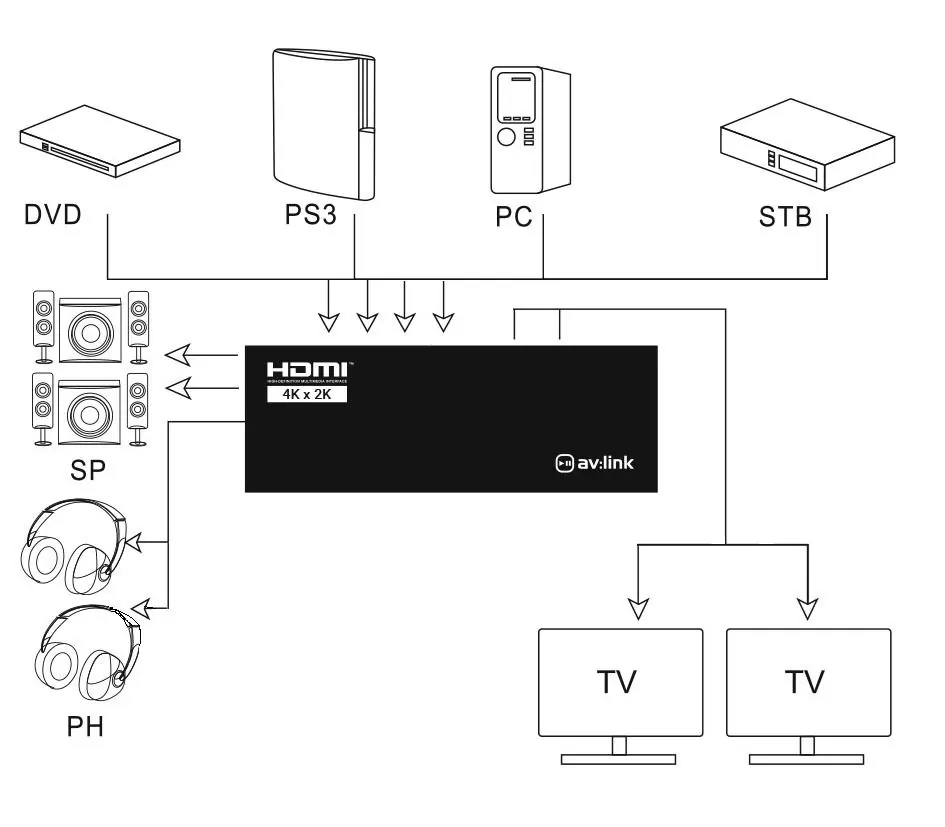
- Source Devices: Connect the outputs of up to 4 source devices to the HDMI inputs on the matrix. Use HDMI cables up to 15m for 4K@30Hz or FHD signals, or up to 5m for 4K@60Hz signals.
- Display Devices: Connect the HDMI outputs of the matrix to the inputs of up to 2 display devices. Use the same cable length guidelines as for source devices.
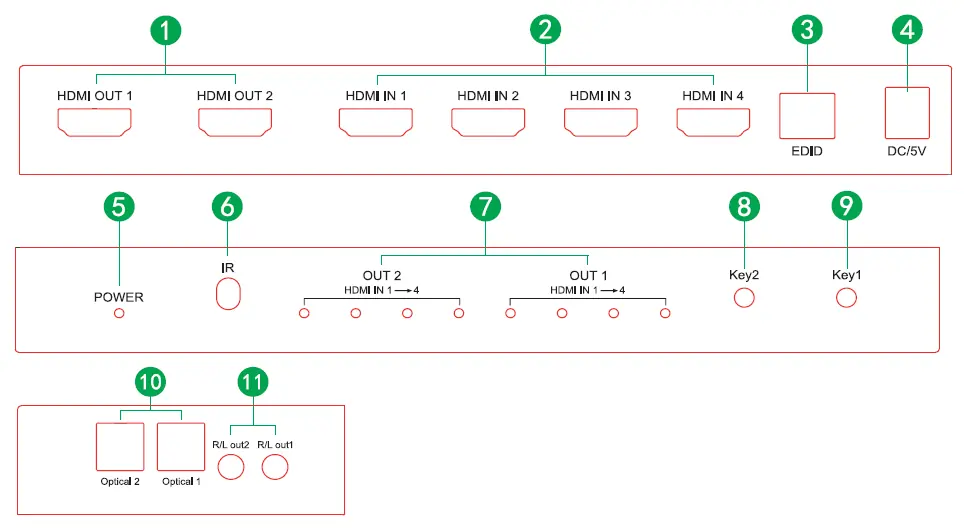
- Power: Connect the supplied 5V power adaptor to the matrix and plug it into a mains outlet.
- Audio Extraction: To channel audio to separate sound systems or headphones, connect cables to the digital SPDIF or analogue 3.5mm jacks located on the side of the unit. Note that additional cables are required and not supplied.
Operation
You can switch between source devices for both output displays using the Key1 and Key2 buttons on the front of the unit or by using the supplied IR remote control.
EDID management
The device features EDID management switches to configure signal compatibility. Note that the switch position upward equals 0, and downward equals 1.
Settings:
- 0-0-0-0: Copy EDID of HDMI OUT 1
- 0-0-0-1: Copy EDID of HDMI OUT 2
- 0-0-1-0: 3D 1080P 2 CH LPCM
- 0-0-1-1: 3D 1080P 5.1 CH (LPCM/Dolby/DTS)
- 0-1-0-0: 2D 1080P 2 CH (LPCM)
- 0-1-0-1: 2D 1080P 5.1 CH (LPCM/Dolby/DTS)
- 0-1-1-0: 3D 4k 2 CH (LPCM)
- 0-1-1-1: 3D 4k 5.1 CH (LPCM/Dolby/DTS)
Technical specifications
- Video resolution: Up to 3840 x 2160 @ 60Hz
- Audio format: DTS-HD, Dolby True, DTS, Dolby-AC3 and DSD
- Input connections: 4x HDMI
- Output connections: 2x HDMI, 2x Optical (Toslink), 2x 3.5mm Stereo
- Max. bandwidth: 600 MHz
- Transmission distance: 30m max HD or 10m max 4K (20m input/output @ 1080p and 10m input/output @ 4K)
- Power adaptor: Input: AC 100-240V, Output: DC5V/1A
Safety warnings
- Do not immerse the device in water or expose it to damp conditions.
- Do not use the device if it is damaged.
- Only use the power supply provided by the manufacturer.
- Disconnect the power supply from the mains when not in use for long periods.
- Do not attempt to repair or take apart the device, as this will invalidate the warranty.
Practical help
Common problems
No 4K resolution output
Ensure you are using 4K certified cables and that the cable length does not exceed 5m for 4K@60Hz signals.
No audio from external speakers
Ensure the audio cables are connected to the SPDIF or 3.5mm jacks on the side of the unit and that the source device is outputting audio.
Before use
- Verify all HDMI cables are 4K certified.
- Check that cable lengths are within limits (max 5m for 4K@60Hz, 15m for 4K@30Hz/FHD).
- Ensure the 5V power adaptor is connected.
- Confirm all source devices and displays are powered on.
Specs in practice
- Transmission distance
- Maximum cable length is 5m for 4K@60Hz and 15m for 4K@30Hz/FHD.
- Audio format
- Supports high-quality formats including DTS-HD, Dolby True, and DSD.
Images and diagrams
- The application diagram illustrates connecting 4 source devices (DVD, PS3, PC, STB) to the matrix inputs.
- It shows the matrix outputs connected to 2 TVs and optional audio equipment (speakers/headphones).
Model compatibility
- Compatible with 4K digital TV boxes.
- Requires additional cables for audio extraction (not supplied).

Manual page author
Emily Carter
User documentation editor
Prepares concise manual descriptions and highlights the most useful setup, operation, and maintenance information for readers.