Electronics / AV Splitters
User Manual for Av-Link 128.835UK 4K HDMI Switch/Splitter 2x4
Quick guide for the Av-Link 128.835UK 4K HDMI Switch/Splitter 2x4. Learn how to connect your devices, use the IR remote, and understand technical specifications.
Table of contents
Manual images
Click an image to enlargeQuick Guide
The Av-Link 128.835UK is a 2x4 HDMI switch and splitter designed to route signals from two source devices to four display outputs. It supports 4K resolution and includes an IR remote for switching between sources. Ensure you use high-quality HDMI cables of appropriate length to maintain signal integrity.
Device Description
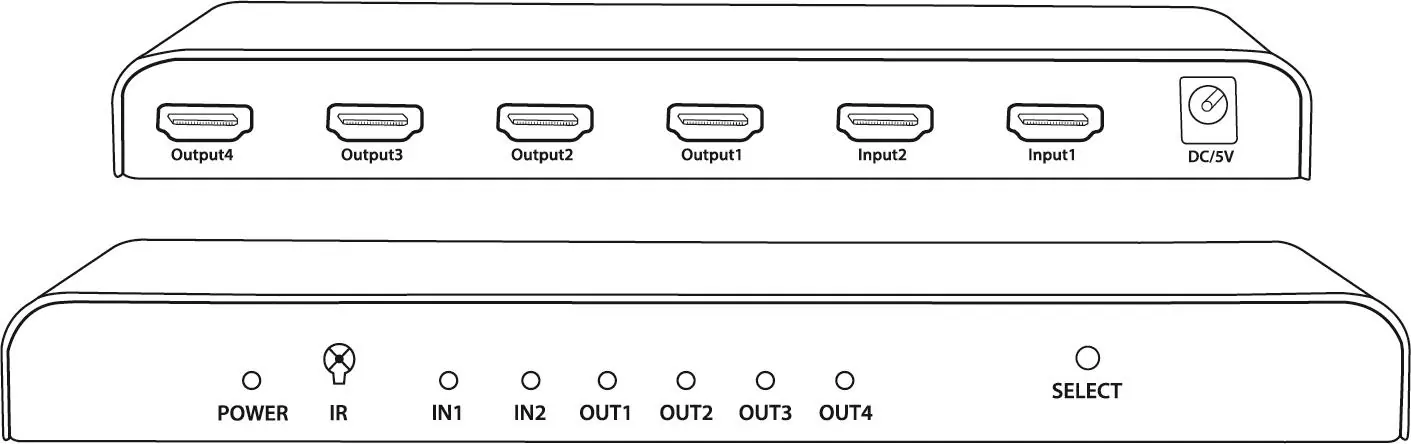
The unit features two HDMI inputs and four HDMI outputs. It includes a 5V DC power input, an IR receiver for the remote control, and a manual 'Select' button on the front panel. Audio can be extracted via SPDIF or a 3.5mm jack for external sound systems.
Installation Instructions
Follow these steps to set up your device:
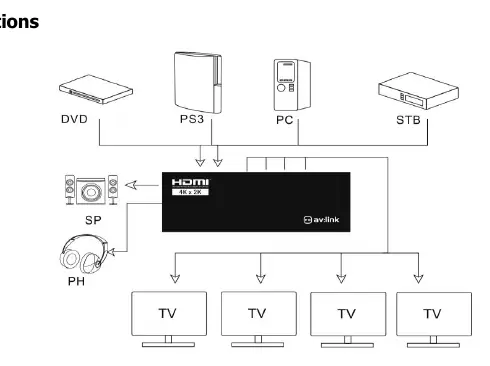
- Connect Sources: Connect your source devices (e.g., DVD, PC, STB) to the inputs on the back of the splitter.
- Connect Displays: Connect your display devices (TVs/Monitors) to the outputs on the back of the splitter.
- Cable Requirements: For HD signals, use HDMI cables up to 10m per device. For 4K signals, use HDMI cables up to 5m per device. Always use 4K certified cables for 4K resolution.
- Power: Connect the supplied 5V power adaptor to the unit and plug it into a mains outlet.
Operation
Once powered on, the green LEDs on the front panel will illuminate when source and display devices are connected and active. You can switch between the two source devices using the 'Select' button on the front of the unit or by using the included IR remote control.
Audio Output
To channel audio to a separate sound system or amplifier, connect an audio cable to the digital SPDIF or analogue 3.5mm jack located on the side of the unit. Note that additional cables are required and are not supplied.
Technical Specifications
- HDMI Version: 2.0a
- Video Resolution: Up to 3840 x 2160 @ 60Hz
- Display Colours: 8/10/12bit deep colour
- Audio Formats: DTS-HD, Dolby True, DTS, Dolby-AC3, DSD
- Max Bandwidth: 600 MHz
- Max Baud Rate: 6Gbps
- Dimensions: 200 x 70 x 25mm
- Weight: 305g
Safety Warnings
- Do not immerse the device in water or expose it to damp conditions.
- Do not subject the device to excessive force.
- Do not use the device if it appears damaged.
- Only use the power supply provided by the manufacturer.
- Disconnect the power supply from the mains when not in use for long periods.
- Do not attempt to repair or disassemble the device, as this will invalidate the warranty.
Practical help
Common problems
No signal on display
Check that HDMI cables are within the recommended length (10m for HD, 5m for 4K) and that all devices are powered on.
4K resolution not working
Ensure you are using 4K certified HDMI cables and that the cable length does not exceed 5m.
Device not powering on
Verify that the supplied 5V power adaptor is securely connected to the unit and the mains outlet.
Before use
- Verify you have the 5V power adaptor.
- Ensure you have sufficient HDMI cables (up to 10m for HD, 5m for 4K).
- Check that source devices and displays are switched on.
- Confirm you have the IR remote control for switching sources.
Specs in practice
- 600 MHz Bandwidth
- Indicates the capacity to handle high-speed data required for 4K video.
- Transmission Distance
- Maximum cable length allowed: 10m for HD, 5m for 4K.
Images and diagrams
- The Back/Front View diagram identifies the location of input/output ports, the power port, and the LED indicators for power, IR, and source selection.
- The Connection Instructions diagram illustrates the correct flow from source devices (DVD, PC, etc.) into the splitter and out to the display devices.
Model compatibility
- Requires 4K certified cables for 4K resolution support.
- Audio extraction requires additional cables (SPDIF or 3.5mm) not included in the box.

Manual page author
Michael Turner
Technical manual editor
Reviews PDF manuals for structure, safety notes, and practical product details so readers can find the right information quickly.