Electronics / AV Splitters
User Manual for av-link 128.827UK 4K HDMI Splitter 1x4
Quick guide for the av-link 128.827UK 4K HDMI Splitter 1x4. Includes connection instructions, technical specifications, and safety warnings for setting up your 1-to-4 HDMI display system.
Table of contents
Manual images
Click an image to enlargeQuick guide from the manual
To set up your av-link 128.827UK HDMI splitter, connect your HDMI source device to the 'Input' port on the back of the unit. Connect your displays to the 'Output' ports (1-4). Finally, connect the supplied 5V power adapter to the DC/5V port and plug it into a mains outlet. Ensure that your HDMI cable lengths do not exceed the recommended limits: 25m combined for HD resolution or 16m combined for 4K resolution. Use 4K certified cables to maintain 4K signal quality.
Device Description
The av-link 128.827UK is a 1x4 HDMI splitter designed to distribute a single HDMI source signal to up to four displays simultaneously. It features gold-plated connectors for optimal signal transfer and supports high-resolution video and various audio formats.

Connection Instructions
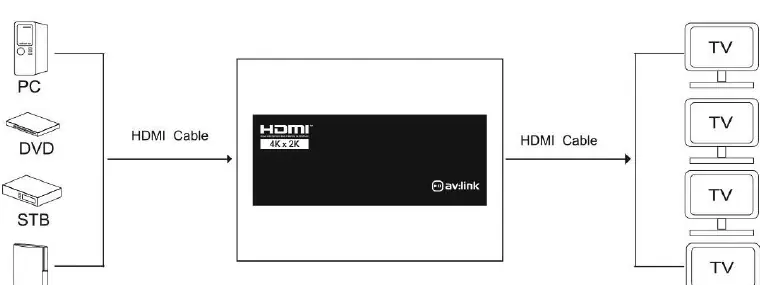
- Connect the output of your source device (e.g., DVD player, PC, STB) to the 'Input' port on the splitter.
- Connect the outputs of the splitter to the inputs of your display devices using HDMI cables.
- For HD signals, ensure the combined cable length per output does not exceed 25m.
- For 4K signals, ensure the combined cable length per output does not exceed 16m. Always use 4K certified cables for 4K resolution.
- Connect the supplied 5V power adapter to the splitter and plug it into a mains outlet.
- Switch on the power. The green LEDs on the front panel will illuminate when the source and display devices are connected and active.
Technical Specifications
- HDMI Version: 1.4b
- Video Resolution: Up to 3840 x 2160 @ 30Hz
- Display Colours: 8/10/12bit deep colour
- Audio Format: DTS-HD, Dolby True, DTS, Dolby-AC3, and DSD
- Max. Bandwidth: 340 MHz
- Max. Baud Rate: 3.4Gbps
- Dimensions: 178 x 66 x 20mm
- Weight: 220g
Safety and Warnings
- Do not immerse the device in water or expose it to damp conditions.
- Do not subject the device to excessive force.
- Do not use the device if it appears damaged.
- Only use the power supply provided by the manufacturer.
- Disconnect the power supply from the mains when the device is not in use for long periods.
- Do not attempt to repair or disassemble the device, as this will invalidate your warranty.
Practical help
Common problems
No signal on displays
Check that cable lengths do not exceed 25m for HD or 16m for 4K. Ensure all connections are secure.
4K resolution not displaying correctly
Ensure you are using 4K certified HDMI cables. Verify that both the source and display support 4K resolution.
Device does not power on
Ensure the supplied 5V power adapter is correctly connected to the splitter and the mains outlet.
Before use
- Verify the package contains the HDMI splitter, 5V DC power adapter, and user manual.
- Ensure you have high-quality HDMI cables of appropriate length.
- Check that your source device and displays are compatible with the required resolution.
- Ensure a mains power outlet is available near the installation site.
Specs in practice
- Transmission Distance
- The maximum combined cable length allowed for signal integrity: 25m for HD, 16m for 4K.
- HDMI Version 1.4b
- Supports resolutions up to 3840 x 2160 at 30Hz.
- Audio Format
- Supports high-definition audio including DTS-HD, Dolby True, and DSD.
Images and diagrams
- Front View: Displays status LEDs for Input and Outputs 1-4, and a Power indicator.
- Back View: Shows the DC/5V power input port and the HDMI Input/Output ports.
Model compatibility
- Requires 4K certified cables for 4K resolution support.
- Only use the provided 5V DC power adapter.

Manual page author
Emily Carter
User documentation editor
Prepares concise manual descriptions and highlights the most useful setup, operation, and maintenance information for readers.