Electronics / AV Splitters
Av-link 128.825UK Mini HDMI Splitter 1x2 User Manual
Quick guide for the Av-link 128.825UK Mini HDMI Splitter 1x2. Learn how to connect your HDMI source to two displays, understand power requirements, and view technical specifications.
Table of contents
Manual images
Click an image to enlargeQuick guide from the manual
The Av-link 128.825UK is a 4K compatible mini HDMI splitter designed to distribute a single HDMI source signal to two displays simultaneously. It can also be used at the end of a long HDMI cable to regenerate the signal. If your source device does not provide sufficient power, an additional USB power lead is included to ensure stable operation.
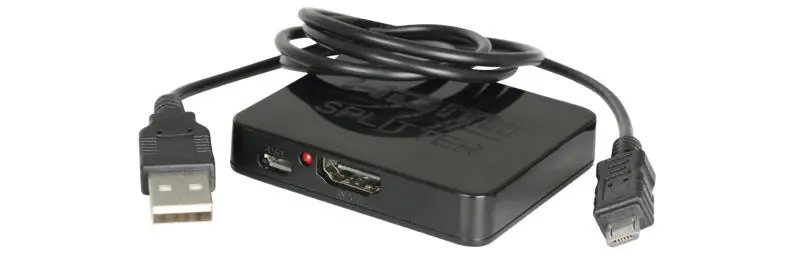
Technical Specifications
- HDMI Version: 1.4a
- Video Format: Up to 1080p @ 60Hz, 3D, 36bit deep colour
- Audio Format: DTS-HD, Dolby-trueHD, DTS, Dolby-AC3 and DSD (HBR)
- Operating Temperature Range: -15 to +55°C
- Max. Bandwidth: 340 MHz
- Max. Baud Rate: 3.4Gbps
- Max. Working Current: 350mA
- Dimensions: 62 x 51 x 11 mm
- Weight: 31g
Connection Instructions
Follow these steps to set up your HDMI splitter:

- Connect one end of an HDMI cable to the input port of the splitter and the other end to your source device. Note that the maximum recommended input cable length is 15m.
- Connect two additional HDMI cables from the output ports (Output 1 and Output 2) to your display devices. The maximum recommended output cable length is 20m.
- The green LEDs on the front of the unit will indicate which device is live at any one time.
- If your source device does not provide enough power for the unit, connect the supplied USB power cable.
Safety Warnings
- For electrical safety, never immerse the device in water or expose it to damp conditions.
- Do not subject the device to excessive force.
- Do not use the device if it appears damaged.
- Do not attempt to repair or disassemble the device, as this will invalidate your warranty.
Practical help
Common problems
No signal on displays
Ensure the source device is providing enough power. If not, connect the supplied USB power lead to the splitter.
Signal degradation or flickering
Check that your HDMI cables do not exceed the maximum recommended lengths (15m for input, 20m for outputs).
Before use
- Verify that your HDMI cables are within the recommended length limits (15m input, 20m output).
- Ensure the source device is compatible with HDMI 1.4a standards.
- Check the device for any physical damage before installation.
- Have the USB power lead ready in case the source device power is insufficient.
Specs in practice
- HDMI Version 1.4a
- Supports 1080p resolution at 60Hz, 3D content, and 36-bit deep colour.
- Max. Bandwidth 340 MHz
- The maximum data throughput capacity of the splitter.
- Operating Temperature
- The device is designed to function safely between -15°C and +55°C.
Images and diagrams
- The connection diagram illustrates the flow from the HDMI source into the 'Input' port, with two separate paths leading to 'Output 1' and 'Output 2' displays.
- The diagram also highlights the USB power connection point on the splitter.
Model compatibility
- Compatible with 4K sources.
- Supports high-quality audio formats including DTS-HD, Dolby-trueHD, and DSD (HBR).

Manual page author
Michael Turner
Technical manual editor
Reviews PDF manuals for structure, safety notes, and practical product details so readers can find the right information quickly.