Home Appliances / Commercial Kitchen Equipment
User Manual for Avantco Adjustable Speed Conveyor Ovens
Quick guide for Avantco Adjustable Speed Conveyor Ovens. Includes installation, operation, cleaning, maintenance, and technical specifications for models 177CVROV10RA, 177CVROV10RB, 177CVROV10RD, 177CVROV14RB, and 177CVROV14RD.
Quick answers from the manual
Quick answer
- This manual provides operating instructions, safety guidelines, and maintenance procedures for Avantco Adjustable Speed Conveyor Ovens. Key operations include preheating for 20-25 minutes and ensuring support feet are installed to prevent motor failure. p. 1, 6
Key actions
- Install support feet p. 6
- Preheat the oven p. 6
First start
- Preheat for 20-25 minutes before cooking. p. 6
Problems and fixes
Heating element or motor failure
Ensure feet are installed to allow airflow to the bottom fan.
p. 3, 6Maintenance and reset
- Clean conveyor belt using an abrasive pad while it rotates at slow speed with no heat. p. 7
Technical specifications
| Parameter | Value | Meaning | Pages |
|---|---|---|---|
| Dimensions (10 series) | 19.3" H x 17" W x 36.5" D | Physical size of the unit. | p. 2 |
| Dimensions (14 series) | 19.3" H x 20" W x 36.5" D | Physical size of the unit. | p. 2 |
Where to find it in the PDF
- Specifications p. 2
- Safety Information p. 3
- Circuit Diagrams p. 4, 5
- Operation Instructions p. 6
- Cleaning & Maintenance p. 7
Table of contents
Manual images
Click an image to enlargeQuick Guide
This manual provides essential instructions for the safe and efficient operation of Avantco Adjustable Speed Conveyor Ovens. Key points include:
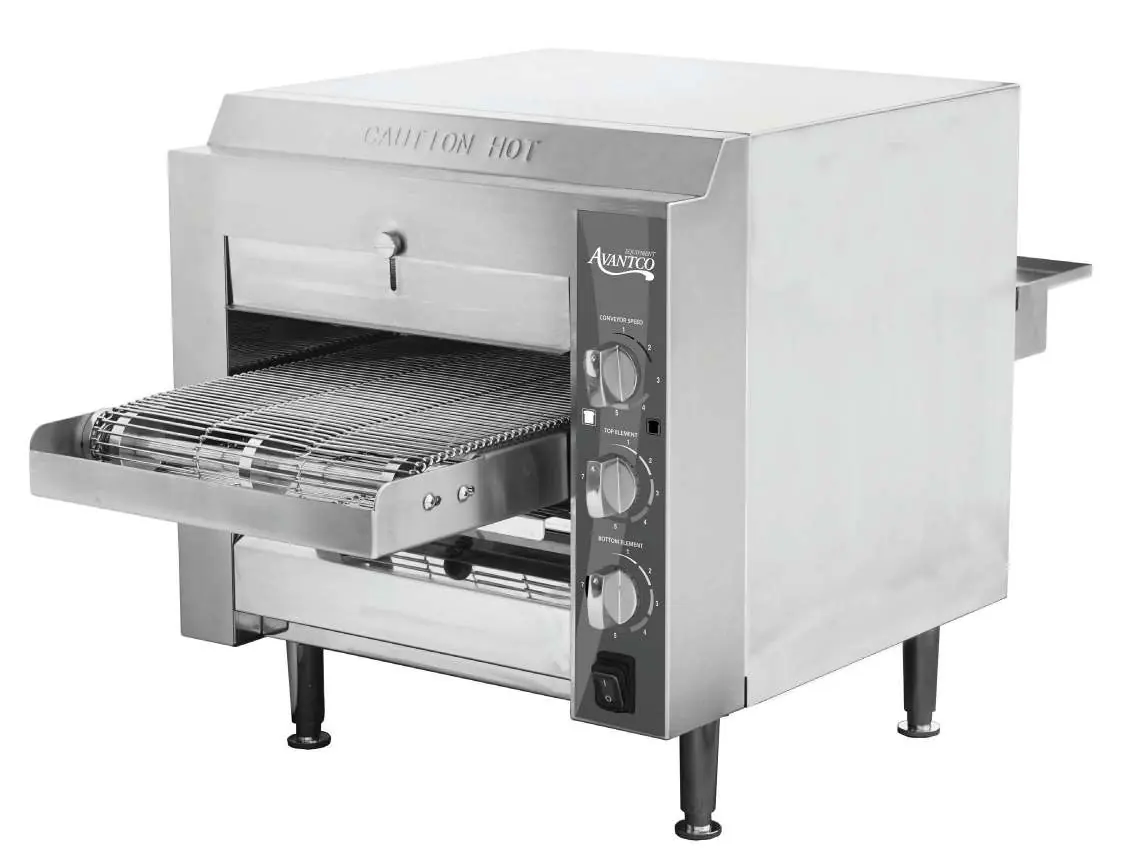
- Commercial Use Only: Designed for low to medium volume commercial establishments.
- Installation: Must be installed on a non-combustible surface with specific clearances (18" sides/front/rear, 40" above).
- Feet Installation: Support feet must be installed to prevent fan blockage and motor failure.
- Preheating: Allow 20-25 minutes for the unit to reach operating temperature before use.
- Cleaning: Unplug and cool completely before cleaning. Do not use steel wool or immerse in water.
Safety Information
Always follow basic safety precautions when using electrical appliances:
- Do not touch hot surfaces.
- Keep cords, plugs, and components away from water or liquids.
- Unplug the unit when not in use and before cleaning.
- Do not operate with a damaged cord or plug.
- Do not use outdoors or near hot gas/electric burners.
- Do not insert metal utensils or oversized foods.
- Do not store items on top of the unit during operation.
- Do not cover the interior with metal foil, as it may cause overheating.
- Ensure the unit is placed on a flat, well-ventilated surface.
Installation
To reduce the risk of fire, the appliance must be installed on a non-combustible surface in non-combustible surroundings. Ensure there is no combustible material within 18 inches of the sides, front, or rear, or within 40 inches above the appliance. Note: Model 177CVROV14RB requires an individual branch circuit.
Before Use
Before cooking for the first time:
- Ensure support feet are assembled to the unit.
- Thoroughly clean the unit as described in the cleaning section.
- Preheat the oven for 20-25 minutes to reach the correct operating temperature.
Operation Instructions
The oven features three main controls:
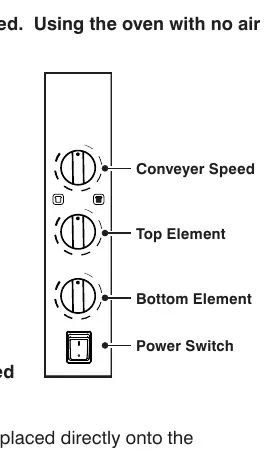
- Conveyor Speed: Determines the length of time the product is in the heating chamber. Slower speed results in longer exposure and a darker product.
- Top Heating Element Control: Adjustable from 1 (lowest) to 7 (hottest).
- Bottom Heating Element Control: Adjustable from 1 (lowest) to 7 (hottest).
The top and bottom heating elements are independently controlled. To test settings, place a slice of bread on the conveyor belt and observe the results, adjusting temperature and speed as needed.
Cleaning & Maintenance
Caution: Do not immerse the appliance in water. Use only a damp cloth or sponge with soapy water. Do not use steel wool.
- Exterior: Unplug, allow to cool completely, and wipe with a dry cloth. Wait at least 30 minutes before reconnecting.
- Crumb Tray: Unplug, cool, pull the tray forward to remove, clean with a damp cloth/sponge, dry, and reinsert.
- Conveyor Belt: Turn off and cool. Turn the unit on, set to slow speed with no heat. Use an abrasive pad to wipe the belt side-to-side as it rotates to remove baked-on product. Use a damp cloth for general cleaning.
Technical Specifications
The oven dimensions vary by model:
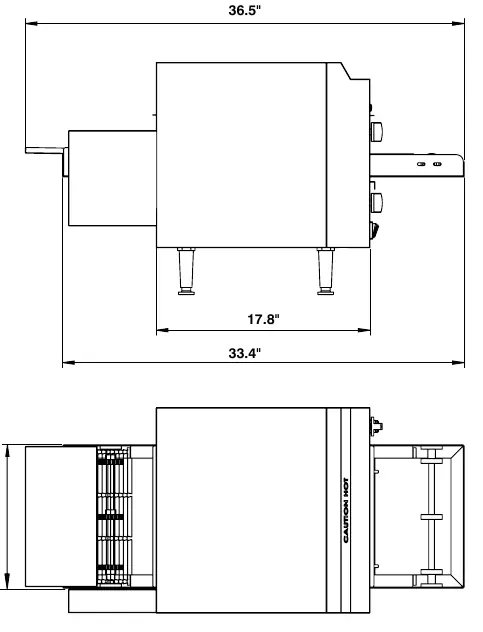
- 177CNVYOV10RA/B/D: 19.3" H x 17" W x 36.5" D (10.5" Belt Width)
- 177CNVYOV14RB/D: 19.3" H x 20" W x 36.5" D (14" Belt Width)
Manufacturer information
Avantco Equipment
Practical help
Common problems
Heating element or motor failure
Ensure support feet are installed. The fan on the bottom is blocked if feet are missing, causing overheating.
Baked-on product on conveyor belt
Use an abrasive pad to wipe the belt side-to-side while it rotates at a slow speed with no heat.
Oven overheating
Do not cover the interior with metal foil.
Before use
- Assemble support feet to the unit.
- Clean the unit thoroughly.
- Check voltage and outlet compatibility.
- Preheat for 20-25 minutes.
Specs in practice
- Conveyor Speed
- Determines exposure time; slower speed results in darker product.
- Top/Bottom Element Control
- Settings 1-7, where 7 is the hottest.
Images and diagrams
- Circuit diagrams illustrate the wiring for heating elements, conveyor motor, cooling fan, and speed control.
Model compatibility
- Model 177CVROV14RB requires an individual branch circuit.

Manual page author
Michael Turner
Technical manual editor
Reviews PDF manuals for structure, safety notes, and practical product details so readers can find the right information quickly.