Home Appliances / Commercial Kitchen Equipment
Avantco Meat Saw 177EMBS94SS User Manual
Quick guide for the Avantco 177EMBS94SS Meat Saw. Includes installation steps, blade replacement procedures, safe operation instructions, and safety features.
Quick answers from the manual
Quick answer
- The Avantco 177EMBS94SS is a meat saw that requires the operator to wear cut-resistant gloves. It features an emergency shut-off, door sensors, and a tension-adjustable blade system. p. 1, 2
Key actions
- Installing the blade p. 1, 3
- Adjusting blade tension p. 1, 2, 3
First start
- Ensure the unit is on a level surface, check voltage, install/check the blade, and wear cut-resistant gloves before starting. p. 1
Problems and fixes
Meat gets stuck
Turn off the equipment immediately. Once the unit is completely turned off, remove the meat product from the blade with cut-resistant gloves.
p. 2Maintenance and reset
- Blade replacement involves loosening the hand nut, turning the tension knob clockwise to loosen the blade, replacing it, and re-tensioning. p. 3
Technical specifications
| Parameter | Value | Meaning | Pages |
|---|---|---|---|
| Blade | 4 TPI | Preassembled blade type. | p. 1 |
Where to find it in the PDF
- Installation and Components p. 1
- Operation and Safety p. 2
- Replacing the Blade p. 3
Table of contents
Quick guide from the manual
This manual provides essential instructions for the safe installation, operation, and maintenance of the Avantco 177EMBS94SS Meat Saw. Operators must wear cut-resistant gloves at all times when handling this equipment to prevent injury. Before starting, ensure the machine is placed on a stable, level surface and that the power supply matches the unit's requirements.
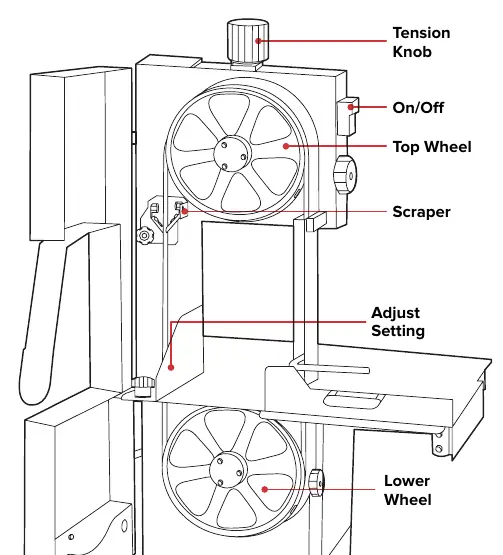
Installation
- Use a team lift to remove the saw from the packaging.
- Place the unit on a stable, level surface. Adjust the rubber feet on the bottom if the surface is uneven.
- Verify that the voltage and power requirements match the unit's label.
- The saw comes preassembled with a 4 TPI blade. Change the blade if necessary based on the food product.
- Open the upper and lower cavity doors.
- Install the blade over both wheels. Ensure the blade is parallel to the edge of the block and facing the front (teeth edge flush with the wheel edge).
- Close the doors and tighten the hand nut.
- Turn the tension knob counterclockwise until it clicks.
- Press the start button on the control panel. Ensure the blade runs clockwise before adding food.
- To stop, press the stop button and unplug the machine.
Operation
Before operating, ensure all doors, covers, and guards are closed. The scraper should lean against the blade without touching the teeth; adjust if necessary.
- Starting: Use the control panel to start the unit.
- Blade Adjustment: Use the tension knob to ensure the blade is vertical and secure.
- Thickness Adjustment: Use the thickness adjustor to control the thickness of the meat. Push the safety fence handle evenly from left to right.
- Cutting: Place meat on the push plate and slide it until it contacts the safety fence. Use the handle on the push plate to press the meat towards the blade. Never use hands to push meat.
- Retrieval: Use a cut-resistant glove to catch the meat product on the other side.
- Troubleshooting: If meat gets stuck, turn off the equipment immediately. Once stopped, remove the meat using cut-resistant gloves.
Replacing the Blade
- Stop and unplug the machine.
- Open the machine door by loosening the hand nut.
- Turn the tension knob clockwise to loosen the blade.
- Use cut-resistant gloves to carefully remove the blade from both wheels.
- Install the replacement blade, ensuring it faces the front with teeth flush against the wheel edge.
- Close and secure the cavity doors with the hand nut.
- Ensure the blade is vertical and secure, then adjust the tension knob counterclockwise as necessary.
Safety Features
- Power Outage: The machine will stop running within three seconds if power is lost.
- Door Sensors: Power to the machine ceases automatically if the top or lower cavity door is opened.
- Emergency Shut-off: An open-chassis safety shut-off switch activates if the saw is opened while turned on.
Manufacturer information
Avantco Equipment
Practical help
Common problems
Meat getting stuck
Turn off the equipment immediately. Once the unit is completely stopped, remove the meat product from the blade using cut-resistant gloves.
Scraper not in correct position
Adjust the scraper before operating the machine so it leans against the blade without touching the teeth.
Blade not running correctly
Ensure the blade is vertical and secure using the tension knob. The blade should run clockwise when operating properly.
Before use
- Wear cut-resistant safety gloves.
- Ensure the machine is on a stable, level surface.
- Verify voltage and power requirements match the unit's label.
- Check that all doors, covers, and guards are closed.
- Ensure the scraper is properly positioned.
- Verify the blade is vertical and properly tensioned.
Images and diagrams
- The diagram identifies the Tension Knob, Top Wheel, On/Off switch, Scraper, Adjust Setting, and Lower Wheel.
Model compatibility
- The machine is designed for meat products.
- Always use the push plate; never use hands or other materials to push food products.

Manual page author
David Miller
Documentation analyst
Organizes user manual content into clear summaries, with attention to model details, product context, and everyday usability.