Home Appliances / Commercial Kitchen Equipment
User Manual for Avantco Portion Steamers
Quick guide for Avantco Portion Steamers (177QS1800SS, 177QSHD1800A, 177QSHD3300B, 177QSHD3300D). Includes setup, operation, programming, cleaning, and troubleshooting instructions.
Quick answers from the manual
Quick answer
- To operate, fill the reservoir with 3 quarts of distilled water, preheat the unit, load your product, and press the steam button for 2 seconds. Do not hold the button longer than 2 seconds to prevent flooding. p. 11, 12
Key actions
- Resetting the Hi-Limit Thermostat p. 13
- Programming Quick Select Buttons p. 10
First start
- Initial Setup p. 5, 6
Problems and fixes
Unit overheats
Reset the hi-limit thermostat by pressing the button on the rear after cooling.
p. 13Error codes
| Code | Meaning | Action | Pages |
|---|---|---|---|
| Lo | Generator temperature below 250°F | Wait for temperature to recover | p. 13 |
| HIGH | Temperature exceeds set point | Allow unit to cool | p. 13 |
| Er-1 | Faulty thermostat sensor | Contact service | p. 13 |
| Er-2 | Low water level | Refill water | p. 13 |
Maintenance and reset
- Hi-Limit Reset p. 13
Technical specifications
| Parameter | Value | Meaning | Pages |
|---|---|---|---|
| Default Temperature | 390°F | Recommended operating temperature | p. 10 |
| Water Capacity | 3 quarts | Recommended water fill amount | p. 11, 12 |
Where to find it in the PDF
- Assembly p. 6
- Cleaning & Maintenance p. 7, 8
- Programming p. 10
Table of contents
Manual images
Click an image to enlargeQuick Guide from the Manual
This manual covers the operation and maintenance of Avantco Portion Steamers. Key requirements include using distilled water to prevent mineral buildup and ensuring the unit is placed on a flat, well-ventilated surface. Always use caution as steamed foods will be extremely hot.
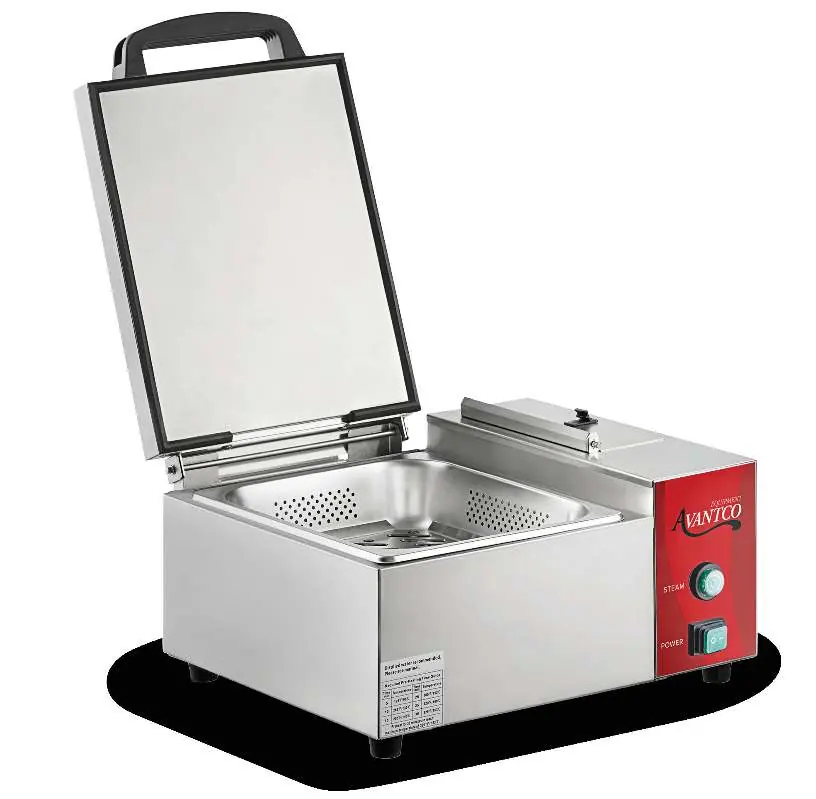
Assembly
Before first use, attach the handle to the spatula using the included hardware. Ensure all components, including the spatula liner, drip pan, and top cover, are properly assembled and secured. Refer to the component overview in the manual to verify all parts are in their correct locations.
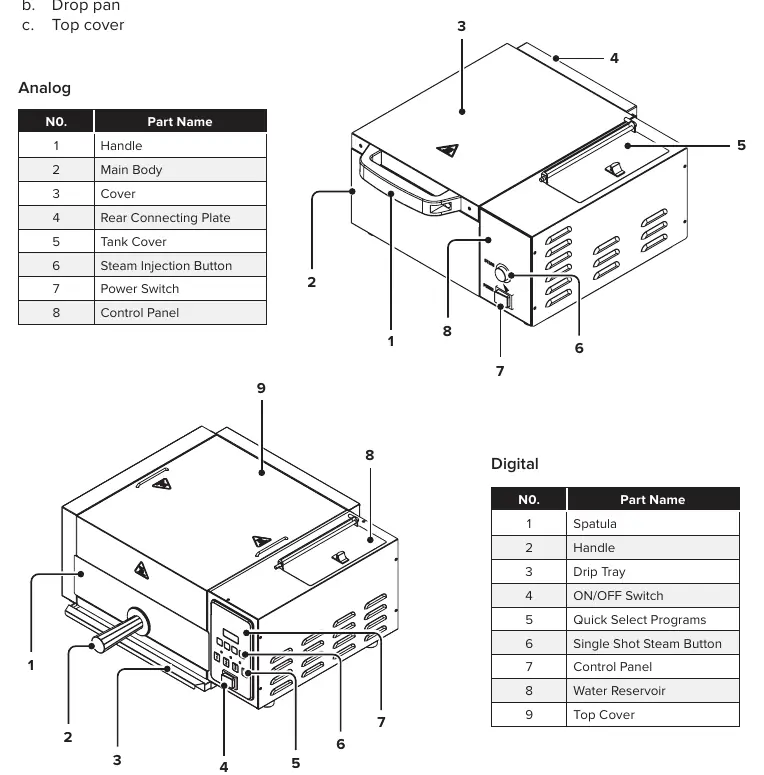
Operation
Analog Operation: Fill the reservoir with approximately 3 quarts of distilled water. Plug in the unit and allow it to preheat for 25 minutes. Load the product, then press the steam button for 2 seconds. Wait 20 seconds for steam to penetrate before repeating if necessary. Do not hold the button for more than 2 seconds to avoid flooding.
Digital Operation: Follow the same filling and preheating steps. The display will show "LO" while preheating and the actual temperature once reached (approx. 15 minutes). Use the quick select buttons (1-4) to begin a timed steaming cycle.
Programming for Digital Steamers
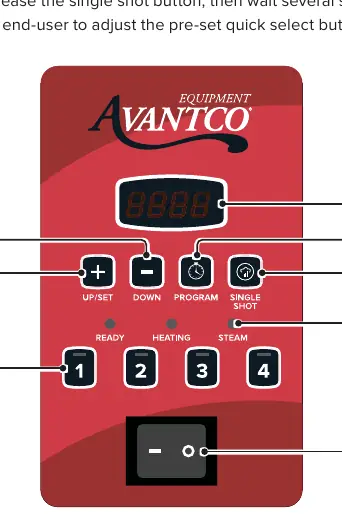
To customize the quick select buttons: press the "Program" button, select the button (1-4) to edit, and adjust the overall duration (minutes/seconds), steam injection rate, and steam shot length using the "+" or "-" buttons. Press "Program" again to save your settings.
Cleaning & Maintenance
Daily: Pour 1 cup of white vinegar into the tank and cycle the steamer. Rinse with 1 cup of distilled water until clear. Wipe the exterior with soapy water after the unit has cooled for 45 minutes.
Weekly: Remove the spray tube and water tank filter. Soak these components in vinegar for 15 minutes. Use a paper clip to remove any mineral deposits. Soak the generator surface with vinegar for 15 minutes, scrape off deposits, and reassemble.
Troubleshooting
If the unit overheats, a hi-limit thermostat will cut power. Allow the unit to cool for 45 minutes, remove the black cap on the rear of the unit, and press the Hi-Limit Reset Button.
Manufacturer information
Avantco Equipment
Practical help
Common problems
Lo error code
Generator temperature is below 250°F. Wait for the temperature to recover.
HIGH error code
Actual temperature exceeds set temperature. Allow the unit to cool slightly.
Er-1 error code
Faulty thermostat sensor. Contact service.
Er-2 error code
Water level is below the minimum required level.
Before use
- Inspect packaging for external damage
- Attach handle to spatula
- Ensure filter is properly installed
- Fill with approximately 3 quarts of distilled water
- Preheat unit for 15-25 minutes
Specs in practice
- Water Hardness
- Maximum acceptable hardness is 50ppm or 3 GCG. Use distilled water to prevent damage.
- Default Temperature
- The recommended operating temperature is 390°F.
Images and diagrams
- The assembly diagram identifies the spatula, handle, drip tray, and control panel locations.
- The interface diagram shows the location of the screen, programming buttons, and steam controls.
Model compatibility
- Commercial use only.
- Indoor use only.
- Do not use tap water.

Manual page author
Emily Carter
User documentation editor
Prepares concise manual descriptions and highlights the most useful setup, operation, and maintenance information for readers.