Electronics / Microphones
User Manual for qtx U-MIC Wireless UHF Microphone Kit 171.812UK
Quick guide for the qtx U-MIC (171.812UK) wireless UHF microphone system. Learn how to set up the USB receiver, connect the beltpack transmitters, and operate the system.
Quick answers from the manual
Quick answer
- The U-MIC is a wireless UHF microphone system with two beltpack transmitters and a USB receiver. It requires 5V USB power and connects to a mixer or amplifier via a 3.5mm to 6.3mm jack. p. 2, 3
Key actions
- Powering the receiver p. 2
- Installing batteries p. 3
First start
- Connect USB power to the receiver, insert batteries into transmitters, connect the audio lead to your mixer/amplifier, and switch on the transmitters. p. 2, 3
Problems and fixes
No sound
Check battery levels, volume settings on transmitter and mixer, and cable connections.
p. 3Maintenance and reset
- For long term storage, unplug the jack and USB receiver and remove the batteries from both beltpack transmitters. p. 3
Technical specifications
| Parameter | Value | Meaning | Pages |
|---|---|---|---|
| Carrier frequency | 863.2MHz + 864.8MHz | Operating frequencies | p. 4 |
| Wireless range | Up to 50m | Maximum operating distance | p. 4 |
Where to find it in the PDF
- Introduction and Layout p. 2
- Operation p. 3
- Specifications p. 4
Table of contents
Manual images
Click an image to enlargeQuick guide from the manual
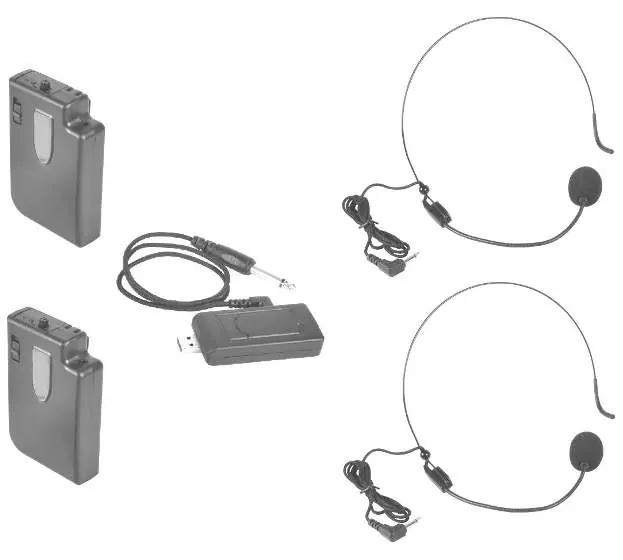
The U-MIC is a wireless UHF microphone system consisting of two beltpack transmitters and a USB receiver. The system is designed for use with a mixer or amplifier. The receiver requires a 5V 1000mA USB power source. Audio is output via a 3.5mm jack, which can be adapted to 6.3mm using the supplied lead.
Device layout
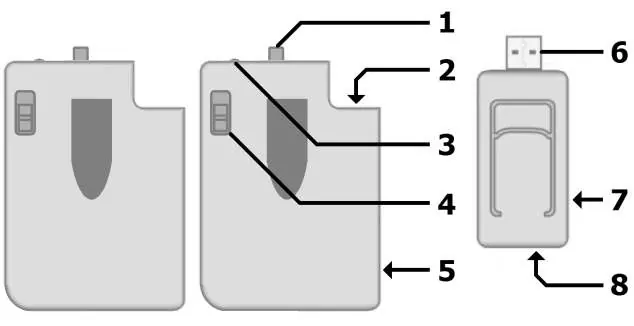
- 1. Volume control: Adjusts the output level of the transmitter.
- 2. 3.5mm mic input: Connection for the neckband microphone.
- 3. LED power indicator: Shows the power status of the transmitter.
- 4. Power switch: Turns the transmitter on or off.
- 5. Battery compartment: Holds 2 x AA alkaline batteries.
- 6. USB type A plug: Connects to a USB power source for the receiver.
- 7. 3.5mm audio output: Connection for the audio lead to the mixer/amplifier.
- 8. USB type A socket: Pass-through socket for connecting other USB devices.
Setting up
Connect the USB type A plug (6) on the receiver to a 5V 1000mA USB power source (e.g., power adaptor or power bank). Note that the USB port is for power only; audio is not transmitted through it. Connect the supplied 3.5mm to 6.3mm lead from the receiver's audio output (7) to the microphone input on your mixer or amplifier.
Operation
Before connecting, turn down the volume on your mixer or amplifier to avoid loud noises. Connect the neckband microphone to the transmitter's 3.5mm input (2). Open the battery compartment (5) and insert 2 x AA alkaline batteries, ensuring correct polarity. Move the power switch (4) to the 'on' position; the power indicator (3) should light up. Gradually increase the volume on the transmitter and the mixer/amplifier until the desired sound level is reached. When finished, turn down the volume and switch off the power.
Specifications
- Carrier frequency: 863.2MHz + 864.8MHz
- RF power: 10mW
- Power supply (transmitter): 2 x AA batteries (each)
- Power supply (receiver): 5Vdc 1000mA (USB)
- Frequency response: 50Hz - 15kHz
- Wireless range: Up to 50m
Practical help
Common problems
No sound output
Check that batteries are installed correctly in the transmitters, ensure the receiver is powered via USB, and verify that the volume is turned up on both the transmitter and the connected mixer/amplifier.
Audio interference or dropouts
Ensure the distance between the transmitter and receiver is within the 50m range and that there are no major obstructions.
Before use
- Insert 2 x AA alkaline batteries into each beltpack transmitter.
- Ensure the USB receiver is connected to a 5V 1000mA power source.
- Turn down the volume on the mixer or amplifier before connecting the receiver.
- Connect the neckband microphone to the transmitter input.
Specs in practice
- Carrier frequency
- The specific radio frequencies (863.2MHz + 864.8MHz) used for wireless transmission.
- Wireless range
- The maximum distance (up to 50m) the signal can travel effectively.
- Power supply (receiver)
- Requires a standard 5V USB power source capable of 1000mA output.
Images and diagrams
- The layout diagram identifies the volume control, mic input, power indicator, power switch, and battery compartment on the transmitter.
- The receiver layout identifies the USB power plug, 3.5mm audio output, and USB pass-through socket.
Model compatibility
- The receiver output is a 3.5mm mono jack, supplied with a 3.5mm to 6.3mm adapter lead for mixer/amplifier inputs.
- The USB port on the receiver is for power only; it does not transmit audio.

Manual page author
Emily Carter
User documentation editor
Prepares concise manual descriptions and highlights the most useful setup, operation, and maintenance information for readers.