Electronics / Microphones
User Manual for QTX STRATUS-1200 Low Level Fog Machine
Quick guide for the QTX STRATUS-1200 low level fog machine. Learn how to set up, operate via DMX or remote, maintain the unit, and troubleshoot common issues.
Table of contents
Manual images
Click an image to enlargeQuick Start Guide
The QTX STRATUS-1200 is a low-level fog machine designed for stages and events. It uses a combination of standard fog fluid and water to create a ground-hugging mist effect. Before operation, ensure the unit is placed on a stable, non-slip surface and allowed to acclimatize to room temperature.
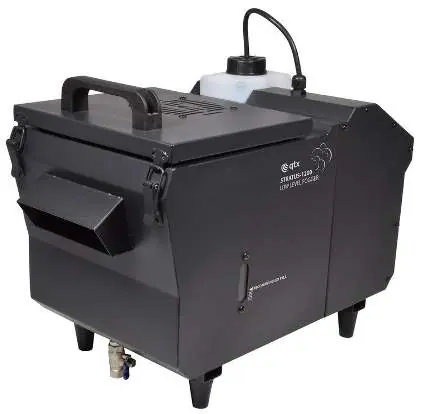
In the Box
- Stratus-1200 Low Fog Machine
- Wired digital control panel
- RF wireless remote
- UK/EU Mains Leads
- User guide
Setting Up
- Unpack the unit and place it on a stable, non-slip surface.
- Unscrew the top cap of the fluid tank and fill it with standard fog fluid.
- Replace the bottle and screw the cap securely, ensuring the pipe reaches the bottom of the bottle.
- Open the water tank cover and add water or distilled water to the reservoir, ensuring you do not exceed the recommended fill line.
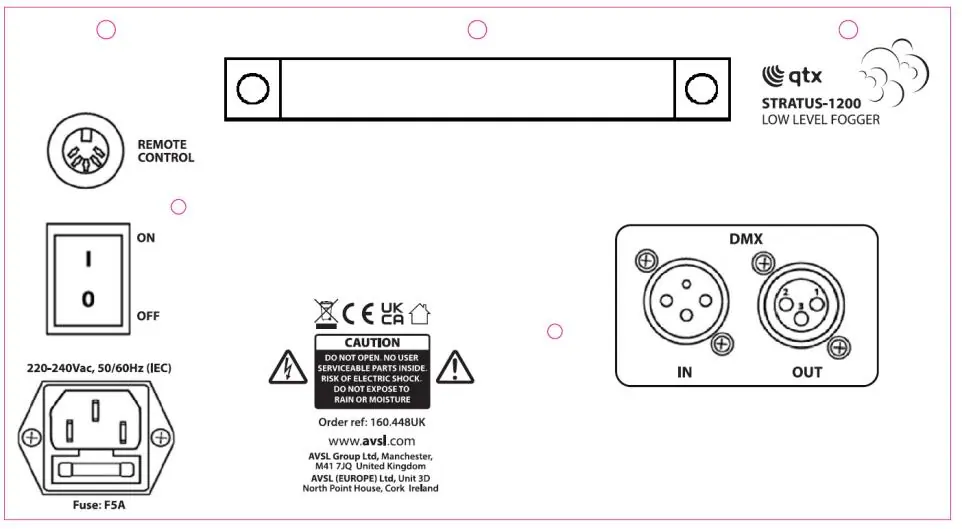
- Connect the wired digital control panel to the socket marked "Remote Control" on the rear panel.
- If using DMX, connect the DMX signal from your controller to the DMX IN XLR connector.
- Connect the IEC mains lead and power the unit on.
- Allow 3-5 minutes for the unit to warm up.
Operation
The wired digital control panel features an LCD display and several buttons for configuration:

- FUNC: Scroll through menu options.
- TIMER: Set up the fog timer function.
- UP/DOWN: Adjust menu values.
- START/STOP: Start or stop continuous fog.
- MANUAL: Fog on demand.
LCD Menu Options:
- Heating status: Displays "Warming up" or "Ready to fog".
- Manual volume adjust: Set output 1-100.
- Interval: Set continuous fog intervals 1-900.
- Duration: Set continuous fog duration 1-200.
- Volume: Set continuous fog output 1-100.
- Wind: Set fan speed 1-100.
- DMX512: Set DMX address 1-512.
DMX Control: When set to DMX mode, the unit uses 2 channels:
- CH1: Fan speed (0-255, 0-100%)
- CH2: Fog output (0-255, 0-100%)
RF Remote Control: Ensure the wired control panel is connected to use the remote:
- A: Continuous fog stop
- B: Continuous fog start
- Up arrow: Fog increase
- Down arrow: Fog decrease
Safety and Cleaning
- The unit must be earthed.
- Parts of the housing may become hot during use.
- Clean the fog mechanism periodically by operating with distilled water.
- It is recommended to use fog machine cleaning fluid (160.670UK) periodically.
- Do not use strong solvents to clean the casing.
Practical help
Common problems
No power to main unit or wired controller
Check that the mains voltage is correct, the socket is switched on, the IEC lead is connected properly, and check the mains fuse in the IEC connector and plug top.
Power is on but no fog output
Check fluid level in the tank, ensure lines are not blocked, verify output is not set to zero on the control panel or remote, and check DMX settings if applicable.
Fog output drifts upwards
Ensure you are using the correct fog fluid, that there is sufficient water in the reservoir, and that the reservoir is not overfilled.
Before use
- Check contents against the box list.
- Ensure the unit is on a stable, non-slip surface.
- Fill the tank with fog fluid.
- Fill the reservoir with water (do not overfill).
- Connect the wired control panel.
- Allow 3-5 minutes for warm-up.
Specs in practice
- Power consumption
- 1200W
- Fluid capacity
- 1.2L fog fluid, 3L water
- Warm up time
- 3-5 minutes
- DMX Channels
- 2 channels for fan speed and fog output
Images and diagrams
- Rear Panel: Shows DMX IN/OUT, Remote Control socket, Power switch, and IEC inlet.
- Wired Control Panel: Buttons for FUNC, TIMER, UP, DOWN, START/STOP, MANUAL.
Model compatibility
- Requires standard fog fluid and water.
- Compatible with 2-channel DMX controllers.

Manual page author
Michael Turner
Technical manual editor
Reviews PDF manuals for structure, safety notes, and practical product details so readers can find the right information quickly.