Automotive / Car Audio
User Manual for BANDA AUDIOPARTS ELITE 4000.4 Amplifier
Quick guide for the BANDA AUDIOPARTS ELITE 4000.4 amplifier. Includes wiring diagrams, technical specifications, crossover settings, and troubleshooting steps.
Quick answers from the manual
Quick answer
- The ELITE 4000.4 is a 4-channel amplifier requiring a 200A external fuse and operating between 9-15V. It features adjustable crossover settings (Low, Flat, High) and protection indicators for temperature, clipping, and low voltage. p. 4, 5, 8
Key actions
- Connect GND to chassis, Remote to antenna, and 12V positive to battery. p. 4
- Adjust Crossover switch to LOW, FLAT, or HIGH based on speaker requirements. p. 5
First start
- Ensure all connections are secure and the correct fuse is installed before powering on. p. 4
Problems and fixes
Blue & Red LED On
Amplifier temperature reached operating limit. Ensure ventilation is not obstructed.
p. 19Technical specifications
| Parameter | Value | Meaning | Pages |
|---|---|---|---|
| Input Voltage | 9 - 15V | Operating voltage range. | p. 8 |
| Recommended Fuse | 200A | Required external fuse rating. | p. 8 |
Where to find it in the PDF
- Front Panel and Power Unit p. 4
- Crossover Settings p. 5
- Wiring Examples p. 6
- Technical Specifications p. 8
Table of contents
Manual images
Click an image to enlargeQuick Guide
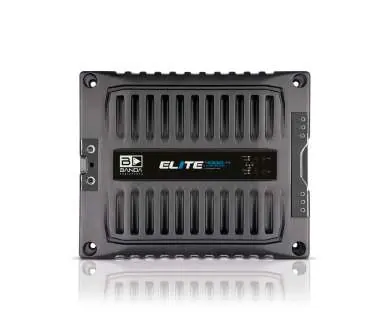
The BANDA AUDIOPARTS ELITE 4000.4 is a high-performance 4-channel amplifier. This manual provides essential information for installation, configuration, and troubleshooting. Always ensure the amplifier is installed in a well-ventilated area and use an external fuse (200A recommended) to protect the system.
Device Description
The amplifier features a power unit and a front panel with various controls:
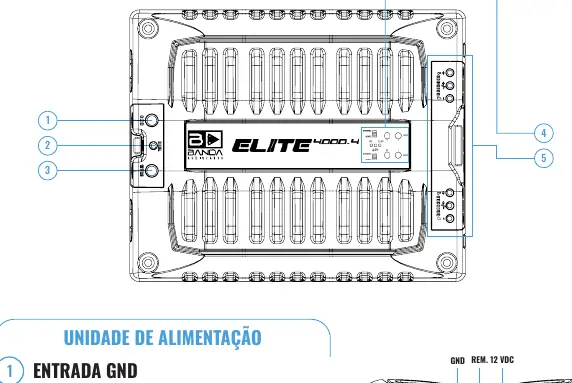
- Power Unit: Includes GND (chassis ground), Remote (antenna trigger), and 12V positive inputs.
- Front Panel: Contains gain adjustments for each channel, Mono/Stereo switches, and LED indicators.
- LED Indicators:
- Blue (ON): Indicates the device is powered on.
- Red (CLIPPING): Indicates output distortion, short circuit, or thermal protection.
- Yellow: Flashes when battery voltage is below the specified range (below 9V).
Crossover Settings
The amplifier includes a Crossover key on the side, allowing you to adjust the frequency response:
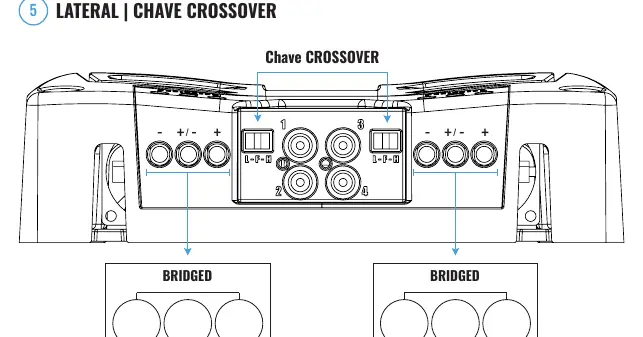
- LOW (L): Limits the device to lower frequencies (20Hz - 90Hz @ -3dBs).
- FLAT (F): Full range response (20Hz - 20kHz @ -3dBs).
- HIGH (H): Limits the device to higher frequencies (90Hz - 20kHz @ -3dBs).
Wiring and Connections
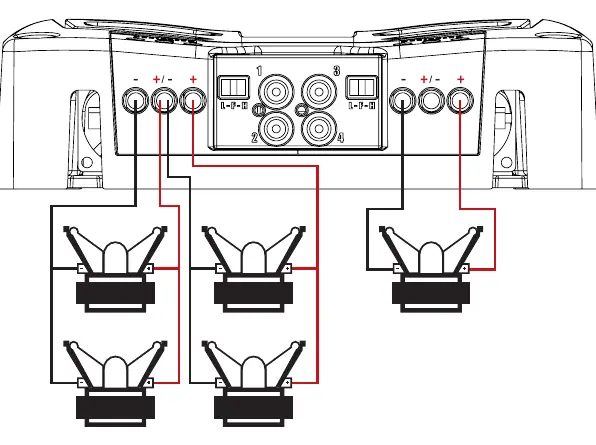
The amplifier supports various configurations, including stereo and bridged modes. Ensure that the speaker impedance matches the amplifier's rated version (1 ohm or 2 ohm). Always verify that speaker cables are connected correctly to avoid short circuits.
Troubleshooting
If the amplifier encounters issues, refer to the LED indicators:
- Blue & Red LED On: Thermal protection triggered. Ensure ventilation is not obstructed.
- Blue LED on, Red flashing (no audio): Short circuit or impedance too low. Check speaker connections.
- Blue LED on, Red flashing (with music): Clipping distortion. Reduce gain.
- Flashing Yellow LED: Low input voltage. Check battery charge and power cable connections.
- Red & Yellow LED On: Internal amplifier problem. Contact authorized service.
Technical Specifications
The ELITE 4000.4 is available in 1 ohm and 2 ohm versions. Key parameters include:
- Input Voltage: 9 - 15V
- THD:< 1%
- Signal to Noise Ratio: 88dB
- Input Sensitivity: 150mV - 4V
- Recommended Fuse: 200A
Manufacturer information
Banda Audioparts
Practical help
Common problems
Blue & Red LED On
Amplifier temperature reached operating limit. Ensure ventilation is not obstructed.
Blue LED on, Red flashing, no audio
Short circuit in output or impedance too low. Check speaker cables and impedance.
Flashing Yellow LED
Input voltage below 9V. Check battery charge and power cable connections.
Before use
- Ensure proper ventilation for the amplifier.
- Use an external fuse (200A recommended).
- Check battery voltage (9-15V).
- Verify speaker impedance matches the amplifier version (1 ohm or 2 ohm).
Images and diagrams
- Wiring diagrams show parallel speaker connections for 1 ohm and 2 ohm versions.
- Bridged mode connections are available for subwoofers.
Model compatibility
- Available in 1 ohm and 2 ohm versions.
- Ensure speaker impedance is not lower than the amplifier's rated minimum.

Manual page author
David Miller
Documentation analyst
Organizes user manual content into clear summaries, with attention to model details, product context, and everyday usability.