Power / Batteries & Chargers
Baseus Bipow Pro 10000mAh 20W Power Bank
Quick guide for the Baseus Bipow Pro 10000mAh 20W Power Bank (Model PPBD2-1020). Learn how to check battery levels, charge devices, and maintain your power bank safely.
Table of contents
Quick guide from the manual
The Baseus Bipow Pro 10000mAh Power Bank is designed for fast charging with a maximum output of 20W. To check the remaining battery level, press the power button once. The device features an automatic sleep mode that activates after 30 seconds of inactivity. If your device does not begin charging immediately, press the power button to manually activate the output.
Product Schematic Design
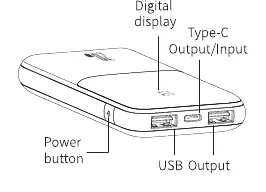
The power bank features a digital display to show battery percentage, a Type-C port that functions as both input and output, a standard USB output port, and a power button located on the side.
Product Specifications
- Model: PPBD2-1020
- Battery Capacity: 10000mAh / 3.7V / 37Wh
- Rated Capacity: 5800mAh (5V=3A)
- Type-C Input: 5V=3A; 9V=2A
- Type-C Output: 5V=3A; 9V=2.22A; 12V=1.5A
- USB Output: 5V=3A; 9V=2A; 12V=1.5A
- Total Output: 5V=3A
- Operating Temperature: 0°C to 40°C
Instructions for Use
To use the power bank, simply connect your device using a qualified and certified charging cable. The power bank supports dual-way fast charging and PD 20W output. For some smartphones, you may need to press the power button to initiate the charging process.
Safety and Maintenance
To ensure the longevity of your device, please observe the following:
- Charge the power bank periodically, at least once every 5 months, to maintain battery health.
- Do not expose the device to temperatures outside the 0°C to 40°C range.
- Avoid physical impacts such as knocking, throwing, or squeezing the device.
- Do not attempt to dismantle the power bank; it contains no user-serviceable parts.
- The device is not suitable for use in tropical areas.
Manufacturer information
Baseus
Practical help
Common problems
Power bank does not charge the connected device
Press the power button once to manually activate the charging output.
Power bank turns off unexpectedly
The device automatically enters sleep mode after 30 seconds if no connection is detected.
Before use
- Check the battery level by pressing the power button once.
- Ensure you are using a qualified and certified charging cable.
- Verify the ambient temperature is between 0°C and 40°C.
- Charge the unit fully before first use if necessary.
Specs in practice
- Rated Capacity: 5800mAh
- The actual usable capacity of the battery after accounting for conversion efficiency.
- Energy Conversion Rate: >=75%
- The efficiency of the power transfer from the internal battery to your device.
Images and diagrams
- The schematic identifies the digital display, Type-C input/output port, USB output port, and the power button.
Model compatibility
- Supports PD 20W output.
- Compatible with iPhone 13/12 fast charging.
- Some smartphones may require manual activation via the power button.

Manual page author
David Miller
Documentation analyst
Organizes user manual content into clear summaries, with attention to model details, product context, and everyday usability.