Tools / Power Tools
User Manual for Bauer 20V Cordless Power Tools and Charger
Comprehensive user guide for Bauer 20V cordless power tools and charger. Includes safety instructions, setup, operation, maintenance, and troubleshooting for the 1/4" Impact Driver (56724), 1/2" Drill/Driver (73216), and 2A Charger (71373).
Quick answers from the manual
Quick answer
- This manual covers the operation, safety, and maintenance of Bauer 20V cordless tools, including the 1/4" Impact Driver (56724), 1/2" Drill/Driver (73216), and 2A Charger (71373). p. 1, 13, 21
Key actions
- Install bits in Impact Driver p. 8
- Adjust torque on Drill/Driver p. 28
- Charge battery p. 17
First start
- Charge battery before first use p. 8, 27
Problems and fixes
Tool will not start
Check battery connection, charge level, and trigger lock.
p. 11, 31Maintenance and reset
- Clean and store p. 10, 30
Technical specifications
| Parameter | Value | Meaning | Pages |
|---|---|---|---|
| Impact Driver No Load Speed | 0-2900/min | Maximum rotational speed | p. 7 |
| Drill/Driver No Load Speed | 0-450 / 0-1700/min | Maximum rotational speed | p. 27 |
| Charger Output | 20VDC, 2.0A | Charging output power | p. 16 |
Where to find it in the PDF
- Impact Driver (56724) p. 1, 12
- Charger (71373) p. 13, 20
- Drill/Driver (73216) p. 21, 32
Table of contents
Manual images
Click an image to enlargeQuick guide from the manual
This manual provides essential safety, operation, and maintenance instructions for Bauer 20V cordless tools and the 2A charger. Before using any tool, ensure the battery is fully charged and the work area is clear of hazards. Always wear ANSI-approved safety goggles.
Safety Information
General Power Tool Safety: Keep work areas clean and well-lit. Do not operate tools in explosive atmospheres. Keep children and bystanders away. Always maintain a firm grip and proper balance.
Battery and Charger Safety: Lithium batteries store a large amount of energy. Do not open, drop, short-circuit, puncture, or incinerate batteries. Do not expose to temperatures above 140°F. Charge only with the specified Bauer 20V charger. Do not place the charger on carpets or rugs as they obstruct vents.
1/4" Hex Compact Impact Driver (56724)
Setup: Pull the collar forward to insert or remove 1/4" hex shank bits. Ensure the bit is secure before use.
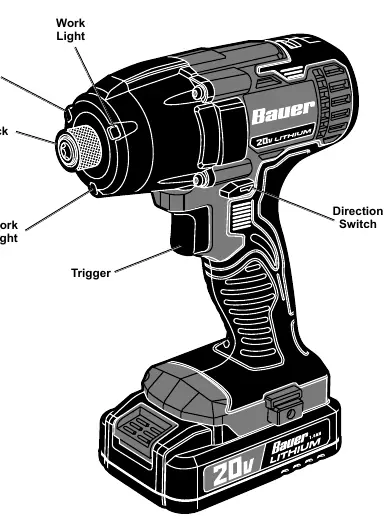
Operation: Use the direction switch to select forward (clockwise) or reverse (counter-clockwise) rotation. Push the switch to the center to lock the trigger. The tool features variable speed; apply more pressure to the trigger for higher speed.
1/2" Compact Drill/Driver (73216)
Setup: Rotate the chuck collar to open or close the jaws. Align flat sides of hex or three-sided shank bits with the jaws.
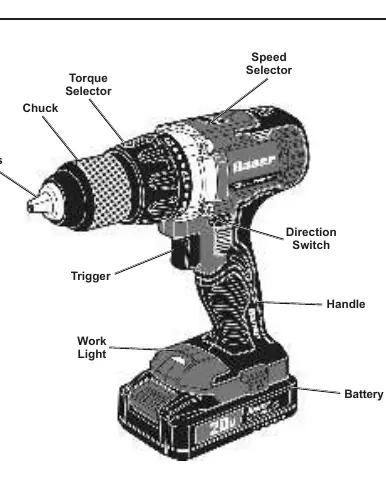
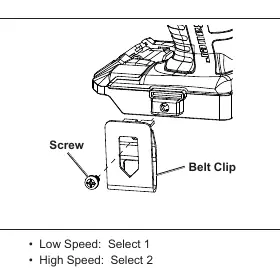
Operation: Use the speed selector to choose between Low Speed (1) and High Speed (2). Adjust the torque selector (1-21) based on the fastener size and material. Use a lower torque setting for small screws in soft materials.
2A Charger (71373)
Charging: Plug the charger into a grounded 120VAC outlet. Slide the battery onto the charger.
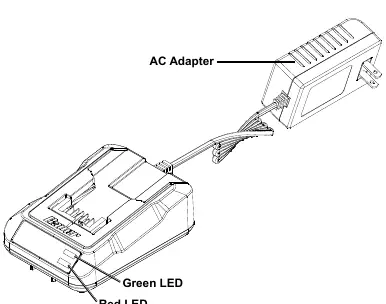
LED Indicators:
- Blinking Green: Battery Charging
- Solid Green: Battery Charged
- Blinking Green and Red: Charging Error (inspect battery/charger)
- Blinking Red: Hot/Cold Delay (temperature out of range)
- Pulsing Green: Battery Ready (80%)
Maintenance
Before each use, inspect the tool for loose hardware, cracked parts, or damaged battery packs. After use, wipe external surfaces with a clean cloth. Store tools and batteries in a dry, indoor area away from metal objects to prevent shorting.
Practical help
Common problems
Tool will not start
Check if the battery is properly connected and charged. Ensure the trigger lock is not engaged.
Tool operates slowly
Do not force the tool; allow it to work at its own rate. Check if the battery is wearing out.
Overheating
Ensure motor housing vents are not blocked. Allow the tool to work at its own rate.
Before use
- Charge the battery pack fully.
- Inspect the tool for damage, loose hardware, or cracked parts.
- Ensure the work area is clean and well-lit.
- Wear ANSI-approved safety goggles.
- Verify the correct bit is installed and secure.
Specs in practice
- No Load Speed
- The rotational speed of the tool when not under load (RPM).
- Input Rating
- The electrical requirements for the charger (120VAC, 60Hz).
Images and diagrams
- The Impact Driver features a collar for bit installation and a direction switch for rotation control.
- The Drill/Driver includes a torque selector (1-21) and a speed selector (1-2) for versatile drilling and driving.
- The Charger has LED indicators to show charging status, errors, and temperature delays.
Model compatibility
- Use only Bauer 20V Li-ion batteries.
- Charger is for 120VAC outlets only.
- Impact Driver requires 1/4" hex shank bits.
- Drill/Driver accepts 1/2" shank bits.

Manual page author
Michael Turner
Technical manual editor
Reviews PDF manuals for structure, safety notes, and practical product details so readers can find the right information quickly.