Tools / Drills
Owner's Manual for Bauer 2241C-B 1" D-Handle SDS Plus Rotary Hammer
Quick guide for the Bauer 2241C-B 1" D-Handle SDS Plus Rotary Hammer. Includes setup, operation, maintenance, troubleshooting, and safety instructions.
Quick answers from the manual
Quick answer
- The Bauer 2241C-B is a 20V cordless rotary hammer. It requires a 20V Li-ion Bauer battery (sold separately) and features three modes: Drill, Hammer Drill, and Chisel. p. 1, 7
Key actions
- Adjusting the auxiliary handle p. 8
- Changing drill bits p. 9
- Selecting operation mode p. 8
First start
- Ensure battery is charged, install bit, adjust handle/depth gauge, select mode, and squeeze trigger. p. 7, 8, 9
Show 4 more answers Show less
Problems and fixes
Tool will not start
Check battery connection, charge, or replace battery.
p. 10
Overheating
Allow tool to work at its own rate, keep bits sharp, clean vents.
p. 10Maintenance and reset
- Lubricate bit shank before each use, wipe tool after use, sharpen chisel bits. p. 11
Technical specifications
| Parameter | Value | Meaning | Pages |
|---|---|---|---|
| Battery Type | 20V Li-ion Bauer | Power source | p. 7 |
| No Load Speed | 0 - 1050/min | Rotational speed | p. 7 |
| Chuck Size | 1" SDS Plus Type | Bit compatibility | p. 7 |
Where to find it in the PDF
- Functions Diagram p. 7
- Mode Selector p. 8
Table of contents
Manual images
Click an image to enlargeQuick guide from the manual
The Bauer 2241C-B is a 20V cordless rotary hammer designed for drilling and chiseling. For best results, use a 3.0 Amp Hour battery or greater. Always ensure the tool is in the off-position and the battery is removed before performing any adjustments, maintenance, or changing bits.
Product Overview
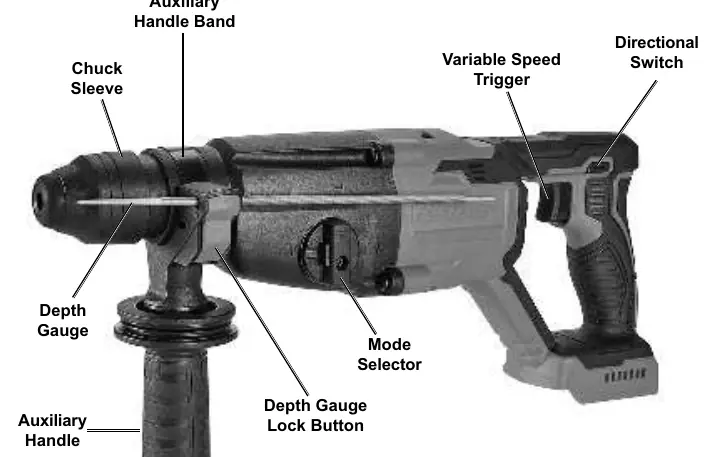
The tool features an auxiliary handle for stability, a depth gauge for precise drilling, and a mode selector to switch between Drill, Hammer Drill, and Chisel functions. The variable speed trigger allows for controlled operation.
Setup
Adjusting the Auxiliary Handle
- Turn the handle counterclockwise to loosen the band.
- Slide the handle to the desired position.
- Turn the handle clockwise to secure it in place.
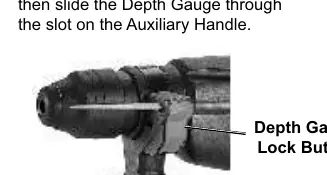
Using the Depth Gauge
- Press the Depth Gauge Lock Button.
- Slide the depth gauge through the slot on the auxiliary handle.
- Position as needed and release the lock button to secure.
Operation
Selecting Modes
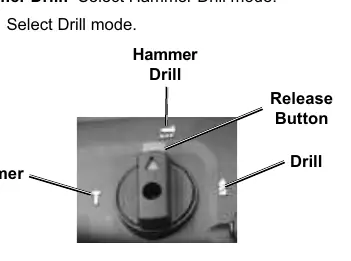
Rotate the Mode Selector only when the motor is stopped. Press the release button and rotate the selector until it clicks into the desired position:
- Drill: For standard drilling.
- Hammer Drill: For masonry drilling.
- Chisel: For chiseling operations.
Changing Drill Bits
- Wear heavy-duty gloves.
- Grease the bit's shank before installing.
- Pull back on the chuck, insert the bit, and release the chuck.
- Ensure the bit is secured and cannot be pulled out.
Maintenance
- Before each use: Inspect for leaking/cracked battery, loose hardware, or damaged parts.
- After use: Wipe external surfaces with a clean cloth.
- Lubrication: Grease the bit shank each time before installing.
- Chisel bits: Sharpen regularly.
Practical help
Common problems
Tool will not start
Check if the battery is properly connected and charged. If the battery is burnt out, replace it.
Tool operates slowly
Do not force the tool; allow it to work at its own rate. Check if the battery is wearing out.
Overheating
Do not force the tool. Ensure bits are sharp and motor housing vents are not blocked.
Before use
- Inspect the tool for any damage or loose parts.
- Ensure the battery pack is fully charged.
- Grease the drill bit shank.
- Set the mode selector to the correct function.
- Ensure the auxiliary handle is securely tightened.
Show more Show less
Specs in practice
- Battery Type
- 20V Li-ion Bauer (64816, 57007, sold separately).
- No Load Speed
- 0 - 1050/min.
Images and diagrams
- The functions diagram identifies the auxiliary handle, depth gauge, mode selector, and trigger.
- The mode selector diagram shows the positions for Drill, Hammer Drill, and Chisel modes.
Model compatibility
- Requires 20V Li-ion Bauer battery (sold separately).
- Use 3.0 Amp Hour battery or greater for best results.

Manual page author
David Miller
Documentation analyst