Tools / Grinding Tools
User Manual for Bauer 2209C-B 190 Watt Power Source Battery Inverter
Quick guide for the Bauer 2209C-B 190 Watt Power Source Battery Inverter. Includes operating instructions, safety warnings, technical specifications, and troubleshooting steps for your 20V battery-powered inverter.
Quick answers from the manual
Quick answer
- The Bauer 2209C-B is a 190W power inverter that converts Bauer 20V Li-Ion battery power into 120VAC (up to 150W) and USB power for mobile devices. p. 1, 4
Key actions
- Slide the battery pack onto the inverter to install. p. 6
- Press the Power Button to turn the inverter on or off. p. 6
First start
- Ensure the battery is charged and properly locked into the inverter before use. p. 7
Show 4 more answers Show less
Problems and fixes
Power button is red
AC output is overloaded. Remove the load and press the power button to reset.
p. 6
Power button is blinking red
Unit is overheating. Ensure vents are clear.
p. 5, 7Maintenance and reset
- If the unit overheats (blinking red), allow it to cool, then press the Power Button to reset. p. 5
Technical specifications
| Parameter | Value | Meaning | Pages |
|---|---|---|---|
| AC Output | 120VAC, 60Hz, 150W | Maximum power output for AC devices. | p. 4 |
| USB-C Output | 5VDC, 3A; 9VDC, 3A; 12VDC, 2.5A; 15VDC, 2A | Power delivery output capabilities. | p. 4 |
Where to find it in the PDF
- Functions and Controls p. 5
- Specifications p. 4
Table of contents
Manual images
Click an image to enlargeQuick guide from the manual
The Bauer 2209C-B is a portable power inverter designed to run on Bauer 20V Li-Ion battery packs. It provides AC power for devices up to 150W and includes USB-A and USB-C charging ports. Always ensure the battery is charged and the inverter is used in a well-ventilated area.
Safety Instructions
- Battery Safety: Use only with Bauer 20V Li-Ion battery packs. Keep the battery dry and away from metal objects to prevent shorting. Do not use if damaged.
- Operating Environment: Keep the inverter in a cool environment away from heat. Do not use near flammable gases or fumes. Do not use for medical equipment.
- Usage Limits: The AC output is rated for devices of 150W or less. Connecting larger loads may cause damage.
- Ventilation: Do not obstruct ventilation openings. Overheating may increase the risk of fire.
Product Overview
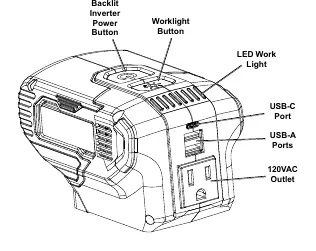
The unit features a backlit power button, a worklight button, an integrated LED work light, a USB-C port, USB-A ports, and a 120VAC outlet.
Operating Instructions
- Installation: Slide the Bauer 20V battery pack onto the inverter until it locks in place.
- Powering On: Press the Power Button to turn the inverter on.
- Connecting Devices: Plug your device into the USB charging port or the AC outlet.
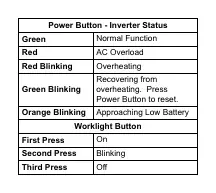
- Worklight: Use the Worklight Button to toggle the LED light (1st press: On, 2nd press: Blinking, 3rd press: Off).
Note: The inverter will automatically shut down if no activity is detected for 3 minutes. The cooling fan will turn on and off automatically during operation.
Troubleshooting
If the power button backlight is red, the AC output is overloaded; remove the connected load and press the power button to reset. If the light is blinking red, the unit is overheating; ensure vents are clear and allow the unit to cool.
Maintenance
Procedures not explained in the manual must be performed by a qualified technician. Always disconnect the battery pack before storage or maintenance. Store in a dry, indoor area out of reach of children.
Practical help
Common problems
Inverter will not turn on
Ensure the battery pack is properly connected and charged. Reinsert the battery firmly until it locks.
No AC Output
The inverter may be overloaded (exceeding 150W). Check the device rating or try a different device.
Overheating
Ensure all vents are clear. Clean dust from the unit using compressed air while wearing safety goggles and a dust mask.
USB-C will not charge device
The device may require 20V, but this inverter provides up to 15V through USB-C. Verify device requirements.
Before use
- Ensure the battery pack is fully charged.
- Inspect the inverter and battery for any damage.
- Verify the device to be powered is 150W or less.
- Ensure the area is well-ventilated and free of flammable materials.
- Wear ANSI-approved safety goggles.
Show more Show less
Specs in practice
- USB-C Output
- Supports Power Delivery (PD) up to 15V, 2A.
- Operating Temperature
- 14°F to 104°F (-10°C to 40°C).
Images and diagrams
- Power Button Status: Green (Normal), Red (Overload), Red Blinking (Overheating), Green Blinking (Recovering from overheating), Orange Blinking (Low Battery).
- Worklight Button: Cycles through On, Blinking, and Off modes.
Model compatibility
- Compatible exclusively with Bauer 20V Li-Ion battery packs.

Manual page author
Emily Carter
User documentation editor