Electronics / PA Systems
User Manual for Gemini WPX-2000 and WPX-2000TOGO Modular Line Array System
Quick guide for the Gemini WPX-2000 and WPX-2000TOGO modular line array speaker systems. Learn about setup, Bluetooth/USB operation, TWS linking, battery management, and troubleshooting.
Quick answers from the manual
Quick answer
- The Gemini WPX Series are modular line array speaker systems. The WPX-2000 is 1200W, while the WPX-2000TOGO is 1000W and battery-powered. Both feature a 3-channel mixer, Bluetooth/USB streaming, and TWS linking. p. 4
Key actions
- Pairing TWS p. 6, 11, 17, 21
- Charging Battery (TOGO) p. 5, 9, 16, 20
Problems and fixes
Distortion/Clipping
Adjust input gain or lower master volume if LIMIT light is on.
p. 4, 8, 11, 15Maintenance and reset
- Factory Reset: Long-press MODE & PREVIOUS/REWIND for >6 seconds. p. 6, 12, 13, 17
Technical specifications
| Parameter | Value | Meaning | Pages |
|---|---|---|---|
| WPX-2000 Power | 1200W Peak | Max power output | p. 7, 13 |
| WPX-2000TOGO Power | 1000W Peak | Max power output | p. 7, 13 |
Where to find it in the PDF
- Product Overview p. 4, 7, 10, 15
- Specifications p. 7, 13
Table of contents
Manual images
Click an image to enlargeQuick Guide
The Gemini WPX Series consists of two modular line array speaker systems: the 1200W WPX-2000 and the 1000W battery-powered WPX-2000TOGO. Both systems feature a 3-channel mixer, Bluetooth and USB audio streaming, and TWS (True Wireless Stereo) linking for pairing two speakers.
Product Overview
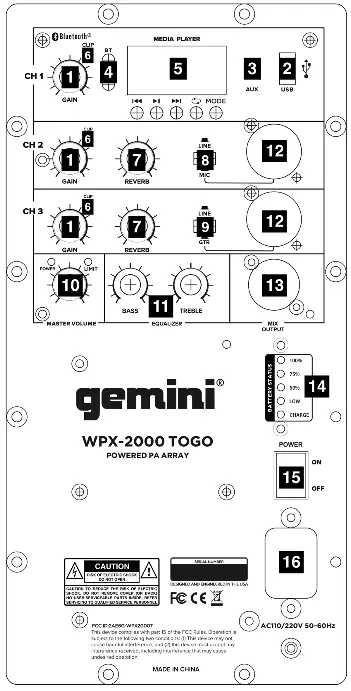
The system consists of an array speaker column, array spacers for height adjustment, and a subwoofer base station containing the 8" driver. The rear panel of the subwoofer base houses the mixer controls, including gain knobs, EQ (Bass/Treble), input switches (Line/Mic/GTR), and output connections.
Setup and Assembly
- Column Assembly: Connect the array speaker column to the subwoofer base station. Use the included array spacers between the column and the base to achieve the desired height.
- Connections: Use the XLR/1/4" combo jacks for microphones, guitars, or line-level instruments. Use the XLR Mix Output to connect to additional speakers or recording devices.
Operation
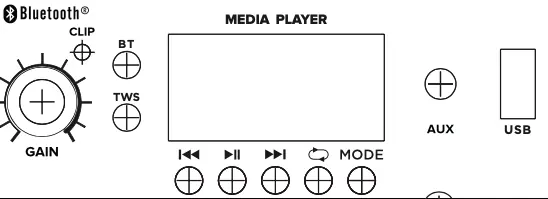
- Bluetooth Mode: Upon power-on, the system defaults to Bluetooth mode. The screen flashes "BLUE" while searching. Once connected, "BLUE" stops flashing. The connection name is "GEMINI WPX SERIES".
- USB Playback: Inserting a USB stick automatically activates MP3 playback. Supported formats include MP3, WAV, MP2, and WMA.
- TWS Linking: To link two speakers, switch both to BT mode, then long-press the "TWS" button on the master device. The display will show "PAIR" until connected.
Battery Management (WPX-2000TOGO)
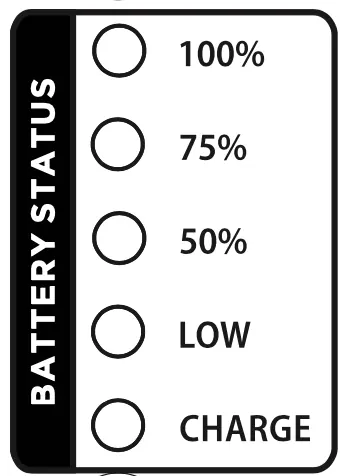
The WPX-2000TOGO features an 11.1V Lithium battery. It charges in 4-5 hours and provides 4-8 hours of playback depending on volume. The battery indicator shows charge status: 100%, 75%, 50%, LOW, and CHARGE. It is recommended to charge the device at least once every 70 days when not in use.
Troubleshooting and Indicators
- CLIP (Yellow Light): Indicates signal overload on input channels. Reduce input gain.
- LIMIT (Red Light): Indicates the master volume is too high and the limiter is active. Reduce master volume.
- POWER (Green Light): Confirms the unit is powered on.
- Factory Reset: If button programming becomes unresponsive, long-press the MODE & PREVIOUS/REWIND buttons for more than 6 seconds.
Practical help
Common problems
Distortion or clipping sound
Check the yellow 'CLIP' lights on input channels. If illuminated, reduce the gain for that channel.
Red 'LIMIT' light is on
The master volume is too high. Turn down the master volume until the light turns off.
TWS pairing fails
Ensure both speakers are in Bluetooth mode before long-pressing the TWS button on the master unit.
Battery not holding charge
Ensure the device is charged at least once every 70 days. If the battery is damaged, it must be replaced with one of the same specifications.
Before use
- Ensure all array spacers and the speaker column are securely attached.
- For WPX-2000TOGO, ensure the battery is charged.
- Verify that the input switch (Line/Mic/GTR) matches your connected device.
- Check that the master volume is set to a low level before turning on the unit.
Images and diagrams
- The rear panel contains the mixer controls, including gain, reverb, EQ, and master volume.
- The battery status indicator on the TOGO model shows five levels: 100%, 75%, 50%, LOW, and CHARGE.
Model compatibility
- WPX-2000TOGO includes a rechargeable 11.1V Lithium battery.
- Supports MP3, WAV, MP2, and WMA formats via USB.
- Compatible with XLR and 1/4" cables.

Manual page author
Emily Carter
User documentation editor
Prepares concise manual descriptions and highlights the most useful setup, operation, and maintenance information for readers.