Home Appliances / Steam Cleaners
User Manual for Bissell 21H6 Series Steam Mop Max
Comprehensive user guide for the Bissell 21H6 Series Steam Mop Max. Includes assembly instructions, operation steps, maintenance tips, troubleshooting, and safety guidelines.
Quick answers from the manual
Quick answer
- The Bissell 21H6 Steam Mop Max is a household steam cleaner. It requires a Phillips head screwdriver for assembly and uses a water purification system to prevent mineral buildup. p. 1, 5
Key actions
- Assemble the unit p. 5
- Clean hard floors p. 7
First start
- Assemble unit, fill tank with water, plug in, wait for ready light. p. 5, 6, 7
Show 3 more answers Show less
Problems and fixes
No steam
Check water level, replace filter if needed, or clear nozzle with paper clip.
p. 9, 10Maintenance and reset
- Replace water filter when green grains turn blue. p. 9
Where to find it in the PDF
- Assembly p. 5
- Operations p. 6, 7, 8
- Maintenance p. 9
Table of contents
Manual images
Click an image to enlargeQuick Guide
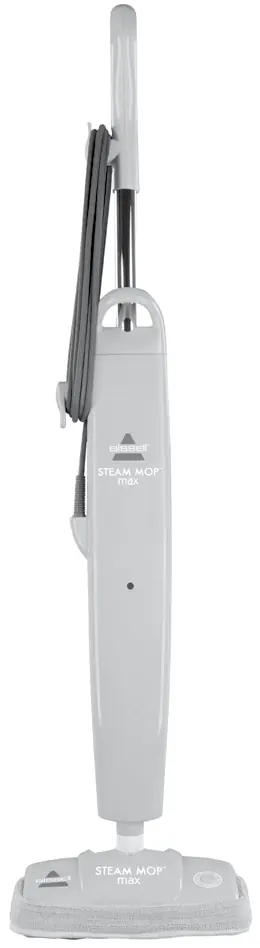
The Bissell Steam Mop Max is designed for cleaning hard floors and refreshing carpets. Before first use, assemble the unit using a Phillips head screwdriver. Always use distilled or demineralized water to maximize the life of the water purification filter. Do not add chemicals, detergents, or aromatic products to the water tank.
Safety Instructions
- Do not direct steam at people, animals, or electrical outlets.
- Do not use on leather, wax-polished furniture, or delicate fabrics.
- Unplug the unit when not in use and before maintenance.
- Do not immerse the unit in water.
- Use only manufacturer-recommended attachments.
Assembly
You will need a Phillips head screwdriver for assembly.
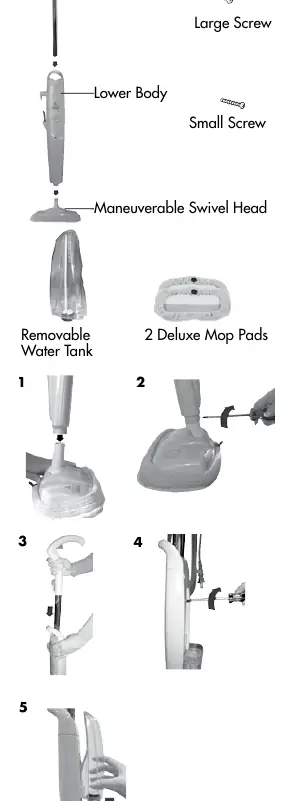
- Attach the lower body to the maneuverable swivel head.
- Secure the swivel head with the small Phillips head screw.
- Slide the handle assembly down into the lower body.
- Secure the handle using the large Phillips head screw through the rear opening.
- Slide the water tank onto the lower body by aligning the vertical glides.
Operations
Getting Ready
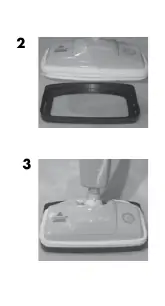
Ensure the mop pad is attached to the swivel head. Fill the removable water tank with water (distilled recommended). Plug the unit into a 120-volt outlet. The ready light will illuminate when the unit is heated and ready for use.
Cleaning Hard Floors
Sweep or vacuum the floor before steam cleaning. Slowly pass the mop over the surface while pressing the steam-on-demand trigger. To sanitize, hold the mop over a spot for 15-20 seconds.
Carpet Refresher Attachment
To refresh carpets, attach the mop pad to the swivel head, then place the head into the carpet refresher attachment. Move the mop in a continuous forward and backward motion. Do not leave the mop stationary on the carpet.
Maintenance and Care
- After Use: Unplug the unit, remove the mop pad (it will be hot), empty the water tank, and store upright.
- Mop Pads: Machine wash in warm water with mild detergent. Air dry. Do not use fabric softeners.
- Water Purification System: Replace the filter when the bright green grains turn blue.
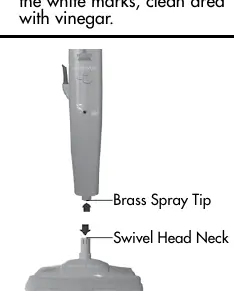
- Nozzle Cleaning: If steam output is reduced, remove the swivel head and pour vinegar through the center tube. Clear the brass spray tip with a paper clip.
Troubleshooting
If you experience reduced or no steam, check the following:
- Ensure the water tank is not empty.
- Check if the water filter is depleted (replace if necessary).
- Check if the steam nozzle is blocked (clean with a paper clip).
Manufacturer information
Bissell Inc.
Practical help
Common problems
Reduced steam or no steam
Check if the water tank is empty, the filter is depleted, or the steam nozzle is blocked.
Knocking sound during first use
This is normal and occurs as the filter fills with water. It should subside within 30-60 seconds.
Before use
- Sweep or vacuum the floor
- Ensure the mop pad is attached
- Fill the water tank with water (distilled recommended)
- Check the water filter status (replace if green grains are blue)
- Plug into a 120-volt outlet
Show more Show less
Specs in practice
- Water Purification System
- Removes minerals from tap water to prevent damage. Replace when green grains turn blue.
Images and diagrams
- Assembly steps showing screw placement
- Water tank removal and filling
- Carpet refresher attachment usage
- Nozzle cleaning procedure
Model compatibility
- Use only on hard floors or carpets with the provided attachment
- Do not use on leather, wax-polished furniture, or delicate fabrics
- Use only BISSELL water filters

Manual page author
Emily Carter
User documentation editor