Home Appliances / Steam Cleaners
User Guide for Bissell PowerFresh Slim Steam Mop
Quick guide for the Bissell PowerFresh Slim Steam Mop. Learn how to assemble, fill the water tank, use the steam mop for floors, and utilize the handheld steam cleaning mode.
Quick answers from the manual
Quick answer
- The Bissell PowerFresh Slim Steam Mop is a versatile steam cleaner for floors and handheld surfaces. Assembly involves attaching the handle and mop head. Operation requires filling the tank, plugging in, and waiting for the 'Steam Ready' light. p. 4, 5, 6
Key actions
- Assemble the unit p. 4
- Fill the water tank p. 5
- Use as a floor mop p. 7
- Use as a handheld steamer p. 8, 9
First start
- Assemble, fill with water, plug in, and wait for the 'Steam Ready' light. p. 4, 5, 6
Show 2 more answers Show less
Maintenance and reset
- Wash the cleaning pad after use. p. 11
Where to find it in the PDF
- Assembly p. 4
- Filling Tank p. 5
- Floor Cleaning p. 7
- Handheld Cleaning p. 8, 9
Table of contents
Manual images
Click an image to enlargeQuick guide from the manual
This document provides visual instructions for the Bissell PowerFresh Slim Steam Mop. It covers the assembly, operation, and maintenance of the device. Always ensure the unit is unplugged before performing maintenance or changing accessories.
What's in the box
- Steam mop unit
- Handle and extension wand
- Mop head
- Water cup
- Cleaning pads
- Various cleaning brushes and tools
- Wall mount
Assembly
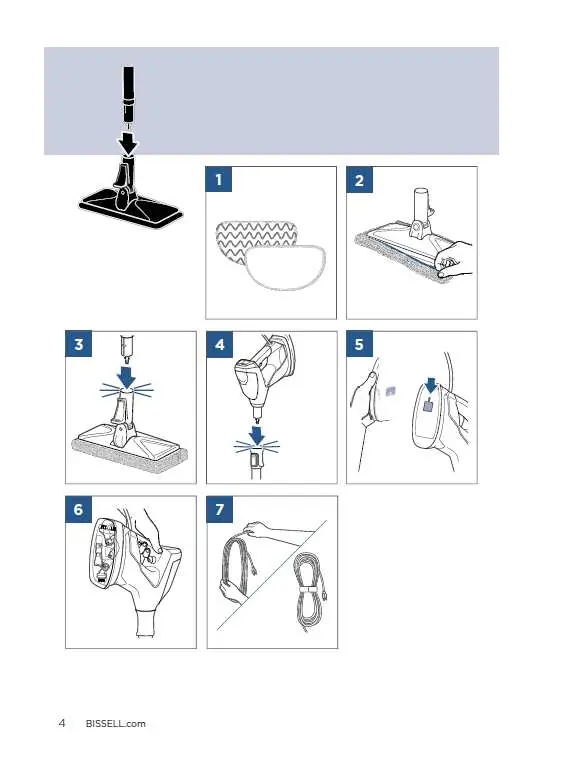
- Insert the extension wand into the mop head until it clicks.
- Attach the handle to the extension wand.
- Attach the desired cleaning pad to the mop head.
- Connect the handheld unit to the extension wand if using as a floor mop.
Filling the water tank
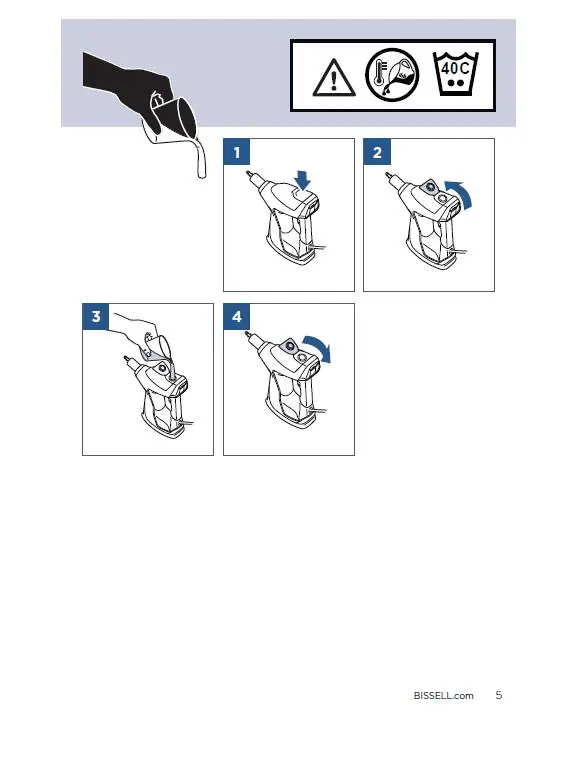
- Ensure the unit is unplugged.
- Open the water tank cap.
- Use the provided water cup to fill the tank with water.
- Securely close the tank cap.
Using the steam mop
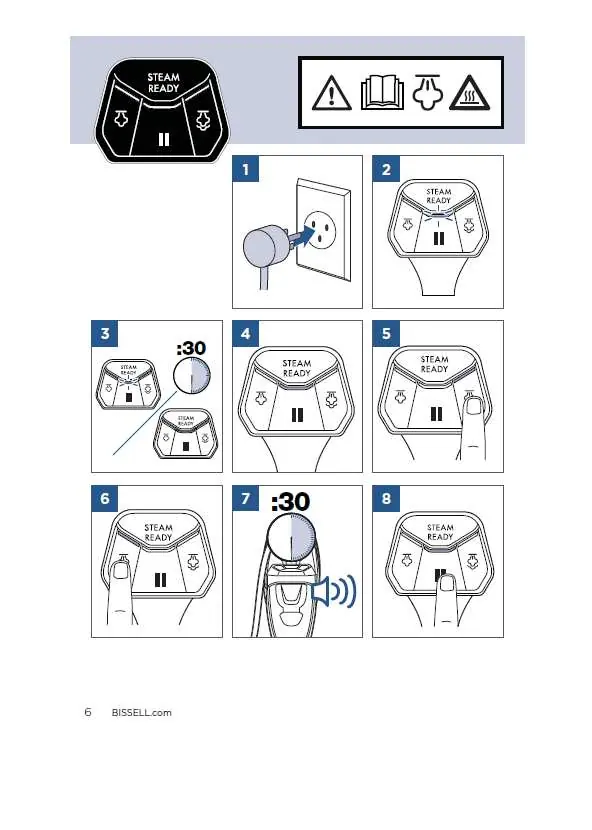
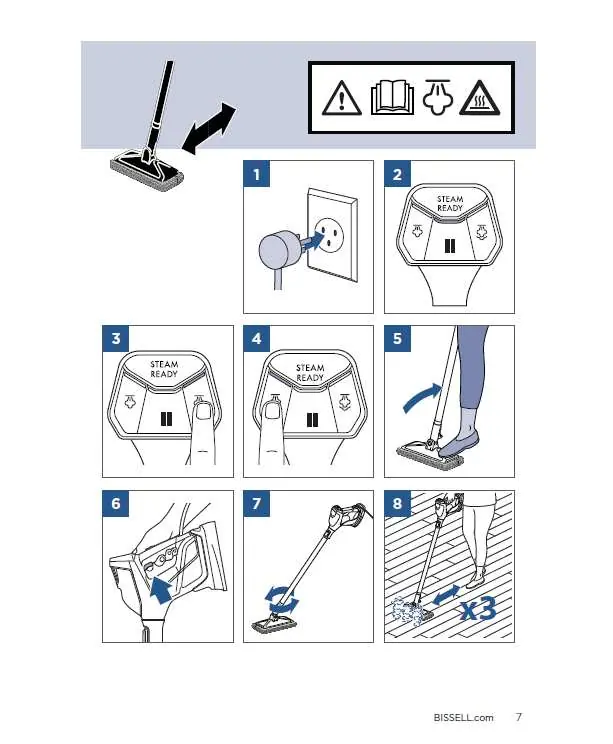
- Plug the unit into a power outlet.
- Wait for the 'Steam Ready' light to illuminate.
- Press the steam button to release steam.
- Move the mop across the floor in a back-and-forth motion.
Handheld steam cleaning
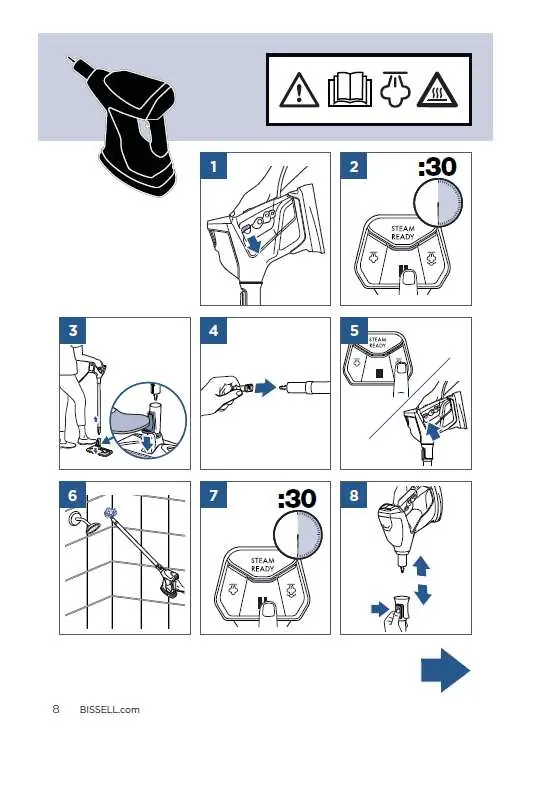
- Detach the handheld unit from the extension wand.
- Attach the desired accessory (e.g., brush, nozzle) to the handheld unit.
- Plug in the unit and wait for the 'Steam Ready' light.
- Press the steam button to begin cleaning surfaces like tiles, sinks, or countertops.
Wall mount installation
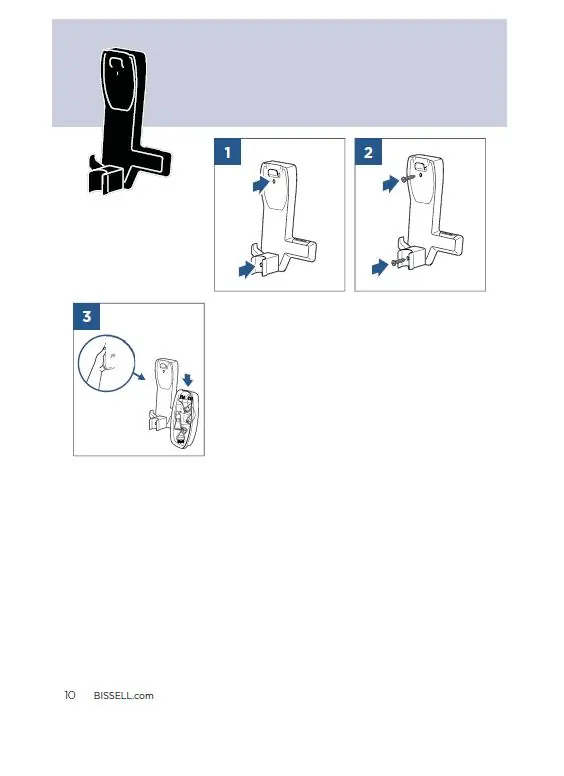
- Position the wall mount on the wall.
- Secure the mount using the provided screws.
- The unit can be stored by hanging it on the mount.
Maintenance and storage
- After use, unplug the unit and allow it to cool.
- Remove and wash the cleaning pad.
- Empty any remaining water from the tank.
- Store the unit in a dry place using the wall mount.
Manufacturer information
Bissell Inc.
Practical help
Common problems
Steam not ready
Ensure the unit is plugged in and the 'Steam Ready' light is solid.
No steam output
Check if the water tank is filled and properly seated.
Before use
- Check all parts are present
- Assemble the handle and mop head
- Fill the water tank
- Attach the cleaning pad
Show more Show less
Images and diagrams
- The manual uses visual steps to guide assembly and operation.
- Icons indicate when to plug in, fill water, and wait for the 'Steam Ready' light.
Model compatibility
- Designed for floor and handheld steam cleaning.

Manual page author
Michael Turner
Technical manual editor