Electronics / Projectors
User Manual for BOL 21Y110VWJ-F028-110V Ceiling Fan with Light
Quick guide for the BOL 21Y110VWJ-F028-110V ceiling fan with light. Includes installation steps, remote control pairing, app setup, and operation instructions.
Quick answers from the manual
Quick answer
- The BOL 21Y110VWJ-F028-110V is a ceiling fan with light. Installation requires turning off power, connecting wires, and assembling the light head, disc, and blades. Pairing the remote or app must be done within 5 seconds of powering on. p. 2, 3
Key actions
- Pairing remote or app p. 3
First start
- Power off, install components, connect wires, power on, and pair remote/app within 5 seconds. p. 2, 3
Show 3 more answers Show less
Problems and fixes
Device not responding to remote/app
Re-pair by pressing the match button within 5 seconds of powering on.
p. 3Technical specifications
| Parameter | Value | Meaning | Pages |
|---|---|---|---|
| Voltage | 110V | Operating voltage | p. 3 |
Where to find it in the PDF
- Installation Instructions p. 2
- Remote Control and App Instructions p. 3
Table of contents
Manual images
Click an image to enlargeQuick Guide
This manual provides instructions for the installation and operation of the BOL 21Y110VWJ-F028-110V ceiling fan with light. Key operations include pairing the remote control or mobile app within 5 seconds of powering on the device to ensure proper connectivity.
Installation Instructions
Warning: Pay attention to electricity! Do not operate with electricity. Ensure the power is off before starting installation.
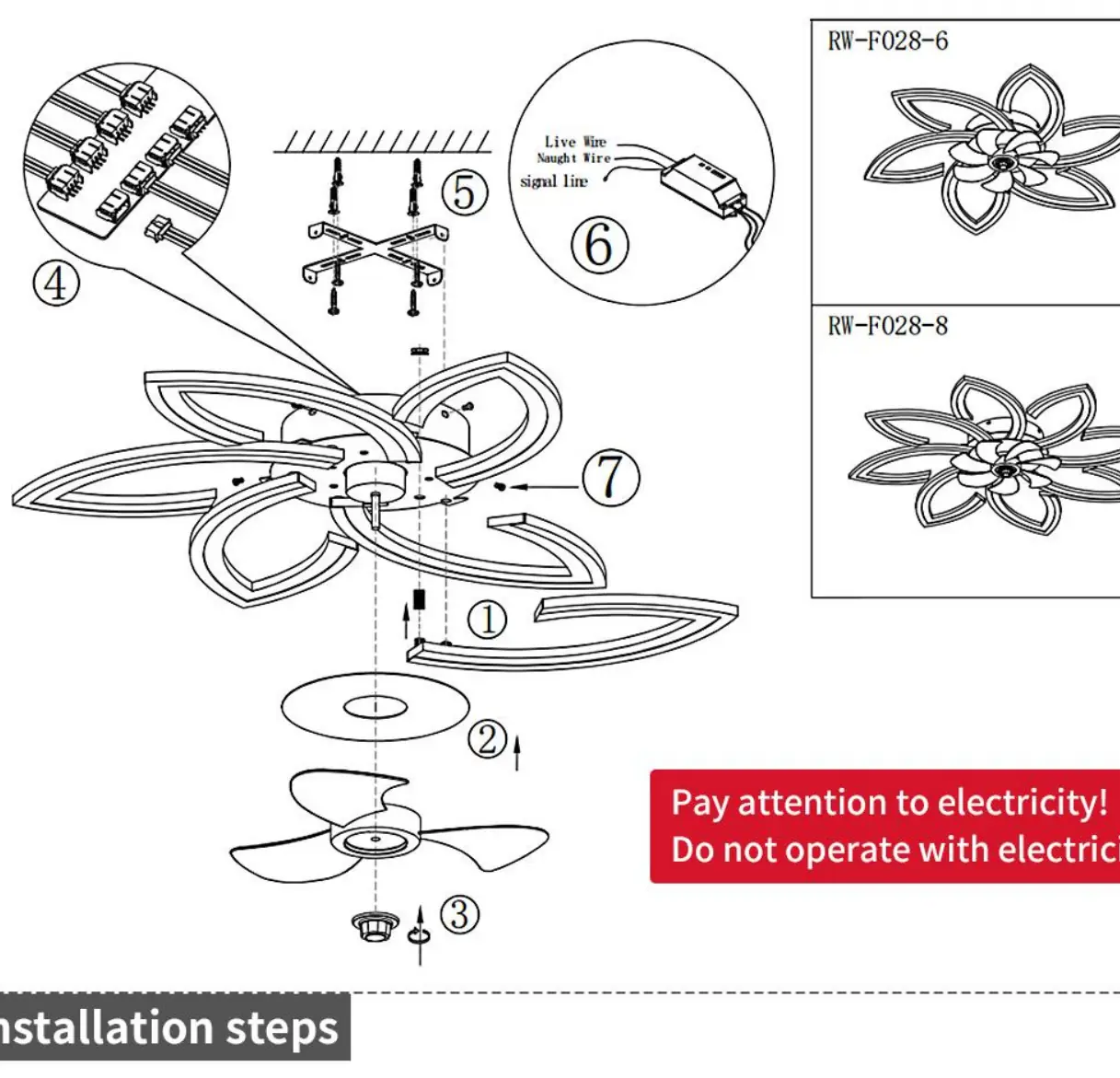
- Install the light head as shown in the figure.
- Install the decorative disc.
- Install the fan blade and fix it securely.
- Plug each PH terminal into the board, or use the red and white terminals.
- Install the hanging plate.
- Ensure the power cord is disconnected during installation.
- Install the ceiling plate.
Remote Control and App Operation
The device is dimmable and supports remote control and mobile app functionality.
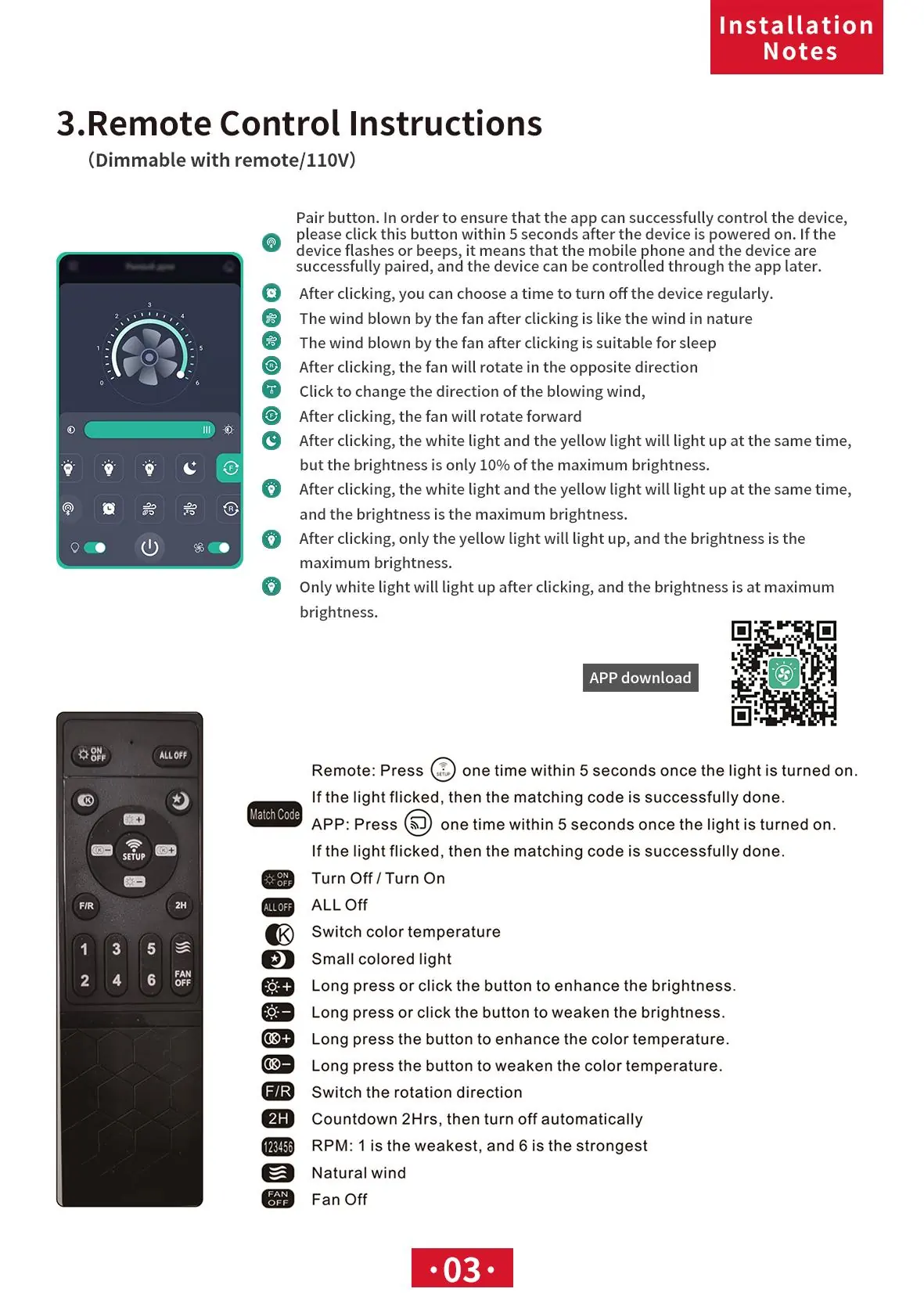
Pairing
To ensure the app or remote can control the device, perform the pairing action within 5 seconds after the device is powered on. If the light flashes or beeps, the matching code is successfully done.
Remote Control Functions
- ON/OFF: Turn the light on or off.
- ALL OFF: Turn off all functions.
- Color Temperature: Switch color temperature.
- Brightness: Long press or click buttons to enhance or weaken brightness.
- Color Temperature Adjustment: Long press buttons to enhance or weaken color temperature.
- F/R: Switch the rotation direction.
- 2H: Countdown 2 hours, then turn off automatically.
- 1-6: RPM settings (1 is the weakest, 6 is the strongest).
- Natural Wind: Activate natural wind mode.
- FAN OFF: Turn off the fan.
Practical help
Common problems
Device not responding to remote or app
Ensure the pairing action (pressing the match button) is performed within 5 seconds of powering on the device.
Before use
- Ensure power is turned off before installation
- Verify wiring connections (Live, Naught, Signal)
- Have the remote or mobile app ready for pairing
- Ensure the ceiling plate is securely installed
Show more Show less
Images and diagrams
- Wiring diagram illustrates the connection of Live, Naught, and Signal wires to the control box
- Assembly diagram shows the sequence of installing the light head, decorative disc, and fan blades
Model compatibility
- Requires 110V power supply
- Compatible with mobile app control

Manual page author
Michael Turner
Technical manual editor