Tools / Woodworking Tools
Bosch GHO 12V-20 Professional Cordless Planer User Manual
Quick guide for the Bosch GHO 12V-20 Professional cordless planer. Includes setup, blade replacement, depth adjustment, dust extraction, and maintenance instructions.
Table of contents
Manual images
Click an image to enlargeQuick guide from the manual
This guide provides essential information for operating the Bosch GHO 12V-20 Professional cordless planer. Always read the full safety instructions before use.
Product Description
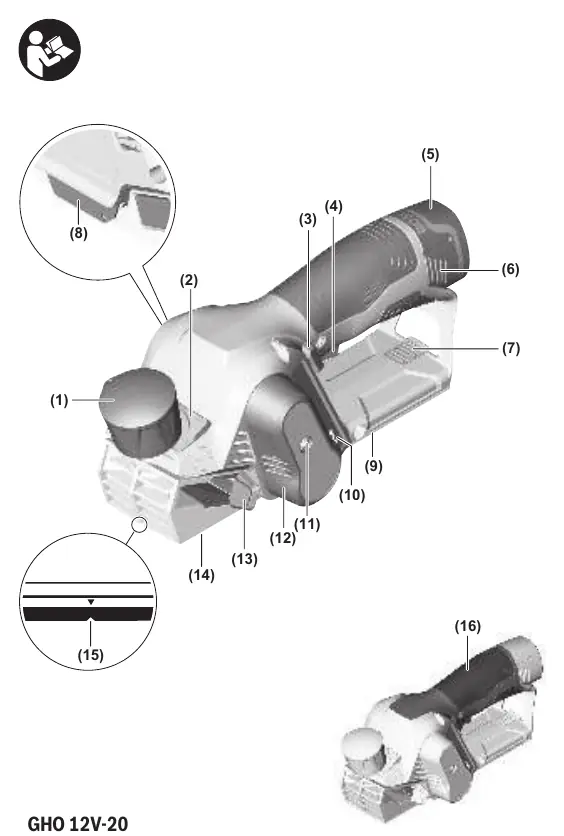
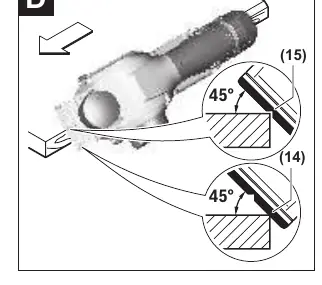
The GHO 12V-20 is a cordless planer designed for planing wood-based materials like beams and boards. It features adjustable cutting depth, a V-groove for chamfering, and options for dust extraction.
Assembly
Battery
Insert the charged battery (5) into the battery holder until it clicks into place.
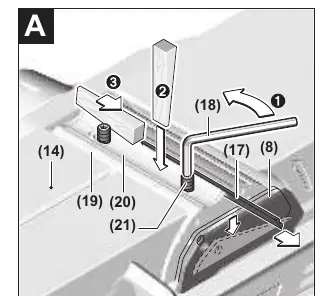
Changing the Blade
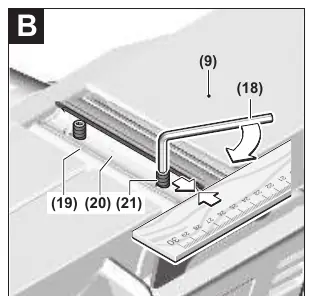
Use the hex key (18) stored inside the tool. Caution: Blades are sharp. Do not touch the cutting edges.
- Turn the blade head (19) until parallel to the adjustable base plate (14).
- Loosen the two fastening screws (21) with the hex key.
- Push the side cutter block guard (8) down and push the blade (17) out sideways.
- Insert the new blade, ensuring it sits correctly in the guide, and tighten the screws.
Operation
Setting Cutting Depth
Use the knob (1) to adjust depth from 0-1.0 mm. For depths >1 mm, press button (2).
Switching On/Off
Press the lock-off button (3), then press and hold the on/off switch (4). Release the switch to turn off.
Dust/Chip Extraction
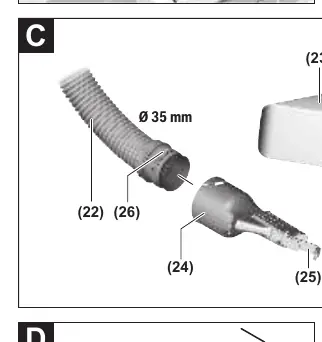
Use the chip ejector (13) or connect an external dust extractor using the adapter (24) and hose (22). For small tasks, use the dust bag (23).
Maintenance
Keep the tool and ventilation slots clean. Clean the chip ejector regularly. Keep the side cutter block guard (8) free-moving.
Manufacturer information
Bosch
Practical help
Common problems
Tool switches off automatically
Battery is discharged or tool is overloaded. Let it cool down or charge the battery.
Chip ejector blocked
Switch off tool, remove chip ejector, and clear with a piece of wood or compressed air.
Poor surface quality
Reduce feed rate, apply pressure to the middle of the base plate, or replace blunt blades.
Before use
- Ensure battery is fully charged
- Check that blades are sharp and correctly installed
- Ensure chip ejector is clear
- Check that the workpiece is securely clamped
Specs in practice
- Cutting depth
- Adjustable from 0-1.0mm (standard) or up to 2.0mm (using button 2).
- No-load speed
- 14,500 min-1 for efficient planing.
- Max. planing width
- 56 mm.
Images and diagrams
- Figure A: Blade removal process
- Figure B: Blade installation process
- Figure C: Dust extraction setup
- Figure D: Chamfering using the V-groove
Model compatibility
- Compatible with all Bosch 10.8V and 12V batteries.

Manual page author
David Miller
Documentation analyst
Organizes user manual content into clear summaries, with attention to model details, product context, and everyday usability.