Tools / Woodworking Tools
User Manual for Bosch GKF 12V-8 Professional Edge Router
Quick guide for the Bosch GKF 12V-8 Professional edge router. Includes instructions for battery installation, changing router bits, adjusting routing depth, and general maintenance.
Table of contents
Manual images
Click an image to enlargeQuick guide from the manual
This edge router is designed for milling edges and profiles in wood, plastic, and non-metallic lightweight materials. Before using the tool, ensure the battery is charged and the router bit is correctly installed. Always wear protective gear, including eye protection and gloves when handling router bits.
Product Description
The Bosch GKF 12V-8 Professional is a cordless edge router. Key components include the battery (1), on/off switch (5), spindle locking lever (7), routing depth coarse adjustment button (8), and the thumbwheel for fine adjustment (10).
Battery
Insert the charged battery into the battery holder until it clicks into place. The battery charge indicator (4) shows the charge level for five seconds after start-up. If the red LED (3) is permanently lit, the battery is too hot; switch off the tool and let it cool. If the red LED flashes, the tool is blocked; remove it from the workpiece to clear the blockage.
Changing the tool
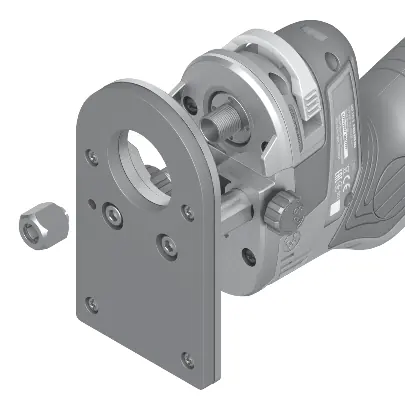
Wearing protective gloves is recommended. Pull out the spindle locking lever (7) to the marking arrow (6) on the housing. If necessary, turn the motor spindle manually until it locks. Use the open-ended spanner (18) to unscrew the cap nut (9) anticlockwise. Insert the router bit into the collet, ensuring the shank is immersed at least 20 mm. Retighten the cap nut clockwise and slide the spindle locking lever back into the housing.
Adjusting the routing depth
The routing depth must only be set while the tool is switched off. Turn the locking wheel (14) anticlockwise to unlock the adjuster. Press and hold the coarse adjustment button (8) to move the drive unit to the approximate position. Release the button. Use the thumbwheel (10) for precise depth adjustment (one revolution equals 1 mm). Turn the locking wheel (14) clockwise to lock the setting.
Operation
Always move the tool against the direction of the router bit rotation (up cut). If moved in the same direction (down cut), the tool may be pulled out of your hands. Guide the tool along the workpiece edge with uniform feed. Do not put the tool down until the bit has come to a complete stop.
Maintenance and Cleaning
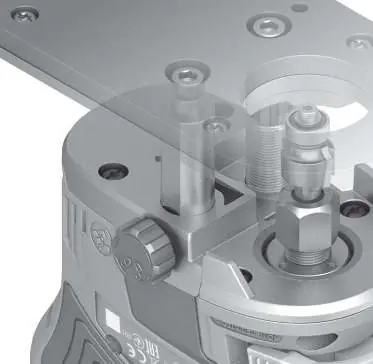
Remove the battery before any maintenance or tool changes. Keep the tool and ventilation slots clean. After use, clean with a vacuum cleaner or brush. Ensure guide columns are free of wood dust and apply a drop of lubricant to the smooth guide column (19).
Manufacturer information
Bosch
Practical help
Common problems
Tool stops automatically and red LED flashes
The tool is blocked. Pull the tool out of the workpiece to clear the blockage.
Tool stops automatically and red LED is permanently lit
The battery is overheated. Switch off the tool and allow the battery to cool down.
Before use
- Ensure the battery is fully charged.
- Check that the router bit is clean, sharp, and undamaged.
- Verify the collet is the correct size for the router bit.
- Ensure the workpiece is securely clamped to a stable platform.
- Set the routing depth only while the tool is switched off.
Specs in practice
- Rated voltage
- 12V DC, indicating this is a cordless power tool.
- No-load speed
- 13,000 min-1, the rotational speed of the tool without a load.
- Router cage stroke
- 36 mm, the maximum vertical travel distance of the router unit.
Images and diagrams
- (7) Spindle locking lever: Used to lock the spindle when changing router bits.
- (8) Routing depth coarse adjustment button: Allows for quick vertical movement of the drive unit.
- (10) Thumbwheel for fine adjustment: Used for precise depth settings.
- (14) Routing depth adjuster locking wheel: Secures the depth setting in place.
Model compatibility
- Compatible collets: 6/8 mm and 1/4 inch.
- Use only original Bosch router bits.

Manual page author
David Miller
Documentation analyst
Organizes user manual content into clear summaries, with attention to model details, product context, and everyday usability.