Tools / Power Tools
Bosch GSS 23 A Professional Orbital Sander User Manual
Quick guide for the Bosch GSS 23 A Professional orbital sander. Includes setup, dust extraction, sanding sheet replacement, operation, and maintenance instructions.
PDF source: polski · summary: English
Quick answers from the manual
Quick answer
- The Bosch GSS 23 A is an orbital sander designed for dry sanding of wood, plastic, metal, filler, and varnished surfaces. p. 12
Key actions
- Changing the sanding sheet p. 13, 14
First start
- Connect the tool to the power supply, ensure the sanding sheet is properly clamped, and press the on/off switch. p. 14
Show 4 more answers Show less
Problems and fixes
Dust box not collecting dust
Empty the dust box and ensure the sanding sheet holes are aligned with the sanding plate holes.
p. 13Maintenance and reset
- Empty the dust box regularly and clean the filter element with a soft brush. p. 13
Technical specifications
| Parameter | Value | Meaning | Pages |
|---|---|---|---|
| Rated power input | 190 W | Power consumption | p. 12 |
| No-load speed | 12,000 min⁻¹ | Speed without load | p. 12 |
| Orbit diameter | 2.0 mm | Sanding orbit size | p. 12 |
Where to find it in the PDF
- Safety Instructions p. 11
- Product Description p. 12
- Assembly p. 13
- Operation p. 14
Table of contents
Manual images
Click an image to enlargeQuick guide from the manual
The Bosch GSS 23 A Professional is an orbital sander designed for dry sanding of wood, plastic, metal, filler, and varnished surfaces. This guide provides essential information for setup, operation, and maintenance.
Product Description
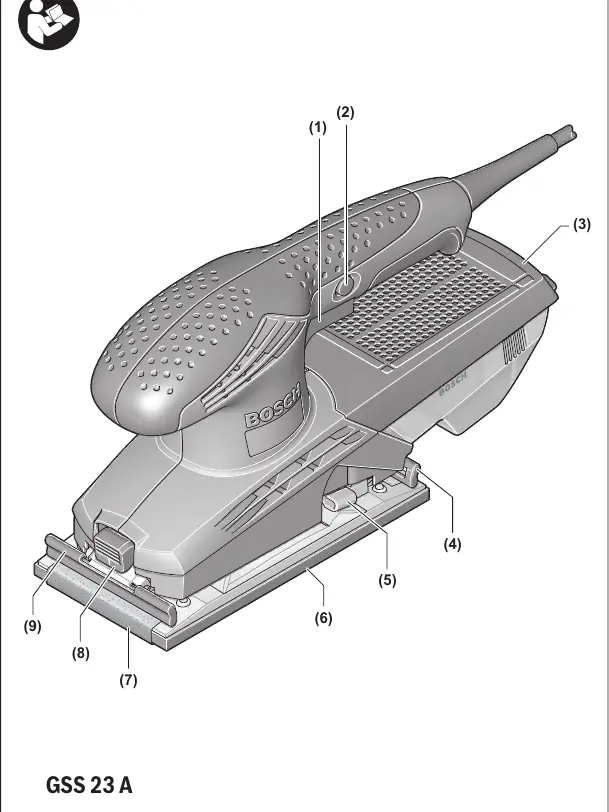
The sander features an on/off switch with a lock-on button for continuous operation. It includes a dust box with a microfilter system for efficient dust collection. The sanding plate is designed for standard sanding sheets, which are secured using front and rear clamping brackets.
Assembly and Setup
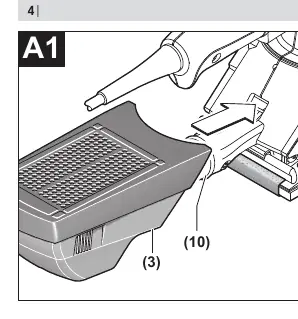
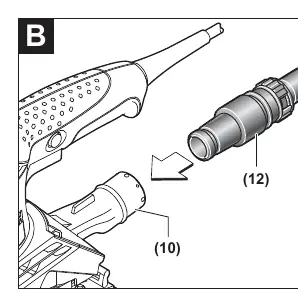
- Dust Extraction: Attach the dust box (3) to the extraction outlet (10) until it clicks into place. To empty, pull the box downwards. For external extraction, connect a suitable dust extraction hose (12) to the outlet (10).
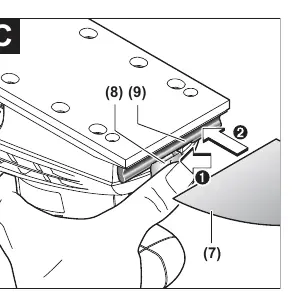
- Changing the Sanding Sheet: Press and hold the release button (8) to open the front clamping bracket (9). Insert the sanding sheet (7) and release the button. Press the unlocking lever (5) to open the rear clamping bracket (4), pull the sheet tight around the sanding plate, and release the lever to lock it.
Operation
To switch on the tool, press and hold the on/off switch (1). For continuous operation, press the lock-on button (2) while holding the switch. To switch off, release the on/off switch (1). Always wait for the tool to come to a complete stop before placing it down.
Maintenance and Cleaning
Always disconnect the power plug before performing any work on the tool. Keep the ventilation slots clean to ensure efficient cooling. If the power cord requires replacement, it must be performed by an authorized Bosch service center to maintain safety.

Manufacturer information
Bosch
Practical help
Common problems
Dust extraction not working effectively
Empty the dust box and ensure the holes in the sanding sheet are aligned with the holes in the sanding plate.
Sanding sheet comes loose during operation
Ensure the sanding sheet is clamped tightly and centered under both the front and rear clamping brackets.
Before use
- Check that the mains voltage matches the tool's rating plate.
- Ensure the sanding sheet is correctly clamped and tensioned.
- Check that the dust box is properly attached.
- Wear appropriate personal protective equipment (eye protection, dust mask).
Show more Show less
Specs in practice
- Rated power input
- 190 W, indicates the motor's power consumption.
- Orbit diameter
- 2.0 mm, the size of the sanding orbit for surface finish.
- No-load speed
- 12,000 min⁻¹, the speed of the motor without load.
Images and diagrams
- (1) On/off switch
- (6) Sanding plate
- (9) Front clamping bracket
- (4) Rear clamping bracket
Model compatibility
- Use only original Bosch sanding accessories.

Manual page author
Michael Turner
Technical manual editor