Music / Guitar Effects
BOSS ME-90B Bass Multiple Effects Pedal User Manual
Quick guide for the BOSS ME-90B Bass Multiple Effects Pedal, covering setup, sound management, effect signal chain, USB connectivity, and troubleshooting.
Table of contents
Manual images
Click an image to enlargeQuick guide from the manual
The BOSS ME-90B is a powerful multi-effects processor for bass guitar. This manual provides essential instructions for connecting your equipment, managing sound memories, utilizing the built-in tuner, and configuring system settings. Always ensure your volume is turned down before powering the unit on or off to protect your equipment.
Device Overview
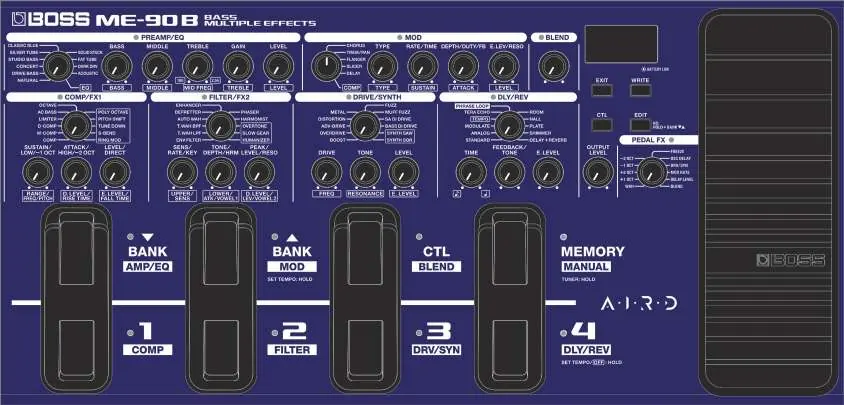
The top panel features dedicated knobs for effect configuration, a display for parameter values, and footswitches for switching between banks and memories. The rear panel includes inputs for your bass, outputs for amps or mixers, a USB port for computer connectivity, and a jack for the optional BT-DUAL Bluetooth adapter.
Outputting Sound
To output sound, connect your bass to the INPUT jack and your amp or mixer to the OUTPUT jacks. Use the [AMP/LINE] switch to match the output to your connected device (AMP for bass amps, LINE for mixers/headphones). The [OUTPUT LEVEL] knob controls the overall volume.
Saving and Recalling Sounds
The ME-90B uses "Memory Mode" to store and recall sound settings. There are 72 memories available. You can switch between "Manual Mode" (where pedals toggle individual effects) and "Memory Mode" (where pedals recall saved sound combinations) using the [MEMORY/MANUAL] pedal.
Effect Signal Chain
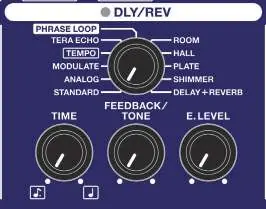
The signal chain is automatically optimized based on the selected effect type. It includes stages for PEDAL FX, COMP/FX1, FILTER/FX2, DRIVE/SYNTH, SEND/RETURN, PREAMP/EQ, NS, MOD, DLY/REV, and BLEND. You can connect external effect units via the SEND/RETURN jacks.
USB Connectivity
Connect the ME-90B to your computer via USB to record audio, transmit MIDI data, or use the BOSS TONE STUDIO app for advanced sound editing and IR data loading. Ensure you download the dedicated driver from the official BOSS website.
System Settings and Maintenance
You can configure global settings such as output selection, knob behavior, and LED colors by entering the system settings mode. If you experience issues, refer to the troubleshooting section for common solutions, such as checking cable connections or recalibrating the expression pedal.
Practical help
Common problems
No sound or insufficient volume
Check connection cables, ensure the connected amp/mixer is on, verify the [OUTPUT LEVEL] knob is up, and ensure the tuner is not active.
Cannot switch between memories
Check if the bank switch operation setting is set to 'h0', which requires pressing a numbered pedal to confirm the bank change.
Expression pedal not responding correctly
The pedal may need recalibration due to extended use. Follow the calibration procedure in the manual.
Bluetooth connection issues with Android
Ensure location data is turned on for your Android device, as it is required for Bluetooth connectivity.
Before use
- Turn down the volume on all connected devices before powering on.
- Set the [AMP/LINE] switch to match your output device (AMP or LINE).
- Ensure batteries are installed correctly or use a compatible AC adaptor (BOSS PSA-S series).
- Download the latest USB driver from the BOSS website if connecting to a computer.
- Verify that the expression pedal is calibrated if you experience control issues.
Specs in practice
- Sampling Frequency
- 48 kHz, ensuring high-quality digital audio processing.
- Input Impedance
- 1 MΩ for both INPUT and RETURN, optimized for bass guitar signals.
Images and diagrams
- The top panel layout shows the arrangement of effect knobs, footswitches, and the expression pedal.
- The rear panel diagram identifies all input/output jacks, including USB, DC IN, and Bluetooth adaptor port.
- The signal flow diagram illustrates how the bass signal passes through the effect chain to the various outputs.
Model compatibility
- Use only BOSS PSA-S series AC adaptors.
- Bluetooth functionality requires the optional BT-DUAL adaptor.
- USB cables must support data transmission; charge-only cables will not work.

Manual page author
Michael Turner
Technical manual editor
Reviews PDF manuals for structure, safety notes, and practical product details so readers can find the right information quickly.