Electronics / Audio
Owner's Manual for BOSS BCB-30X Pedal Board
Quick guide for the BOSS BCB-30X pedal board. Learn how to install effect units, customize the holding pad, manage cables, and safely connect your equipment.
Table of contents
Manual images
Click an image to enlargeQuick guide from the manual
The BOSS BCB-30X is a pedal board designed for organizing and powering effect units. This manual provides instructions on customizing the holding pad, managing cables, and safely connecting your equipment.
Effect unit installation
You can customize the layout of your pedals by cutting the included holding pad. Use the existing pre-cuts to remove unneeded portions and create a clean layout.
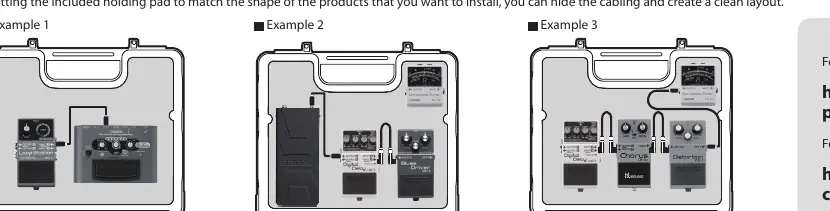
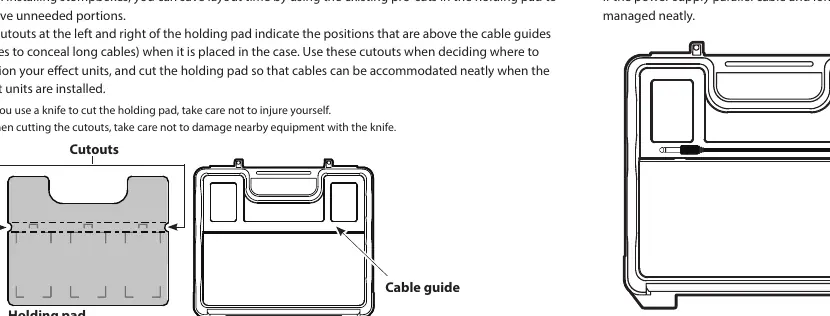
- The cutouts on the left and right of the holding pad indicate positions above the cable guides.
- Use these cutouts to conceal long cables.
- When cutting the pad, use a knife carefully to avoid injury or damage to nearby equipment.
Cable management
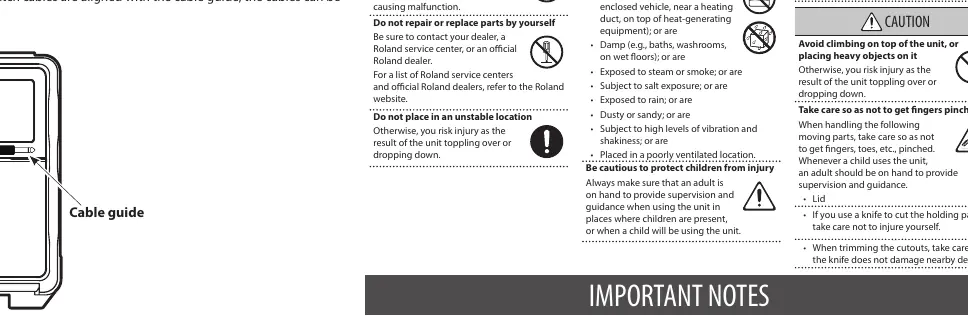
To keep your setup neat, align the power supply parallel cable and long patch cables with the cable guides provided in the case.
Lid operation
To detach the lid, lift it to the position shown in the illustration, and then press in the direction of the arrow.
Making connections
To prevent malfunctions or speaker damage, follow these steps:
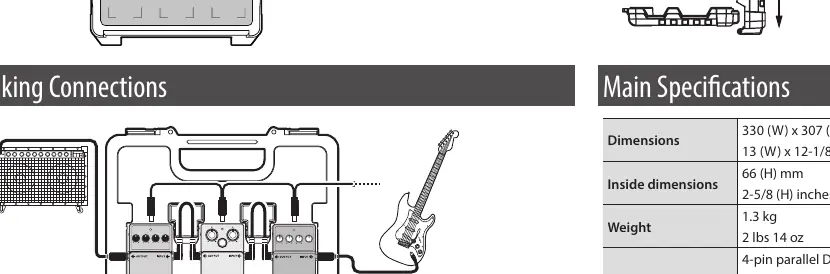
- Minimize the volume of all devices.
- Power off all devices before making connections.
- When turning the power on, power on the amp last.
- When turning the power off, power off the amp first.
Safety and maintenance
Observe the following precautions to ensure safe operation:
- Placement: Do not place the unit on unstable surfaces. Be aware that rubber feet may discolor or mar certain surfaces depending on material and temperature.
- Maintenance: Never use benzine, thinners, alcohol, or solvents to clean the unit.
- Children: When using the unit near children, adult supervision is required. Be careful not to pinch fingers when opening or closing the lid.
Specifications
- Dimensions: 330 (W) x 307 (D) x 100 (H) mm (13 x 12-1/8 x 3-15/16 inches).
- Inside dimensions: 66 (H) mm (2-5/8 (H) inches).
- Weight: 1.3 kg (2 lbs 14 oz).
- Accessories: 4-pin parallel DC cable, pre-cut insert pad.
- Optional: PSA series AC adaptor.
Practical help
Common problems
Lid is difficult to remove
Lift the lid to the position shown in the illustration and press in the direction of the arrow.
Surface discoloration
Rubber feet may mar surfaces depending on material and temperature; ensure the surface is suitable.
Equipment damage during connection
Always minimize volume and power off all devices before making connections.
Before use
- Ensure the surface is stable and suitable for rubber feet.
- Plan your pedal layout using the pre-cuts in the holding pad.
- Have a knife ready for cutting the holding pad (use caution).
- Verify all devices are powered off before connecting.
- Ensure you have the required PSA series AC adaptor if powering pedals.
Images and diagrams
- Holding pad cutouts: Use these to conceal long cables.
- Cable guides: Align power and patch cables here for a clean layout.
Model compatibility
- Optional AC adaptor: PSA series.

Manual page author
Emily Carter
User documentation editor
Prepares concise manual descriptions and highlights the most useful setup, operation, and maintenance information for readers.