Power / Solar Systems
User Manual for BougeRV 12V 1000W/2000W Pure Sine Wave Inverter
Quick guide for the BougeRV 12V 1000W/2000W Pure Sine Wave Inverter. Includes installation steps, safety warnings, LCD display explanation, and troubleshooting methods.
Table of contents
Manual images
Click an image to enlargeQuick guide from the manual
This manual provides essential information for operating the BougeRV 12V Pure Sine Wave Inverter. Key safety requirements include ensuring the battery voltage matches the inverter input (12V), using correct cable sizes, and avoiding parallel connections. Always switch off and disconnect the inverter when not in use.
Features
- Pure Sine Wave Output: Advanced SPWM technology providing stable power.
- Multiple Protection: Includes input under/over voltage, overload, short-circuit, over-temperature, and reverse connection protection.
- Remote Control: Allows remote operation and monitoring.
- LCD Display: Shows real-time operating data including voltage, power, frequency, and current.
Identification of Parts
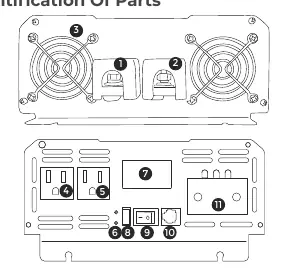
The inverter features positive and negative battery input terminals, cooling fans, AC output terminals, a USB interface, an ON/OFF switch, a network interface for the remote, and a high-power link port.
LCD Display
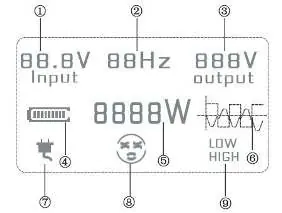
The LCD screen provides visual feedback on product input voltage, frequency, output voltage, battery power, product power, waveform, mains connection status, working status, and protection alerts (high/low voltage).
Installation Connection Steps
- Ensure the inverter is switched off before making any connections.
- Verify that the battery voltage is consistent with the inverter's reference voltage (12V).
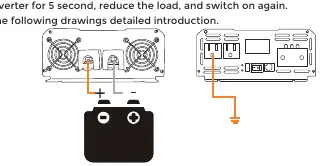
- Connect the Red cable to the Positive (+) pole and the Black cable to the Negative (-) pole. Do not reverse connections, as this will blow the fuse.
- Use appropriately sized DC cables; avoid using cables that are too long.
- Turn on the power switch; the green/blue indicator light confirms proper operation.
- Connect loads to the AC output. If overloading occurs, the inverter will alarm and stop. To restart, switch off for 5 seconds, reduce the load, and switch on again.
Protection Functions
The inverter includes several safety mechanisms:
- Overload Protection: Alarms and stops after 20 seconds if overloaded by 125%.
- Short Circuit Protection: Automatically protects against short circuits.
- Over-temperature Protection: Stops working if internal temperature exceeds 80°C; resumes automatically once cooled.
- Low/Over Voltage Protection: Alarms and stops if battery voltage is outside the safe operating range.
- Reverse Connection Protection: If connected incorrectly, the fuse will blow. Switch off, disconnect, and replace the fuse.
Troubleshooting
If the inverter fails to operate, check the following:
- Low Battery: Alarm sounds (single beep), red light flashes. Charge the battery.
- High Battery Voltage: Alarm sounds (double beep), red light flashes. Check input voltage.
- Overload: Continuous alarm, red light flashes. Reduce the number of loads.
- Overheating: Alarm sounds (triple beep), red light flashes. Reduce load and allow to cool.
- Short Circuit: Continuous alarm. Disconnect the short circuit.
- Unresponsive: If the unit is powered on but unresponsive, check if the internal fuse is blown.
Specifications
- Rated Power: 1000W/2000W
- Surge Power: 2000W/4000W
- Input Voltage: DC 12V
- Output Voltage: AC 120V ±10%
- Output Frequency: 50Hz/60Hz ±0.5Hz
- Efficiency: >85%
- Operating Temperature: -10°C to +45°C
Manufacturer information
BougeRV
Practical help
Common problems
Inverter shuts down with single beep alarm
Battery voltage is low. Charge the battery.
Inverter shuts down with double beep alarm
Battery voltage is too high. Measure voltage and adjust input.
Inverter shuts down with continuous alarm
Overload or short circuit. Reduce loads or remove short circuit.
Inverter shuts down with triple beep alarm
Overheating. Reduce load and wait for unit to cool down.
Unit is unresponsive
Internal fuse may be blown. Replace the fuse.
Before use
- Ensure inverter is switched off before connection.
- Verify battery voltage matches inverter input (12V).
- Connect Red cable to Positive (+), Black to Negative (-).
- Ensure DC cable size is sufficient.
- Do not use excessively long DC cables.
- Ensure ventilation area is dry and free of flammable items.
Specs in practice
- Input voltage
- Must be DC 12V; do not use with 24V systems.
Images and diagrams
- Parts identification: Shows input terminals, cooling fans, AC outlets, and remote port.
- LCD diagram: Explains voltage, frequency, power, and protection icons.
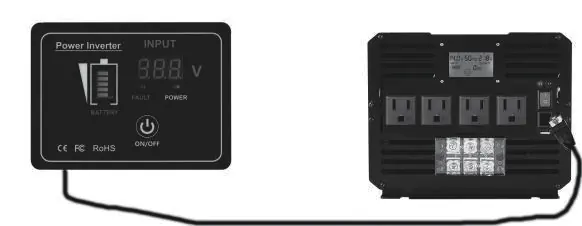
- Remote control: Shows connection to the main unit for remote operation.
Model compatibility
- Only for 12V battery systems.
- Cannot be used to charge batteries (inverter only).
- Cannot be connected in parallel.
- Not for use with mains power.

Manual page author
Michael Turner
Technical manual editor
Reviews PDF manuals for structure, safety notes, and practical product details so readers can find the right information quickly.