Power / Solar Systems
User Manual for BougeRV 12V Electric Heating Blanket
Quick guide for the BougeRV 12V Electric Heating Blanket (Model EBB001). Includes setup instructions, heat level adjustments, timer settings, safety warnings, and maintenance tips.
Table of contents
Manual images
Click an image to enlargeQuick guide from the manual
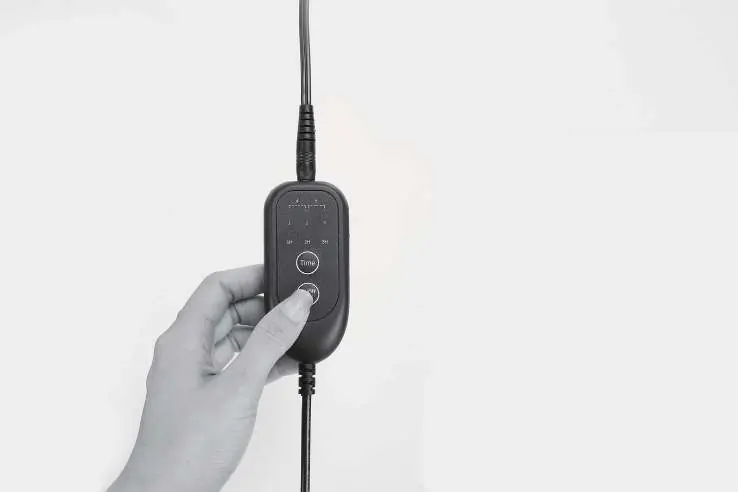
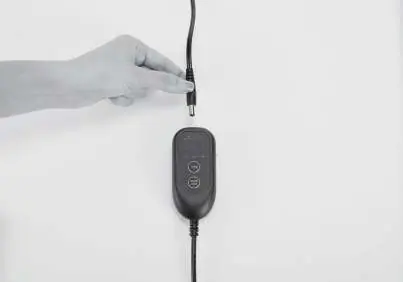
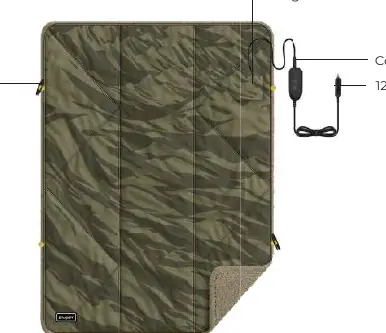
The BougeRV 12V Electric Heating Blanket (Model EBB001) is designed for 12V DC power sources. To set it up, connect the controller to the blanket, attach the DC5521 barrel connector to the controller, and plug the car adapter into a 12V auxiliary power supply rated at 48W (12V/4A). Press and hold the power button for 1 second to turn it on.
Safety Notices
- Power Source: Use only with 12V (nominal) power sources. Do not use with 100-240V AC-DC wall adapters, transformers, or 24V DC power supplies.
- Usage Restrictions: Do not use with children, infants, or individuals incapable of feeling heat. Do not place the blanket under your body (e.g., as a sleeping bag liner).
- Prohibitions: Do not machine wash, dry clean, or immerse in water. Do not use pins or sharp objects to fasten the device.
Product Overview
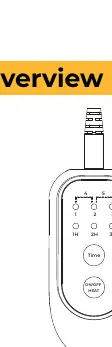
The blanket features a controller with a digital display for heat levels and timer settings, a storage pocket, and toggle clasps for securing the blanket around your shoulders.
Operating Instructions
Power and Heat Control
- Power On/Off: Press and hold the On/Off button for 1 second.
- Adjust Heat: Short-press the On/Off button while the blanket is on to cycle through heat levels 1-5.
Timer Settings
- Standard Timer: Short-press the Time button to select 1, 2, or 3 hours for automatic shut-off.
- Extended Timer: 4-10 hour timing control must be set via the mobile app.
Pro Tip: Unfold the blanket and turn it on for about 10 minutes to preheat before use.
Care and Maintenance
- Cleaning: Spot clean only with a damp cloth. Do not machine wash, iron, bleach, or dry clean.
- Storage: Store in a dry, safe, and clean place after cleaning and drying. Do not store while powered on.
Troubleshooting
- Blanket not heating: Verify the power source supports 12V/4A output and check that the battery is charged.
- Connection issues: Ensure the car adapter is fully inserted, the controller-to-blanket locking connector is secure, and the DC5521 barrel connector is fully inserted.
- Restart: Turn off the device, unplug the power source, disconnect the controller, reconnect everything, and restart.
Specifications
- Model: EBB001
- Voltage: 12V
- Operating Power: 0-48W
- Heat Levels: 1-5 gears
- Timer: 1-3 hours (4-10 hours via app)
- Dimensions: 70.87 in x 50.18 in (180 cm x 130 cm)
Manufacturer information
BougeRV
Practical help
Common problems
Blanket does not heat up
Verify the power source provides 12V/4A output. Check that all cable connections (controller to blanket, DC5521 connector, and car adapter) are secure.
Device will not turn on
Check the battery level of your power source and ensure it is fully charged and compatible.
Before use
- Ensure power source is 12V DC (4A output)
- Check that the controller is securely connected to the blanket
- Verify the DC5521 barrel connector is fully inserted
- Unfold the blanket before turning it on
- Preheat for 10 minutes
Specs in practice
- Operating Power
- 0-48W
Images and diagrams
- Controller: Shows heat levels (1-5) and timer settings (1H, 2H, 3H)
- Setup: Connect controller to blanket, then connect power cable to controller and 12V source
Model compatibility
- Requires 12V/4A power supply
- Not for use with 100-240V AC-DC wall adapters
- 4-10 hour timer requires mobile app

Manual page author
Emily Carter
User documentation editor
Prepares concise manual descriptions and highlights the most useful setup, operation, and maintenance information for readers.