Automotive / Jump Starters
User Manual for BS Battery Power Box 12V
Quick start guide and user manual for the BS Battery Power Box 12V jump starter. Learn how to safely jump-start your vehicle, charge mobile devices, and troubleshoot common error codes.
Table of contents
Manual images
Click an image to enlargeQuick Guide from the Manual
The BS Battery Power Box 12V is a portable jump starter designed for gas and diesel engines equipped with 12V lead-acid batteries. It is not recommended for lithium batteries. Before first use and after each use, the device must be fully recharged. For jump-starting, the device must be charged to at least 80% capacity.
Product Overview
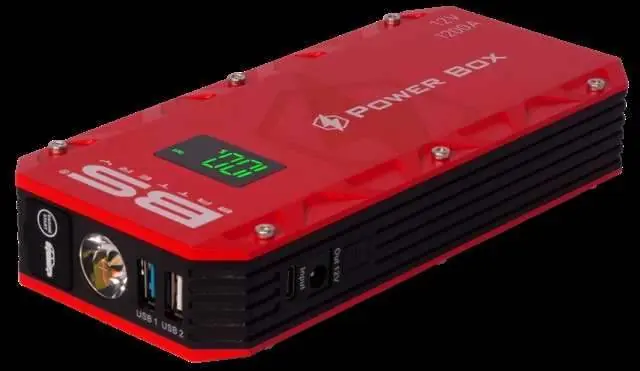
The device features an LED display, an ON/OFF switch, a jump start socket, and various output ports including USB 5V/3A, 9V/2A, 12V/1.5A, USB 5V/2A, and a 15V/5A output port. It also includes an LED flashlight with three modes: normal, stroboscope, and SOS.
Safety Instructions
Important: This device is for 12V lead-acid batteries only. Do not use for non-rechargeable batteries. Never charge a frozen or damaged battery. Do not cover the device or expose it to temperatures exceeding 50°C (122°F). Risk of explosion or acid projection exists if clamps are short-circuited or if connected to a 24V vehicle.
Jump Starting a Vehicle

- Connect the smart jump start cable to the Power Box connector.
- Connect the red clamp to the (+) terminal of the battery.
- Connect the black clamp to the (-) terminal of the battery.
- Wait for the 'Start' and 'Error' lights to flash alternately in green and red, indicating the product is ready.
- If the 'Start' light turns green and the 'Error' light turns off, start the vehicle within 30 seconds. Do not exceed 3 start attempts with a 30-second interval between each.
- After starting, disconnect the smart start cable and remove the clamps from the vehicle battery terminals within 30 seconds. Leave the vehicle running.
Charging Mobile Devices
Plug your charging cable into USB port 1 or USB port 2. Select the appropriate adapter for your mobile phone or tablet and plug it in. The Power Box will launch the charge automatically.
Flashlight Function
Press the ON/OFF button for 3 seconds to turn on the LEDs. Briefly press the button to switch between the three lighting modes: normal, stroboscope, and SOS.
Troubleshooting
If the device does not respond, it may be discharged; please charge it. If the 'Error' light is fixed on the smart start cable, the internal battery voltage is below 11.0V; please charge the product. If the 'Error' indicator flashes with a discontinuous beeper, a short circuit is detected; check clamp connections. If it flashes with a continuous sound, reverse polarity is detected; check clamp connections. If it flashes with a quick beep, the device is overheating; disconnect clamps and wait 5 minutes.
Technical Specifications
- Battery Capacity: 12000mAh (44.4Wh)
- Start Current: 600A
- Peak Current: 1200A
- Operation Temperature: -20°C to 60°C (-4°F to 140°F)
- Size: 170x80x38 mm
- Weight: 0.500 kg
Maintenance and Disposal
Clean the device surfaces with a soft, dry cloth. Do not use solvents. The power supply cable cannot be replaced; if damaged, the device should not be used. This product must be disposed of at an appropriate recycling facility and not in domestic waste. The battery must be removed before disposal.
Practical help
Common problems
No response when pressing ON/OFF button
The Power Box is discharged. Charge the product.
Error light fixed on smart start cable
Internal battery voltage is below 11.0V. Charge the product.
Error indicator flashes + discontinuous beeper
Short circuit detected. Check that clamps are properly connected and reconnect the smart start cable.
Error indicator flashes + continuous sound
Reverse polarity detected. Check that clamps are properly connected and reconnect the smart start cable.
Error indicator flashes + quick beep
Overheating detected. Disconnect clamps from the battery and Power Box, wait 5 minutes, then reconnect.
Before use
- Ensure the Power Box is charged to at least 80% before attempting a jump start.
- Verify the vehicle battery is a 12V lead-acid type.
- Check that the smart start cable is not damaged.
- Wear safety goggles and protective gloves.
- Ensure the vehicle is in neutral or park and the ignition is off.
Specs in practice
- Battery Capacity
- 12000mAh (44.4Wh) - Total energy storage.
- Start Current
- 600A - The current available for cranking the engine.
- Peak Current
- 1200A - The maximum current the device can provide for a short burst.
- Operation Temp
- -20°C to 60°C - The safe temperature range for device operation.
Images and diagrams
- The device features an LED display, ON/OFF switch, jump start socket, and multiple USB/DC output ports.
Model compatibility
- Compatible with 12V lead-acid batteries only.
- Not recommended for lithium batteries.

Manual page author
Emily Carter
User documentation editor
Prepares concise manual descriptions and highlights the most useful setup, operation, and maintenance information for readers.